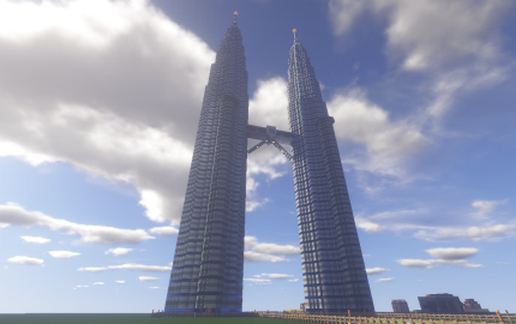
Petronas Twin Towers, Kuala Lumpur, Malaysia
Published on May 15, 2023
By MAN_NL323F_A22
👁️🗨️ 40572
13096
★
★
★
★
★
Rate it
Description
Standing Tall, connected by a sky bridge, Representing Malaysia. These are my Petronas Twin Towers at half scale, 44 floors tall, with a concrete raft and the architectural spires that glow in the night. Ideal to add on to your world or start up your city, you can admire them to be strong symbols of unity. I hope you enjoy my large and most spectacular icons of Malaysian pride and modernity at half scale.
Download: Petronas Twin Towers, Kuala Lumpur, Malaysia schematic for Minecraft
| Format | Size | Use with | |
|---|---|---|---|
.litematic petronas-twin-towers,-kuala-lumpur,-malaysia.litematic |
58.18 KB | Litematica (Java) — more Litematica schematics |
|
.schem petronas-twin-towers,-kuala-lumpur,-malaysia.schem |
6.91 KB | WorldEdit / FAWE |
|
.schematic petronas-twin-towers,-kuala-lumpur,-malaysia.schematic |
14.57 KB | Legacy / online installer |
|
Install this build directly on your Minecraft map
Auto-converted from the original format; container contents (chests, signs) may be missing.
📘 How to use with Litematica (click to expand)
- Put the downloaded
.litematicfile into the.minecraft/schematics/folder. - In game, press M to open the Litematica menu and choose Load Schematics.
- Select the file in the list and click Load Schematic.
- Position the placement where you want it and build — or paste it instantly in creative with Easy Place mode.
Requires the Litematica mod (Java Edition).
More builds: Litematica schematics.





doesn't work
how work ,not work litemetica plese replay