How to Enable Keep Inventory in Minecraft BE
Keep inventory stops you from losing your items and XP on death. One command, and every death becomes nothing more than a respawn.


The Command
Open chat and type /gamerule keepinventory true. To turn it off: /gamerule keepinventory false. To check the current state: /gamerule keepinventory.
Enabling Cheats
The command only works if cheats are enabled. For a new world, toggle Activate Cheats in the Game settings before creating it. For an existing world, go to Settings and turn it on there. Be aware that enabling cheats permanently disables achievements for that world on Bedrock. There's no way around this.
What It Does
- All inventory items are kept on death, nothing drops at your death point
- All XP levels are kept
- Works in the Overworld, Nether, and End
- Works regardless of how you die: lava, void, fall damage, mobs
- Applies to all players in the world, not just you
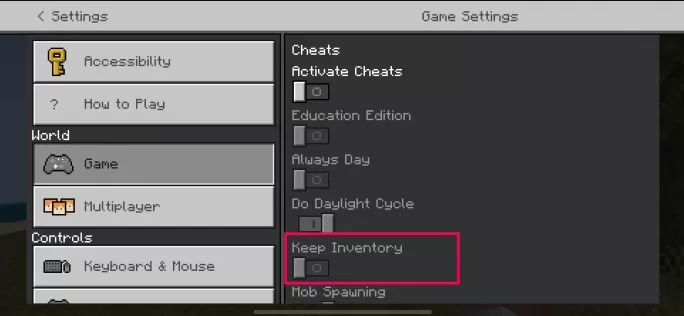
Multiplayer and Realms
On a Realm, only the owner or operators can run the command and it applies to everyone on the server equally. You can't set it per-player. The setting stays active after logging out until someone explicitly turns it off.
Common Questions
Manually dropping items with Q still works normally. Keep inventory only prevents drops on death. If you throw something yourself, it lands on the ground as usual. And no, there's no way to enable keep inventory without turning on cheats in standard Bedrock.