How to Turn Off the Narrator in Minecraft Bedrock (and Turn It Back On)
If a robotic voice suddenly started reading every menu button and chat message in Minecraft Bedrock, you most likely turned on the narrator by accident. On Windows this usually happens because of a keyboard shortcut pressed during play. The good news is that it takes just a few seconds to turn off, and the same settings let you keep only the parts of narration you actually find useful.

How to turn the narrator off
On Windows, the fastest way is to press Ctrl + B. This shortcut switches the game's narrator on and off, and it is also the reason most players turn it on without noticing.
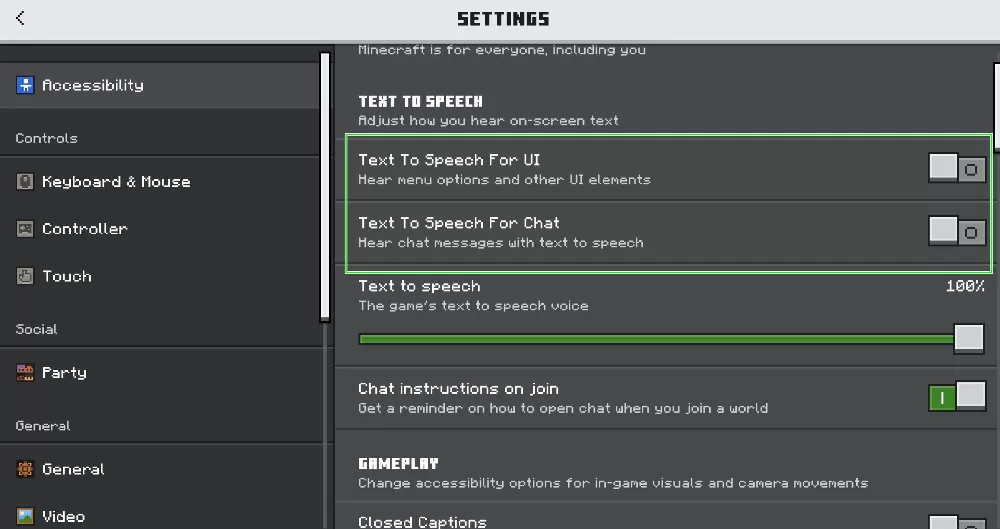
On any platform, including Xbox, PlayStation, Nintendo Switch, Android and iOS, you can also do it through the menu. Open Settings, go to Accessibility and turn off two options: Text-to-Speech for UI, which reads menus and buttons, and Text-to-Speech for Chat, which reads chat messages out loud. The Accessibility section is in the same place on every device, so these steps work everywhere.
If the narrator keeps coming back
In the same Accessibility menu there is an option called Text-to-Speech with Device Settings. When it is on, Minecraft copies your device's accessibility settings and can turn narration back on by itself, even after you disabled it. Switch this option off as well, and the narrator should stay quiet.
If the voice reads not only Minecraft but also your desktop, the system menu or other apps, the problem is not in the game at all. That is your device's own screen reader:
- Windows: press Windows + Ctrl + Enter to turn off Windows Narrator.
- Xbox: hold the Xbox button until the controller vibrates, then press the Menu button, or turn off Narrator in the console's accessibility settings.
- PlayStation: go to Settings, then Accessibility, and turn off Screen Reader.
- Android and iOS: turn off TalkBack or VoiceOver in the phone's accessibility settings.
How to turn the narrator on
Go to Settings, then Accessibility, and enable Text-to-Speech for UI, for Chat or both. On Windows, Ctrl + B turns it back on just as quickly as it turns it off.
Unlike Java Edition, where narration is controlled by a single setting that cycles through modes, Bedrock has two separate switches for menus and chat. That means you can, for example, keep the menus silent and only have chat messages read aloud.
Why some players keep chat narration on
Chat narration can be genuinely handy. Streamers use it to hear viewer and player messages without taking their eyes off a tricky parkour jump or a fight. In multiplayer, it lets you hear what teammates write while you are busy with PvP, redstone or a big build. On minigame servers, it reads out round starts and instructions, so you do not miss them while running around. If any of this sounds useful, turn off narration for the UI and leave it on only for chat.