Minecraft Bedrock Difficulty Guide: How to Change It and What Each Level Changes
Difficulty in Minecraft Bedrock changes much more than how hard mobs hit. It decides whether zombies can break down your door, whether a villager turns into a zombie villager after an attack, whether you can starve to death and even whether some achievements are possible at all. Below is how to switch difficulty and what each level really changes in the game.

How to change difficulty
When creating a new world
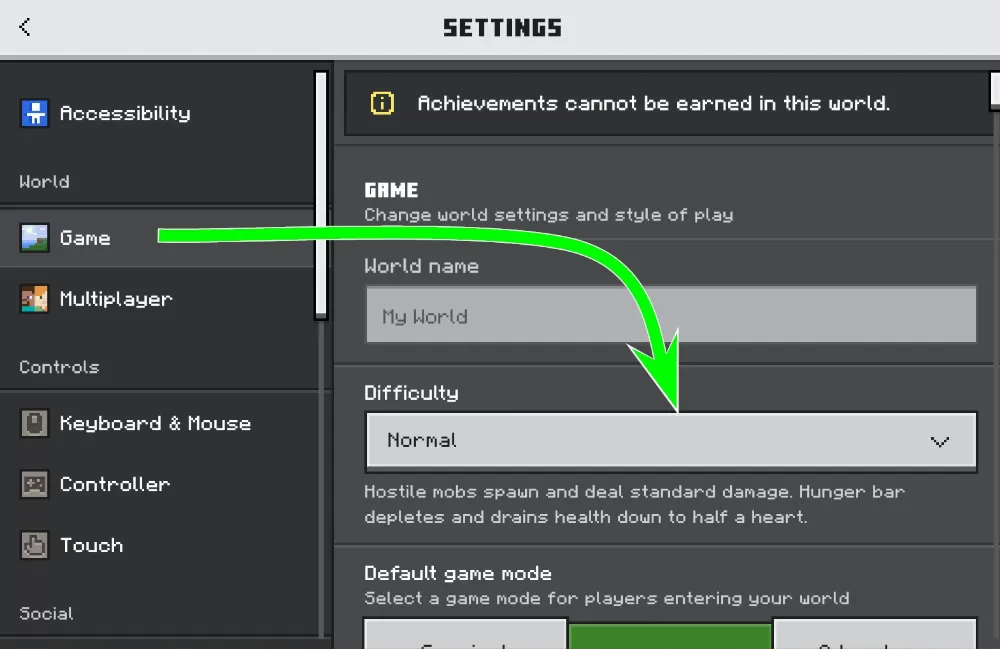
Press Play, then Create New and Create New World. In the Game tab, find the Difficulty option and choose Peaceful, Easy, Normal or Hard.
In an existing world
Pause the game, open Settings and go to the Game section. Change the Difficulty setting there, and it applies right away without restarting the world.
With a command
If cheats are enabled, type /difficulty followed by the level: /difficulty peaceful, /difficulty easy, /difficulty normal or /difficulty hard. Numbers also work in the same order, from 0 for Peaceful to 3 for Hard.
Does difficulty affect achievements?
Changing difficulty through the settings menu does not turn off achievements, so you can switch levels as often as you want. Commands are a different story: to use /difficulty you need cheats, and turning cheats on disables achievements in that world forever. If you care about achievements, always use the menu.
Peaceful still has one catch. Hostile mobs do not spawn there, so you cannot get their drops or experience. Without wither skeletons there are no wither skeleton skulls, which means you cannot summon the Wither, get a Nether Star or unlock achievements like Beaconator. A simple workaround is to build and prepare on Peaceful, then switch to Easy or higher when it is time to fight.
The four difficulty levels
Peaceful
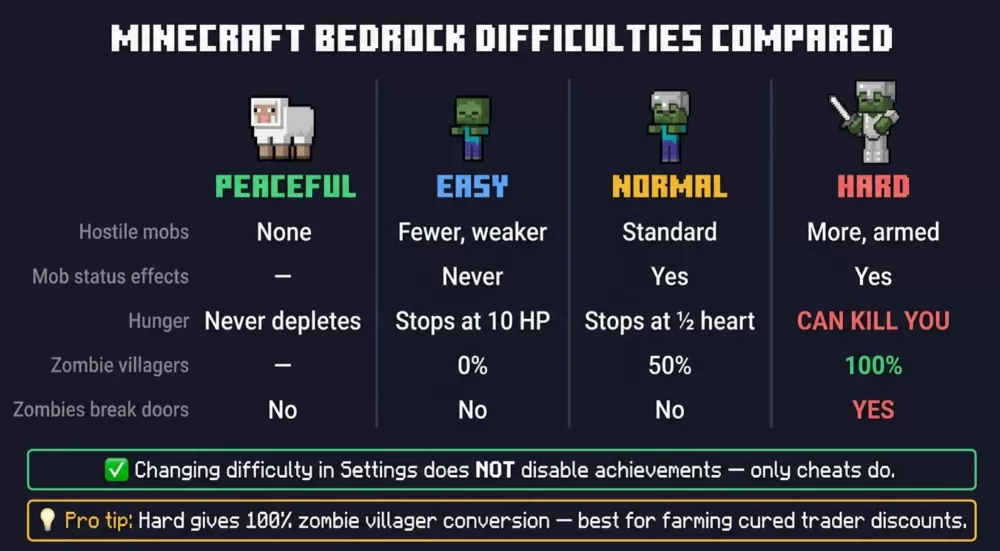
No hostile mobs spawn, and any that already exist disappear as soon as you switch. Endermen, spiders and zombified piglins do not appear either, while piglins and hoglins still spawn but leave you alone. Hunger does not drop, and health regenerates quickly. You are not completely safe, though: lava, drowning, fall damage and other hazards can still kill you. Peaceful is best for building, exploring caves calmly, learning the game or playing with young kids.
Easy
Hostile mobs spawn and attack, but they deal less damage. Cave spiders do not poison you, which makes mineshafts much less dangerous. Hunger now drains, but an empty hunger bar only takes your health down to 10 points (5 hearts) and stops, so you cannot starve to death. Villagers killed by zombies never turn into zombie villagers on this level. It is a good choice for new players who want real survival without harsh punishment.
Normal
This is the standard experience, with regular mob damage and spawn rates. Starving takes your health down to half a heart but does not kill you on its own, although any extra hit will. Villagers killed by zombies have a 50% chance to become zombie villagers.
Hard
Mobs hit the hardest and are more likely to spawn with armor and weapons. Zombies can break wooden doors, so a simple door is no longer enough to protect your house or a village. Hard is also the only level where hunger can kill you: an empty food bar drains your health to zero. Villagers killed by zombies always turn into zombie villagers, which brings us to the most useful trick on this difficulty.
A useful Hard mode trick
Because the conversion chance on Hard is 100%, it is the best difficulty for getting cheap trades. Let a zombie attack a villager, cure the zombie villager with a splash potion of weakness and a golden apple, and it will offer huge discounts, sometimes enchanted books for just one emerald. Many players switch to Hard only for this step and then go back to their usual difficulty.
Regional difficulty: the hidden mechanic
Besides the setting in the menu, the game also tracks regional (local) difficulty for each area. It depends on four things: the chosen difficulty, how old the world is, how long players have spent in that chunk and the current moon phase. Approximate ranges look like this:
- Peaceful: 0
- Easy: 0.75 to 1.5
- Normal: 1.5 to 4.0
- Hard: 2.25 to 6.75
The higher the value, the more likely mobs are to spawn with armor, weapons and enchantments. In practice, this means the area around a base you have lived in for a long time slowly becomes more dangerous, especially on full moon nights.
Can you change difficulty mid-game?
Yes, as many times as you want, with no cooldown or penalty. Switching to Peaceful instantly removes all hostile mobs, so it works as an emergency button if you are surrounded at night. Going back from Peaceful does not bring the mobs back right away; they simply start spawning normally again. On Realms and servers, only the owner or an operator can change the difficulty, and the setting applies to every player in the world.
Which difficulty should you pick?
- Peaceful for building and creative projects in survival.
- Easy for new players learning how survival works.
- Normal for the standard Minecraft experience.
- Hard for a real challenge and for curing villagers to get the best trades.