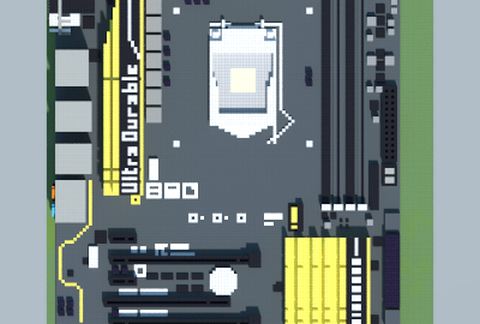
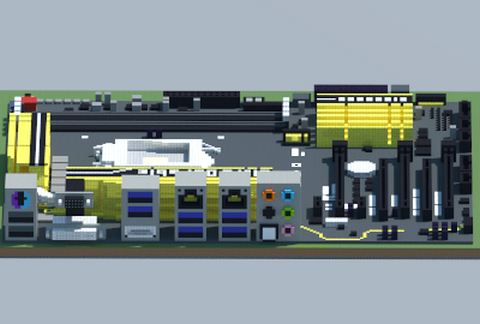
Intel Z97X-UD5H (Gigabyte)
Published on January 1, 2023
By MatthewStevenGo
👁️🗨️ 115
27
★
★
★
★
★
Rate it
Screenshots
Description
Just recreated this motherboard in Minecraft as Pixel Art.
Remember:
1. In case you feel like you find one of my related schematics like this are boring, I HIGHLY suggest that you leave the rating alone (by not giving me cancerous stars, seriously) so as not to poke me into frustration, lest you are aimlessly downvoting my hard works, as doing so would make anyone think you may have low IQ and poor judgment.
2. Please pay extra attention to the category which defines this schematic, so as to prevent confusion.
3. If you think you are an educated person, at least you know how to read?
Remember:
1. In case you feel like you find one of my related schematics like this are boring, I HIGHLY suggest that you leave the rating alone (by not giving me cancerous stars, seriously) so as not to poke me into frustration, lest you are aimlessly downvoting my hard works, as doing so would make anyone think you may have low IQ and poor judgment.
2. Please pay extra attention to the category which defines this schematic, so as to prevent confusion.
3. If you think you are an educated person, at least you know how to read?
Download: Intel Z97X-UD5H (Gigabyte) schematic for Minecraft
| Format | Size | Use with | |
|---|---|---|---|
.litematic intel-z97x-ud5h-(gigabyte).litematic |
62.80 KB | Litematica (Java) — more Litematica schematics |
|
.schem intel-z97x-ud5h-(gigabyte).schem |
5.43 KB | WorldEdit / FAWE |
|
.schematic intel-z97x-ud5h-(gigabyte).schematic |
8.04 KB | Legacy / online installer |
|
| Install this build directly on your Minecraft map |
|
||
Auto-converted from the original format; container contents (chests, signs) may be missing.
📘 How to use with Litematica (click to expand)
- Put the downloaded
.litematicfile into the.minecraft/schematics/folder. - In game, press M to open the Litematica menu and choose Load Schematics.
- Select the file in the list and click Load Schematic.
- Position the placement where you want it and build — or paste it instantly in creative with Easy Place mode.
Requires the Litematica mod (Java Edition).
More builds: Litematica schematics.
Comments
Similar