World on a Pedestal
Published on January 1, 2023
By rplane
👁️🗨️ 226
29
★
★
★
★
★
Rate it
Screenshots
Description
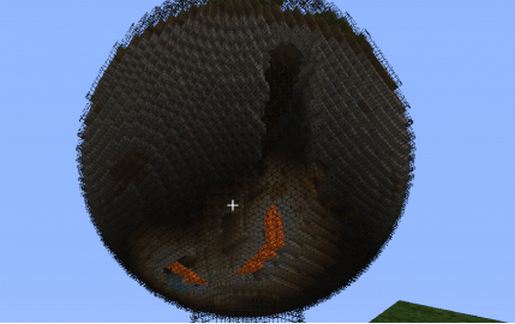
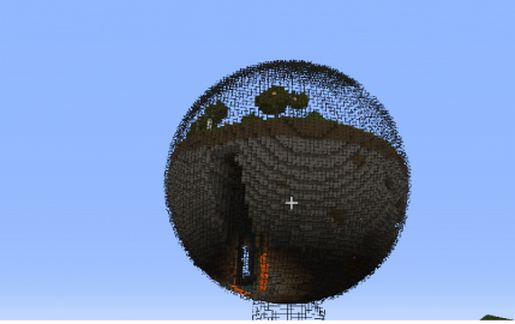
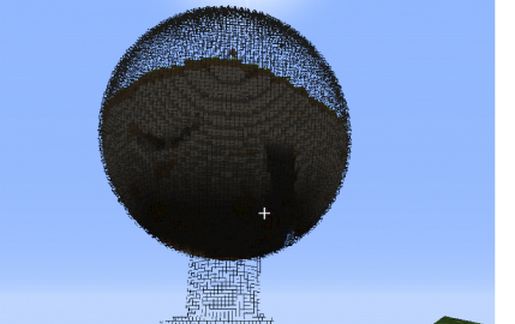
This is my first attempt at a biosphere. A true slice of Minecraft world enclosed in a glass sphere, placed on a glass pedestal. Includes a really nice cavern running through the lower section with both lava and water inside. True to form with ground that can be mined for ores, natural landscaping, a pond on the surface and more. Perfect for adding your own house, science center or any other creation you wish. Room to build a house, plant a farm and catch fish!
There are markers on top for a temporary entrance (remove once you decide how you will enter), but you will have to add a permanent one if you do not intend to fly in every time. I picture a staircase or elevator bringing you to ground level in the dome if you intend to build upon it or use it as a home base.
This is a fairly large biosphere and schematic is approximately 81 x 81 and 106 tall. Paste at ground level where you want the base of the pedestal. You will be standing at the edge of the pedestal when it loads. You will be able to look up and see the dome appear above you. The area below the biosphere will be a flat grassland once you paste it.
If leaving a low rating, which I understand if you don't like it, have the guts to leave a comment to explain why so I can improve the quality of my schematics. Hope you enjoy!
There are markers on top for a temporary entrance (remove once you decide how you will enter), but you will have to add a permanent one if you do not intend to fly in every time. I picture a staircase or elevator bringing you to ground level in the dome if you intend to build upon it or use it as a home base.
This is a fairly large biosphere and schematic is approximately 81 x 81 and 106 tall. Paste at ground level where you want the base of the pedestal. You will be standing at the edge of the pedestal when it loads. You will be able to look up and see the dome appear above you. The area below the biosphere will be a flat grassland once you paste it.
If leaving a low rating, which I understand if you don't like it, have the guts to leave a comment to explain why so I can improve the quality of my schematics. Hope you enjoy!
Download: World on a Pedestal schematic for Minecraft
| Format | Size | Use with | |
|---|---|---|---|
.litematic world-on-a-pedestal.litematic |
84.92 KB | Litematica (Java) — more Litematica schematics |
|
.schem world-on-a-pedestal.schem |
24.52 KB | WorldEdit / FAWE |
|
.schematic world-on-a-pedestal.schematic |
30.16 KB | Legacy / online installer |
|
Install this build directly on your Minecraft map
Auto-converted from the original format; container contents (chests, signs) may be missing.
📘 How to use with Litematica (click to expand)
- Put the downloaded
.litematicfile into the.minecraft/schematics/folder. - In game, press M to open the Litematica menu and choose Load Schematics.
- Select the file in the list and click Load Schematic.
- Position the placement where you want it and build — or paste it instantly in creative with Easy Place mode.
Requires the Litematica mod (Java Edition).
More builds: Litematica schematics.