Majoras Tavern
Published on January 1, 2023
By LordMaverick
👁️🗨️ 139
27
★
★
★
★
★
Rate it
Screenshots
Description
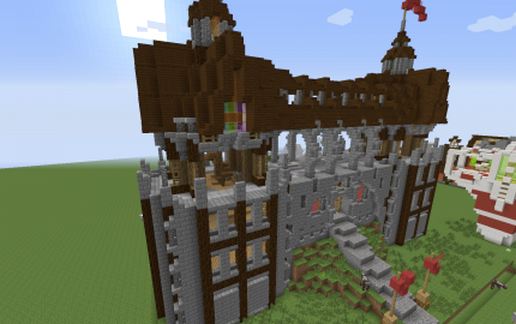
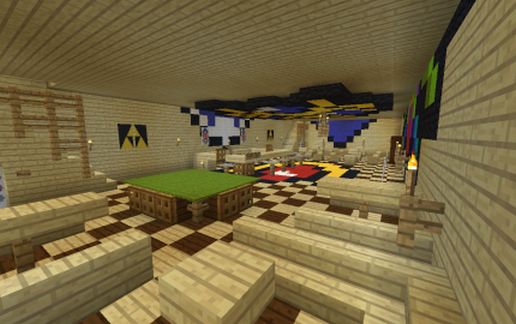
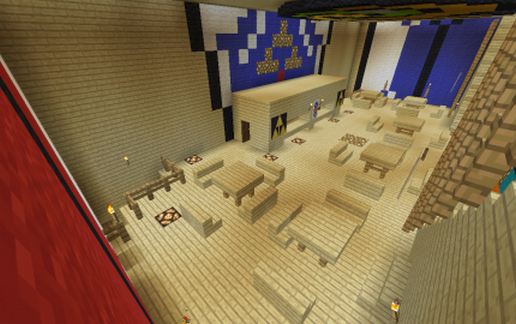
Legend of Zelda inspired tavern with pixel arts. Very practical for those who want to be running a profitable/ famous tavern in your server/world
Whats in the tavern?
Floor 1:
Jukebox to set the atmosphere of the tavern.
A bar with storage for "Drinks"
a set of stoves to cook quick meals
a pool table for entertainment
7 tables with different seating capacities not including bar area
Doors to basement with additional storage
Floor 2:
Kitchen with multiple stoves for cooking meals for your guests
Kitchen sink for washing dishes and hands
6 tables of equal capacity for your guests
Eyes of Majora staring at your and your guest's soul as you cook and they wait.
Floor 3:
Room for those who have gotten too drunk to safely make it home.
10 Rooms in total each room has
a bed a chest and a light that can be toggled
a central shared bathroom with a shower
Observation deck:
Floor to observe the surrounding landscape.
perfect for romantic cuddling and stargazing
Basement:
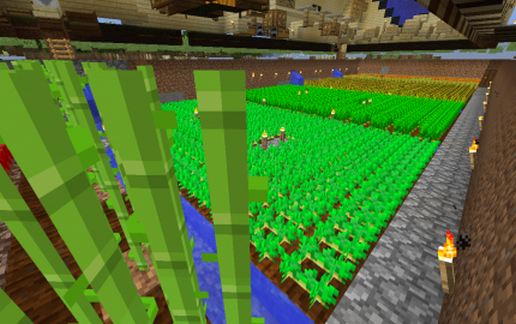
Basement includes storage for different ingredients
A medium farm with lighting and irrigation to keep plant life healthy
farm includes Wheat, carrots, potatos, pumpkins, melons, coco beans, sugarcane, Netherwarts
(pre beetroot build)
Hope this lovely piece satisfies that inner shop keeper inside. :)
Built by me and the wife on survival for a competition.
Feel free to us it on your server. we would love to see it there!
If you want to check out before hand you may visit our sever
167.114.65.207:25767
Once in just type in /Warp MajoraTavern
Once again we hope you enjoy this build!
Whats in the tavern?
Floor 1:
Jukebox to set the atmosphere of the tavern.
A bar with storage for "Drinks"
a set of stoves to cook quick meals
a pool table for entertainment
7 tables with different seating capacities not including bar area
Doors to basement with additional storage
Floor 2:
Kitchen with multiple stoves for cooking meals for your guests
Kitchen sink for washing dishes and hands
6 tables of equal capacity for your guests
Eyes of Majora staring at your and your guest's soul as you cook and they wait.
Floor 3:
Room for those who have gotten too drunk to safely make it home.
10 Rooms in total each room has
a bed a chest and a light that can be toggled
a central shared bathroom with a shower
Observation deck:
Floor to observe the surrounding landscape.
perfect for romantic cuddling and stargazing
Basement:
Basement includes storage for different ingredients
A medium farm with lighting and irrigation to keep plant life healthy
farm includes Wheat, carrots, potatos, pumpkins, melons, coco beans, sugarcane, Netherwarts
(pre beetroot build)
Hope this lovely piece satisfies that inner shop keeper inside. :)
Built by me and the wife on survival for a competition.
Feel free to us it on your server. we would love to see it there!
If you want to check out before hand you may visit our sever
167.114.65.207:25767
Once in just type in /Warp MajoraTavern
Once again we hope you enjoy this build!
Download: Majoras Tavern schematic for Minecraft
| Format | Size | Use with | |
|---|---|---|---|
.litematic majoras-tavern.litematic |
60.56 KB | Litematica (Java) — more Litematica schematics |
|
.schem majoras-tavern.schem |
5.38 KB | WorldEdit / FAWE |
|
.schematic majoras-tavern.schematic |
7.54 KB | Legacy / online installer |
|
| Install this build directly on your Minecraft map |
|
||
Auto-converted from the original format; container contents (chests, signs) may be missing.
📘 How to use with Litematica (click to expand)
- Put the downloaded
.litematicfile into the.minecraft/schematics/folder. - In game, press M to open the Litematica menu and choose Load Schematics.
- Select the file in the list and click Load Schematic.
- Position the placement where you want it and build — or paste it instantly in creative with Easy Place mode.
Requires the Litematica mod (Java Edition).
More builds: Litematica schematics.
Comments
Similar