Pinehold Castle 2.0
Published on January 1, 2023
By Thaylar
👁️🗨️ 24
124
★
★
★
★
★
Rate it
Screenshots
Description
Made a few minor adjustments, like finishing a ceiling I missed in the courtyard kitchen.
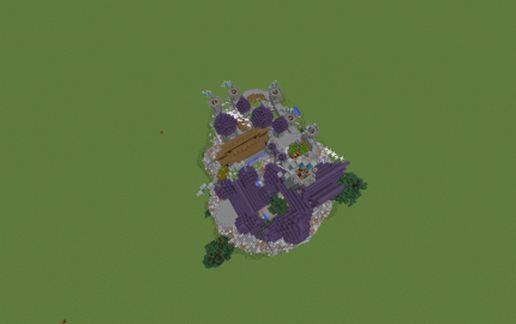
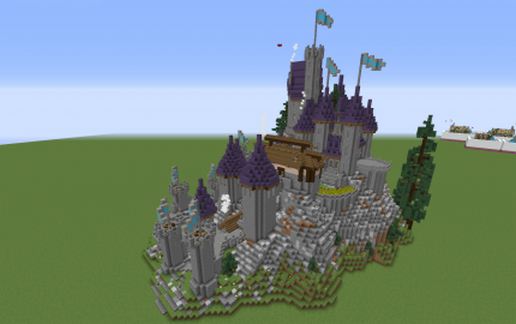
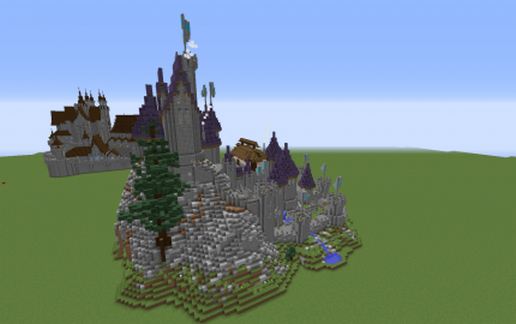
Fully furnished castle on a hill, ready for your town to spring up around it.
Wanted to make more of a survival build castle than going full on creative monstrosity. First time I've ever tried to build a hill using brushes in world edit.
Castle may not actually be safe at night due to monster spawns. You'll have to figure that out.
Features:
Blacksmith
Library
Jorrvaskr-style hall with kitchen and storage beneath
Master bedroom in the upper keep
Kitchen with open patio seating
Guest bedroom tower
Small wheat field and some terraced gardens
Small stable
Castley-castle stuff like walls and towers
Portcullis (entry into the castle is behind you if looking at the portcullis through a somewhat hidden staircase and door)
Fireplaces*
Looks great in Conquest (most resource packs actually make the roof blue not the default "blue" that is purple.
Don't really care what you do with it so long as I am credited for the original build.
*Thaylar is not responsible if you burn the castle down killing your entire minecraftian family along with it. Either don't light or use: gamerule doFireTick false
Credits:
The two large pine trees on the hill are from here: https://www.planetminecraft.com/project/native-trees-of-europe-template-repository-1779952/
Fully furnished castle on a hill, ready for your town to spring up around it.
Wanted to make more of a survival build castle than going full on creative monstrosity. First time I've ever tried to build a hill using brushes in world edit.
Castle may not actually be safe at night due to monster spawns. You'll have to figure that out.
Features:
Blacksmith
Library
Jorrvaskr-style hall with kitchen and storage beneath
Master bedroom in the upper keep
Kitchen with open patio seating
Guest bedroom tower
Small wheat field and some terraced gardens
Small stable
Castley-castle stuff like walls and towers
Portcullis (entry into the castle is behind you if looking at the portcullis through a somewhat hidden staircase and door)
Fireplaces*
Looks great in Conquest (most resource packs actually make the roof blue not the default "blue" that is purple.
Don't really care what you do with it so long as I am credited for the original build.
*Thaylar is not responsible if you burn the castle down killing your entire minecraftian family along with it. Either don't light or use: gamerule doFireTick false
Credits:
The two large pine trees on the hill are from here: https://www.planetminecraft.com/project/native-trees-of-europe-template-repository-1779952/
Download: Pinehold Castle 2.0 schematic for Minecraft
| Format | Size | Use with | |
|---|---|---|---|
.litematic pinehold-castle-2.0.litematic |
64.99 KB | Litematica (Java) — more Litematica schematics |
|
.schem pinehold-castle-2.0.schem |
41.33 KB | WorldEdit / FAWE |
|
.schematic pinehold-castle-2.0.schematic |
60.03 KB | Legacy / online installer |
|
| Install this build directly on your Minecraft map |
|
||
Auto-converted from the original format; container contents (chests, signs) may be missing.
📘 How to use with Litematica (click to expand)
- Put the downloaded
.litematicfile into the.minecraft/schematics/folder. - In game, press M to open the Litematica menu and choose Load Schematics.
- Select the file in the list and click Load Schematic.
- Position the placement where you want it and build — or paste it instantly in creative with Easy Place mode.
Requires the Litematica mod (Java Edition).
More builds: Litematica schematics.
Comments
Similar