Lucky Knot Bridge Changsha, China
Published on January 1, 2023
By ronman101
👁️🗨️ 196
35
★
★
★
★
★
Rate it
Screenshots
Description
ATTENTION: Designed for MineCraft 1.12.2
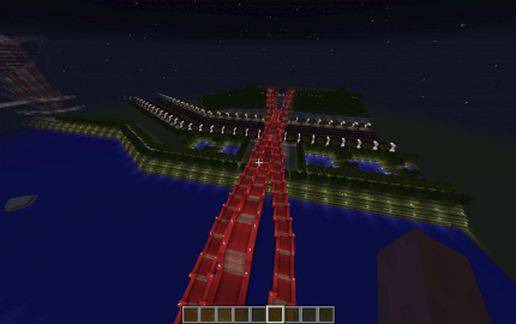
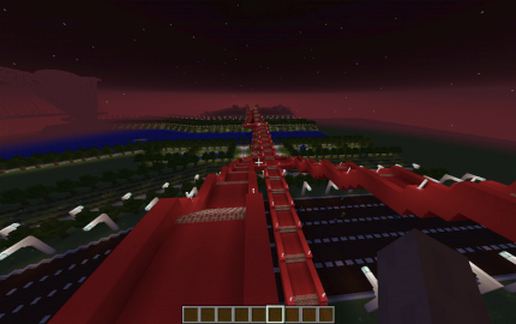
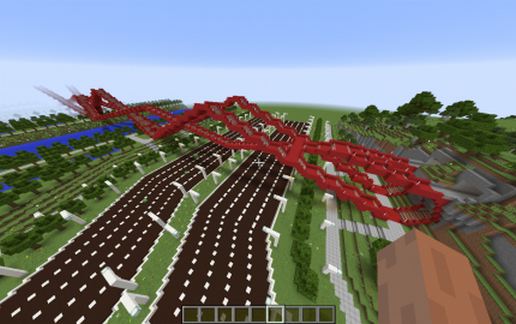
THE LUCKY KNOT Bridge is a topologically fascinating structure. The bright red truss bridge, which spans the Dragon King Harbor River in Changsha, China, twists and knots like a tangled shoestring. Its bright red color makes it shine out among them all. Designed by next Artchitects, it’s described that it has no beginning or an end.
The Build: I build this completely out of RED Concrete, which you will only find in 1.12.2 or greater. I wanted the color to stand out (You can replace it with Red Terracotta to down grade it…and its’ looks). I also used Red Brick Stairs for the climb. This is version 18 (the number of attempts to build this sucker). This was an 8 month build with a couple of stops in between to my other bridge (Footbridge Café/restaurant - Bike/Store Amsterdam, Netherlands). I gave up several times as the spans would never meet, climbing and dropping, from end to end, and never at the same height. Finally, I just made a mathematical decisions and make it BIG!!!! This bridge is the same height up and down from end to end. I’m pulling in extra blocks so that I including the surrounds of the bridge, including the mountains and roads on both sides of the river. The surrounding are not as bright as I want so the Minecraft monsters love to hang out with me.
Night Time is the best time as the Bridge lights up the area around. I hope this will find a place in your world. Go ahead and use it on a server, just give me the credit (..but I’m more of a cash kind of guy…LOL).
The Schemantic is quit big. I cut a lot of extra out of my world so that you can get a feeling of how big this bridge is. If you just want the bridge, Import it into a temporary world and cut out what you need.
As always, thank-you for downloading and please vote graciously. Enjoy another one of my Minecraft projects. Here is a picture from my inspiring build.
THE LUCKY KNOT Bridge is a topologically fascinating structure. The bright red truss bridge, which spans the Dragon King Harbor River in Changsha, China, twists and knots like a tangled shoestring. Its bright red color makes it shine out among them all. Designed by next Artchitects, it’s described that it has no beginning or an end.
The Build: I build this completely out of RED Concrete, which you will only find in 1.12.2 or greater. I wanted the color to stand out (You can replace it with Red Terracotta to down grade it…and its’ looks). I also used Red Brick Stairs for the climb. This is version 18 (the number of attempts to build this sucker). This was an 8 month build with a couple of stops in between to my other bridge (Footbridge Café/restaurant - Bike/Store Amsterdam, Netherlands). I gave up several times as the spans would never meet, climbing and dropping, from end to end, and never at the same height. Finally, I just made a mathematical decisions and make it BIG!!!! This bridge is the same height up and down from end to end. I’m pulling in extra blocks so that I including the surrounds of the bridge, including the mountains and roads on both sides of the river. The surrounding are not as bright as I want so the Minecraft monsters love to hang out with me.
Night Time is the best time as the Bridge lights up the area around. I hope this will find a place in your world. Go ahead and use it on a server, just give me the credit (..but I’m more of a cash kind of guy…LOL).
The Schemantic is quit big. I cut a lot of extra out of my world so that you can get a feeling of how big this bridge is. If you just want the bridge, Import it into a temporary world and cut out what you need.
As always, thank-you for downloading and please vote graciously. Enjoy another one of my Minecraft projects. Here is a picture from my inspiring build.
Download: Lucky Knot Bridge Changsha, China schematic for Minecraft
| Format | Size | Use with | |
|---|---|---|---|
.litematic lucky-knot-bridge-changsha,-china.litematic |
364.43 KB | Litematica (Java) — more Litematica schematics |
|
.schem lucky-knot-bridge-changsha,-china.schem |
144.40 KB | WorldEdit / FAWE |
|
.schematic lucky-knot-bridge-changsha,-china.schematic |
193.69 KB | Legacy / online installer |
|
Install this build directly on your Minecraft map
Auto-converted from the original format; container contents (chests, signs) may be missing.
📘 How to use with Litematica (click to expand)
- Put the downloaded
.litematicfile into the.minecraft/schematics/folder. - In game, press M to open the Litematica menu and choose Load Schematics.
- Select the file in the list and click Load Schematic.
- Position the placement where you want it and build — or paste it instantly in creative with Easy Place mode.
Requires the Litematica mod (Java Edition).
More builds: Litematica schematics.