Behemoth Airship
Published on January 1, 2023
By msummers
👁️🗨️ 244
40
★
★
★
★
★
Rate it
Screenshots

Description
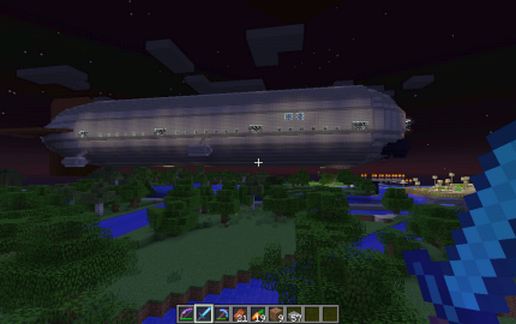
A massive zeppelin style airship that can be flown using the Movecraft 3.1.28 (or later) mod for Bukkit. Although it does cause significant server lag when moved.
This the first capital airship I made, also the largest. Compared to the smaller Destroyer, it has a more sleek design. However it is probably a less practical warship in combat. It requires multiple people to be used effectively, which can be difficult to coordinate.
Features:
Main Bridge controls navigation and main cannons.
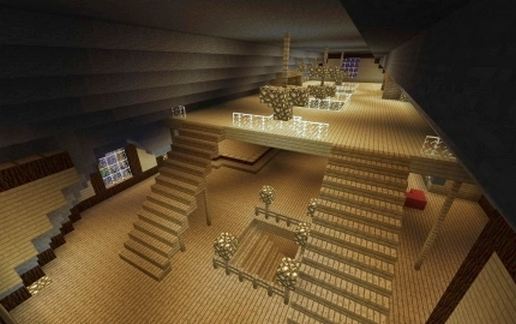
Directly aft of the Main Bridge is a nexus of corridors leading throughout the ship. Signs are posted giving directions to the other sections.
Bomb Bay controls the cluster bomb dropper as well as gives an excellent view of the area beneath the ship.
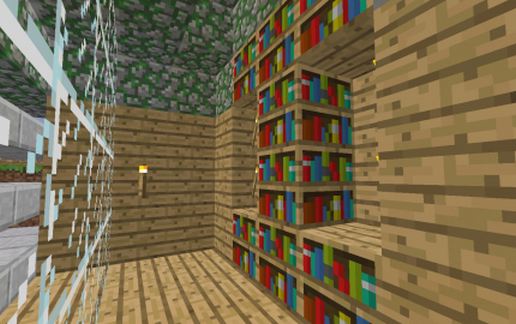
Crew quarters are in the forward section of the ship. My daughters helped build it, and 2 of the rooms are theirs. There are secret doors in both rooms that allow you to explore the ship superstructure or make repairs. (They chose the coloring, don't blame me...)
Ship Stores is, as it sounds, for storing material for repairs as well as building smaller support craft and ammunition.
There is a large hangar bay including 4 landing pads for smaller support craft.
There are 3 defensive rings with machine gun emplacements. Port, Starboard, and Dorsal (pointed up). These are intended to defend the ship against air attacks.
There is also an Emergency Bridge at the extreme aft end of the ship. If the Main Bridge is destroyed, the ship
navigation can be controlled from here.
Unlike the smaller Destroyer, the Behemoth is intended more as an aircraft carrier. While it does have its own defenses, most notably the main cannons, it relies heavily on support craft for defenses.
Armament:
2 x Forward facing main cannons
- Includes seperate safeties for each cannon, so each can be fired seperately or together from the same button
- Fires maximum of 4 TNT charges per volley
- Configurable range
- Effective at breaking through capital airship armor exposing the flammable interior
3 Devensive Rings with 4 dual machine gun emplacements each (24 guns total)
- Intended primarily for anti-air defense using fireballs, but can be loaded with arrows for ground attack
1 Cluster bomb dropper
- Drops 9 TNT bombs arranged in a circle, with 1 on a shorter fuse in the middle
- Middle TNT explodes mid-air, sending the others flying in all directions
- Causes massive destruction beneath the airship
Notes:
This is based on my own custom ".craft" files used for Movecraft 3.1.28, with 2 different craft deffinitions
One is the Behemoth type, which includes any craft bigger than 1000 blocks. It requires:
> 50% wool (lift)
> 1% redstone blocks (engines)
> 0.001% diamond blocks (makes the ships worth fighting over)
Includes Netherbrick and Hardened Clay in Allowed Blocks, so the hangars work for carrying Airskiffs without the Airskiff trying to include the Behemoth. Other Allowed Blocks are as per the old Ships plugin.
The other is the Airskiff type, which must be smaller than 1000 blocks
> 50% wool (more so its highly flammable)
> 10% redstone blocks (faster, so bigger engines)
Allowed Blocks are as per the old Ships plugin.
Please note that as of this writing, Movecraft sometimes drops redstone components off blocks when you move. This screws up all the weapons. Hopefully this will be fixed soon so we can get back to epic airship combat
This the first capital airship I made, also the largest. Compared to the smaller Destroyer, it has a more sleek design. However it is probably a less practical warship in combat. It requires multiple people to be used effectively, which can be difficult to coordinate.
Features:
Main Bridge controls navigation and main cannons.
Directly aft of the Main Bridge is a nexus of corridors leading throughout the ship. Signs are posted giving directions to the other sections.
Bomb Bay controls the cluster bomb dropper as well as gives an excellent view of the area beneath the ship.
Crew quarters are in the forward section of the ship. My daughters helped build it, and 2 of the rooms are theirs. There are secret doors in both rooms that allow you to explore the ship superstructure or make repairs. (They chose the coloring, don't blame me...)
Ship Stores is, as it sounds, for storing material for repairs as well as building smaller support craft and ammunition.
There is a large hangar bay including 4 landing pads for smaller support craft.
There are 3 defensive rings with machine gun emplacements. Port, Starboard, and Dorsal (pointed up). These are intended to defend the ship against air attacks.
There is also an Emergency Bridge at the extreme aft end of the ship. If the Main Bridge is destroyed, the ship
navigation can be controlled from here.
Unlike the smaller Destroyer, the Behemoth is intended more as an aircraft carrier. While it does have its own defenses, most notably the main cannons, it relies heavily on support craft for defenses.
Armament:
2 x Forward facing main cannons
- Includes seperate safeties for each cannon, so each can be fired seperately or together from the same button
- Fires maximum of 4 TNT charges per volley
- Configurable range
- Effective at breaking through capital airship armor exposing the flammable interior
3 Devensive Rings with 4 dual machine gun emplacements each (24 guns total)
- Intended primarily for anti-air defense using fireballs, but can be loaded with arrows for ground attack
1 Cluster bomb dropper
- Drops 9 TNT bombs arranged in a circle, with 1 on a shorter fuse in the middle
- Middle TNT explodes mid-air, sending the others flying in all directions
- Causes massive destruction beneath the airship
Notes:
This is based on my own custom ".craft" files used for Movecraft 3.1.28, with 2 different craft deffinitions
One is the Behemoth type, which includes any craft bigger than 1000 blocks. It requires:
> 50% wool (lift)
> 1% redstone blocks (engines)
> 0.001% diamond blocks (makes the ships worth fighting over)
Includes Netherbrick and Hardened Clay in Allowed Blocks, so the hangars work for carrying Airskiffs without the Airskiff trying to include the Behemoth. Other Allowed Blocks are as per the old Ships plugin.
The other is the Airskiff type, which must be smaller than 1000 blocks
> 50% wool (more so its highly flammable)
> 10% redstone blocks (faster, so bigger engines)
Allowed Blocks are as per the old Ships plugin.
Please note that as of this writing, Movecraft sometimes drops redstone components off blocks when you move. This screws up all the weapons. Hopefully this will be fixed soon so we can get back to epic airship combat
Download: Behemoth Airship schematic for Minecraft
| Format | Size | Use with | |
|---|---|---|---|
.litematic behemoth-airship.litematic |
56.76 KB | Litematica (Java) — more Litematica schematics |
|
.schem behemoth-airship.schem |
6.73 KB | WorldEdit / FAWE |
|
.schematic behemoth-airship.schematic |
10.59 KB | Legacy / online installer |
|
Install this build directly on your Minecraft map
Auto-converted from the original format; container contents (chests, signs) may be missing.
📘 How to use with Litematica (click to expand)
- Put the downloaded
.litematicfile into the.minecraft/schematics/folder. - In game, press M to open the Litematica menu and choose Load Schematics.
- Select the file in the list and click Load Schematic.
- Position the placement where you want it and build — or paste it instantly in creative with Easy Place mode.
Requires the Litematica mod (Java Edition).
More builds: Litematica schematics.