Shulker Storage 1.15.1 Lossless 2 wide Tile-able 100% reliable
Published on January 1, 2023
By macscooby
👁️🗨️ 3
32
★
★
★
★
★
Rate it
Screenshots
Description
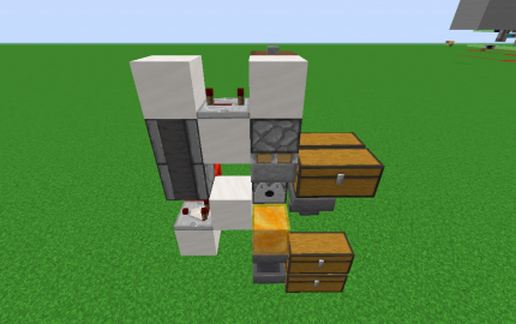
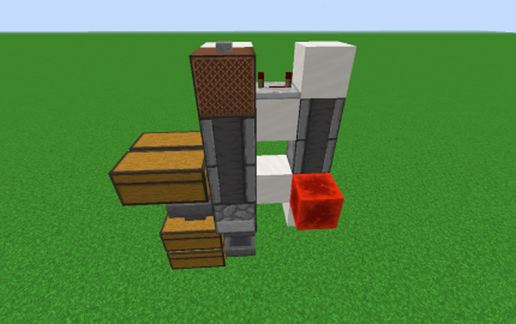
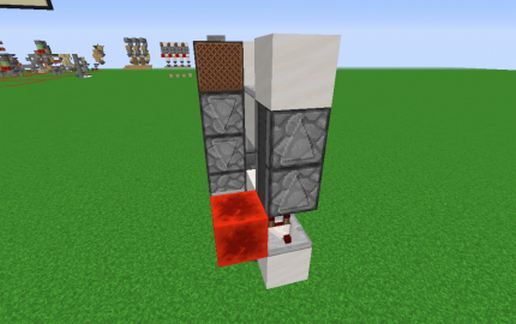
My solution to take raw items and store them in shulker boxes, and when the shulker box is full, put it in a chest.
Requirements I wanted to fulfill:
Must be able to access the contents of the shulker that is getting filled at any time
The full shulker must end up in the chest 100% of the time. NO MISSES! EVER!
A new empty shulker must replace the full one for continued raw item storage
The box must not be obstructed from opening
The box must be visible from the front of the system
It must be as compact as possible
Inputs and outputs for raw items, empty shulkers and full shulkers must be easily accessible
It must be tile-able
It must look tidy
Note: this is not intended to store mixed items in one shulker.
It is best used in conjunction with something like an iron farm where you want to store poppies only in one module and all your iron in another module.
Or a mob farm for all your gunpowder, rotten flesh, bones, arrows etc in each separate module.
I have tested this extensively using a flatworld and the Gnembons Carpet mod, which allows for faster testing.
My inspiration is from Ilmango and his series of videos.
If this design has been done, please let me know so I can give credit where it is due.
I finalized this build on Dec 21/2019 at 8:43pm
MacScooby
Requirements I wanted to fulfill:
Must be able to access the contents of the shulker that is getting filled at any time
The full shulker must end up in the chest 100% of the time. NO MISSES! EVER!
A new empty shulker must replace the full one for continued raw item storage
The box must not be obstructed from opening
The box must be visible from the front of the system
It must be as compact as possible
Inputs and outputs for raw items, empty shulkers and full shulkers must be easily accessible
It must be tile-able
It must look tidy
Note: this is not intended to store mixed items in one shulker.
It is best used in conjunction with something like an iron farm where you want to store poppies only in one module and all your iron in another module.
Or a mob farm for all your gunpowder, rotten flesh, bones, arrows etc in each separate module.
I have tested this extensively using a flatworld and the Gnembons Carpet mod, which allows for faster testing.
My inspiration is from Ilmango and his series of videos.
If this design has been done, please let me know so I can give credit where it is due.
I finalized this build on Dec 21/2019 at 8:43pm
MacScooby
Download: Shulker Storage 1.15.1 Lossless 2 wide Tile-able 100% reliable schematic for Minecraft
| Format | Size | Use with | |
|---|---|---|---|
.litematic shulker-storage-1.15.1-lossless-2-wide-tile-able-100-reliable.litematic |
36.04 KB | Litematica (Java) — more Litematica schematics |
|
.schematic shulker-storage-1.15.1-lossless-2-wide-tile-able-100-reliable.schematic |
1.81 KB | Legacy / online installer |
|
| Install this build directly on your Minecraft map |
|
||
Auto-converted from the original format; container contents (chests, signs) may be missing.
📘 How to use with Litematica (click to expand)
- Put the downloaded
.litematicfile into the.minecraft/schematics/folder. - In game, press M to open the Litematica menu and choose Load Schematics.
- Select the file in the list and click Load Schematic.
- Position the placement where you want it and build — or paste it instantly in creative with Easy Place mode.
Requires the Litematica mod (Java Edition).
More builds: Litematica schematics.
Comments
Similar