Parthenon Spawn
Published on January 1, 2023
By gus1000
👁️🗨️ 407
2449
★
★
★
★
★
Rate it
Screenshots
Description
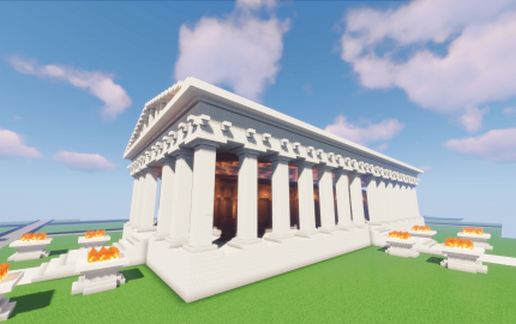
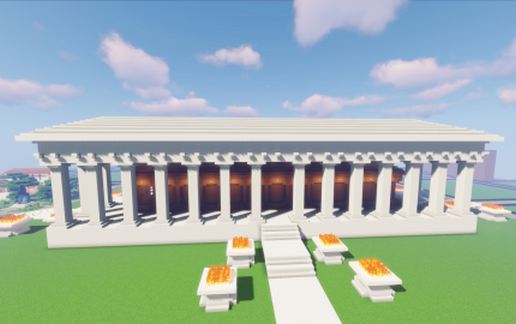
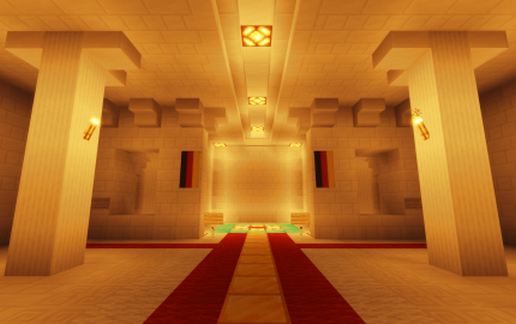
I built the Parthenon from the ancient Greek world as a spawn building.
It took 3 days to build it out of nowhere, just with old floor plans to make it look as close to the original as possible.
_______________________________________________
It was made for version 1.16.1
the Hight on a standard FLAT world is 36 blocks
_______________________________________________
You can Check it out on Our Odyssey-Builds Server :) feel free and visit us at: https://odysseybuilds.enjin.com/
and the minecraft Server IP ----> mc.odyssey-builds.de
we hope we can welcome you on our Server :)
-------------------------------------------------------------------------------
Tested on Singleplayer and Server (version 1.16.1, both)
for Singleplayer needed modifications:
Fabric installer 1.16.1 -> https://maven.fabricmc.net/net/fabricmc/fabric-installer/0.6.1.45/fabric-installer-0.6.1.45.jar
Fabric api 1.16.1 -> https://www.curseforge.com/minecraft/mc-mods/fabric-api/download/3026258
World edit 1.16.1 ->https://ci.enginehub.org/repository/download/bt10/15376:id/worldedit-fabric-mc1.16.1-7.2.0-SNAPSHOT-dist.jar?branch=master&guest=1
if u dont know how u install all these mods watch this video -> https://www.youtube.com/watch?v=ulvnQwKzDfw
>>For the server-side installation, I assume that you are already experienced enough about the installation of mods on the server.
It took 3 days to build it out of nowhere, just with old floor plans to make it look as close to the original as possible.
_______________________________________________
It was made for version 1.16.1
the Hight on a standard FLAT world is 36 blocks
_______________________________________________
You can Check it out on Our Odyssey-Builds Server :) feel free and visit us at: https://odysseybuilds.enjin.com/
and the minecraft Server IP ----> mc.odyssey-builds.de
we hope we can welcome you on our Server :)
-------------------------------------------------------------------------------
Tested on Singleplayer and Server (version 1.16.1, both)
for Singleplayer needed modifications:
Fabric installer 1.16.1 -> https://maven.fabricmc.net/net/fabricmc/fabric-installer/0.6.1.45/fabric-installer-0.6.1.45.jar
Fabric api 1.16.1 -> https://www.curseforge.com/minecraft/mc-mods/fabric-api/download/3026258
World edit 1.16.1 ->https://ci.enginehub.org/repository/download/bt10/15376:id/worldedit-fabric-mc1.16.1-7.2.0-SNAPSHOT-dist.jar?branch=master&guest=1
if u dont know how u install all these mods watch this video -> https://www.youtube.com/watch?v=ulvnQwKzDfw
>>For the server-side installation, I assume that you are already experienced enough about the installation of mods on the server.
Download: Parthenon Spawn schematic for Minecraft
| Format | Size | Use with | |
|---|---|---|---|
.litematic parthenon-spawn.litematic |
65.60 KB | Litematica (Java) — more Litematica schematics |
|
.schem parthenon-spawn.schem |
17.53 KB | WorldEdit / FAWE |
|
.schematic parthenon-spawn.schematic |
11.14 KB | Legacy / online installer Older format: about 18% of the blocks are replaced with their closest pre-1.13 lookalikes. |
|
Install this build directly on your Minecraft map
Auto-converted from the original format; container contents (chests, signs) may be missing.
📘 How to use with Litematica (click to expand)
- Put the downloaded
.litematicfile into the.minecraft/schematics/folder. - In game, press M to open the Litematica menu and choose Load Schematics.
- Select the file in the list and click Load Schematic.
- Position the placement where you want it and build — or paste it instantly in creative with Easy Place mode.
Requires the Litematica mod (Java Edition).
More builds: Litematica schematics.