Redstone Bin Reader (2 Bits)
Published on January 1, 2023
By costin88_boss
👁️🗨️ 137
24
★
★
★
★
★
Rate it
Description
This uses my Redstone PLA (First version) to be made possible.
although, this one removed unused stuff from the PLA and uses a lot of space.
-DISCLAIMER-
I don't know the Dimensions yet, so I suggest you have a space of 50x50x50 free.
Anyway, it is always better to paste the schematic and see how it fits, before pasting it in the wrong place.
for short, it is better to test than make mistakes.
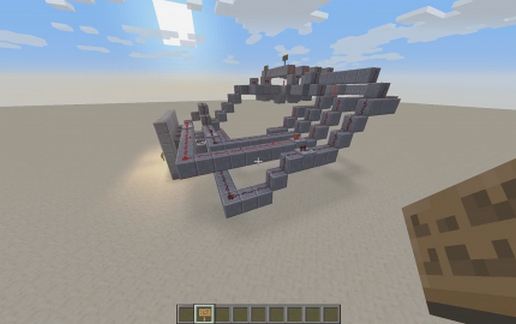
there are 2 levers, activating 4 Lights, to activate those in order, you need to toggle the levers in binary order (00, 01, 10, 11).
More info in the signs.
But please credit me if you make a video.
although, this one removed unused stuff from the PLA and uses a lot of space.
-DISCLAIMER-
I don't know the Dimensions yet, so I suggest you have a space of 50x50x50 free.
Anyway, it is always better to paste the schematic and see how it fits, before pasting it in the wrong place.
for short, it is better to test than make mistakes.
there are 2 levers, activating 4 Lights, to activate those in order, you need to toggle the levers in binary order (00, 01, 10, 11).
More info in the signs.
But please credit me if you make a video.
Download: Redstone Bin Reader (2 Bits) schematic for Minecraft
| Format | Size | Use with | |
|---|---|---|---|
.litematic redstone-bin-reader-(2-bits).litematic |
38.59 KB | Litematica (Java) — more Litematica schematics |
|
.schem redstone-bin-reader-(2-bits).schem |
1.58 KB | WorldEdit / FAWE |
|
.schematic redstone-bin-reader-(2-bits).schematic |
754.00 B | Legacy / online installer |
|
| Install this build directly on your Minecraft map |
|
||
Auto-converted from the original format; container contents (chests, signs) may be missing.
📘 How to use with Litematica (click to expand)
- Put the downloaded
.litematicfile into the.minecraft/schematics/folder. - In game, press M to open the Litematica menu and choose Load Schematics.
- Select the file in the list and click Load Schematic.
- Position the placement where you want it and build — or paste it instantly in creative with Easy Place mode.
Requires the Litematica mod (Java Edition).
More builds: Litematica schematics.
Comments
Similar