Ranch Homestead Schematic
Published on January 1, 2023
By JLBuilds
👁️🗨️ 164
41
★
★
★
★
★
Rate it
Screenshots
Description
Ranch Homestead Schematic
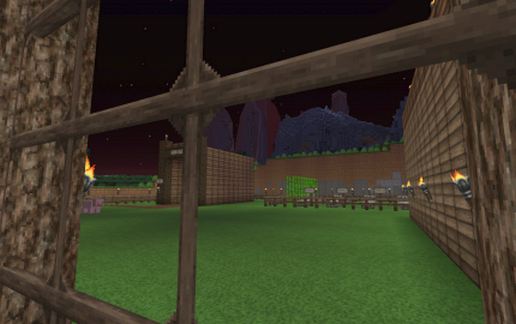
This starter ranch homestead has pretty much everything you should need to be comfortable and safe.
What you'll find with this schematic:
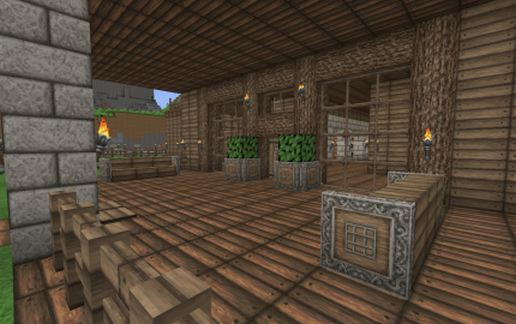
Front porch with seating
Entrance room
Hallway
Bedroom
Enchantment Room
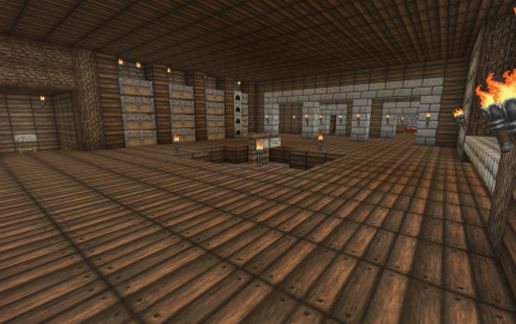
Large Storage Room with an area for a Tinker's Construct Smeltery (if you wish, if not, just fill in the floor area), lots of storage chests, ovens, and crafting table.
Area that begins a ladder down to a mining area (you need to dig down to make the mining area)
Ladder to fenced in rooftop deck area
Guard house/room on rooftop
Back Flordia/Sun Room
Garden Area
Outdoor Armory Area
Underground Barn with an above ground entrance
Large fenced in yard
Using World Edit load the schematic.
Figure out where you would like to place your homestead.
It should paste to the left and front (if facing North) of where you want to paste it but we have found it can be different depending on mods so this is just a start.
Dig down 12 from the level you want the yard to be on
Paste the schematic (if it did not paste as you desire then use double slash undo and start again)
See more pictures at: https://myalbum.com/album/ehnF2sbmzD2a
This build is approximately 72 blocks from front to back and 68 blocks from side to side. The barn floor is 10 blocks down from the yard. The height up from the yard is 12 blocks.
This starter ranch homestead has pretty much everything you should need to be comfortable and safe.
What you'll find with this schematic:
Front porch with seating
Entrance room
Hallway
Bedroom
Enchantment Room
Large Storage Room with an area for a Tinker's Construct Smeltery (if you wish, if not, just fill in the floor area), lots of storage chests, ovens, and crafting table.
Area that begins a ladder down to a mining area (you need to dig down to make the mining area)
Ladder to fenced in rooftop deck area
Guard house/room on rooftop
Back Flordia/Sun Room
Garden Area
Outdoor Armory Area
Underground Barn with an above ground entrance
Large fenced in yard
Using World Edit load the schematic.
Figure out where you would like to place your homestead.
It should paste to the left and front (if facing North) of where you want to paste it but we have found it can be different depending on mods so this is just a start.
Dig down 12 from the level you want the yard to be on
Paste the schematic (if it did not paste as you desire then use double slash undo and start again)
See more pictures at: https://myalbum.com/album/ehnF2sbmzD2a
This build is approximately 72 blocks from front to back and 68 blocks from side to side. The barn floor is 10 blocks down from the yard. The height up from the yard is 12 blocks.
Download: Ranch Homestead Schematic schematic for Minecraft
| Format | Size | Use with | |
|---|---|---|---|
.litematic ranch-homestead-schematic.litematic |
70.64 KB | Litematica (Java) — more Litematica schematics |
|
.schem ranch-homestead-schematic.schem |
9.04 KB | WorldEdit / FAWE |
|
.schematic ranch-homestead-schematic.schematic |
11.52 KB | Legacy / online installer |
|
| Install this build directly on your Minecraft map |
|
||
Auto-converted from the original format; container contents (chests, signs) may be missing.
📘 How to use with Litematica (click to expand)
- Put the downloaded
.litematicfile into the.minecraft/schematics/folder. - In game, press M to open the Litematica menu and choose Load Schematics.
- Select the file in the list and click Load Schematic.
- Position the placement where you want it and build — or paste it instantly in creative with Easy Place mode.
Requires the Litematica mod (Java Edition).
More builds: Litematica schematics.
Comments
Similar