Minecraft Casino / Mansion
Published on January 1, 2023
By Hyperr11
👁️🗨️ 256
420
★
★
★
★
★
Rate it
Screenshots
Description
Hello all!
5 Stars Appreciated!
INSTRUCTIONS TO USE:
For some reason, when downloaded from this site it converts the .schem file into a .schematic file, you need to re-name this file to MinecraftCasino.Schem for it to work, or. download it from planet minecraft here:https://www.planetminecraft.com/project/free-casino-mansion-schematic-download/
Minecraft Casino Build
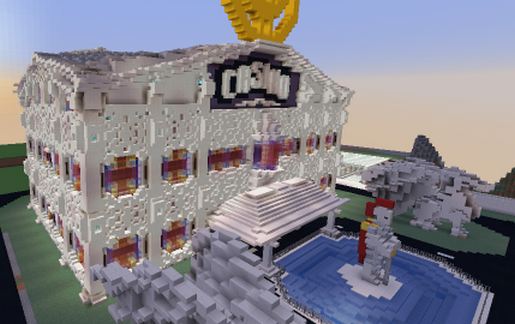
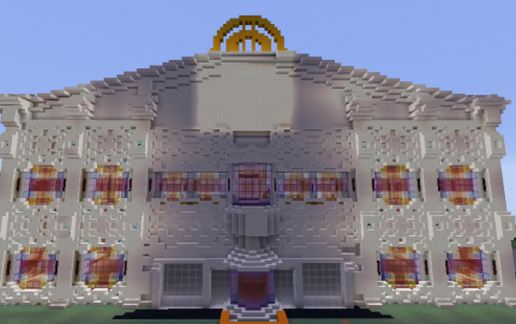
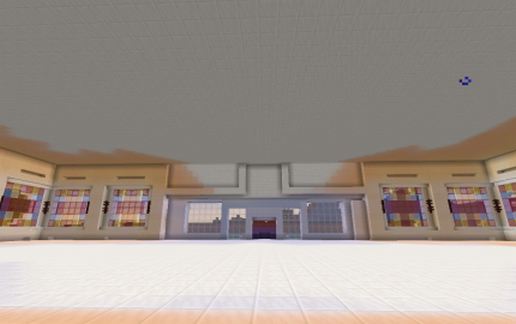
Here is a free Schematic of a casino/mansion I built, it is not furnished inside, although it does have a cool entrance. This was built in 1.16.4 so i do not believe it will work in any version below 1.13 :)
DIMENSIONS:
Length: 82
Width: 91
Height: 72
Relative height to paste: 10 blocks
Features
It has 3 big floors, as it was meant for a casino It would look good with some... casino stuff, although I got bored of building on this project so I thought I'd release the base structure for anyone to use! :)
2 Lion Structures in the outside
Nice outside fountain / pond area.
Built this with a city in mind, so it would be perfect for that!
If you are going to use this on a server/map, please at-least credit me! (And let me know! I'd love to see it!) I don't condone people using this build in any profit builds; unless you asked for permission beforehand. Thank you :)
This is my first actual build published, so may not be perfect, although it was good enough for me to upload it. Enjoy!
5 Stars Appreciated!
INSTRUCTIONS TO USE:
For some reason, when downloaded from this site it converts the .schem file into a .schematic file, you need to re-name this file to MinecraftCasino.Schem for it to work, or. download it from planet minecraft here:https://www.planetminecraft.com/project/free-casino-mansion-schematic-download/
Minecraft Casino Build
Here is a free Schematic of a casino/mansion I built, it is not furnished inside, although it does have a cool entrance. This was built in 1.16.4 so i do not believe it will work in any version below 1.13 :)
DIMENSIONS:
Length: 82
Width: 91
Height: 72
Relative height to paste: 10 blocks
Features
It has 3 big floors, as it was meant for a casino It would look good with some... casino stuff, although I got bored of building on this project so I thought I'd release the base structure for anyone to use! :)
2 Lion Structures in the outside
Nice outside fountain / pond area.
Built this with a city in mind, so it would be perfect for that!
If you are going to use this on a server/map, please at-least credit me! (And let me know! I'd love to see it!) I don't condone people using this build in any profit builds; unless you asked for permission beforehand. Thank you :)
This is my first actual build published, so may not be perfect, although it was good enough for me to upload it. Enjoy!
Download: Minecraft Casino / Mansion schematic for Minecraft
| Format | Size | Use with | |
|---|---|---|---|
.litematic minecraft-casino-/-mansion.litematic |
74.66 KB | Litematica (Java) — more Litematica schematics |
|
.schem minecraft-casino-/-mansion.schem |
17.30 KB | WorldEdit / FAWE |
|
.schematic minecraft-casino-/-mansion.schematic |
16.28 KB | Legacy / online installer Older format: about 3% of the blocks are replaced with their closest pre-1.13 lookalikes. |
|
| Install this build directly on your Minecraft map |
|
||
Auto-converted from the original format; container contents (chests, signs) may be missing.
📘 How to use with Litematica (click to expand)
- Put the downloaded
.litematicfile into the.minecraft/schematics/folder. - In game, press M to open the Litematica menu and choose Load Schematics.
- Select the file in the list and click Load Schematic.
- Position the placement where you want it and build — or paste it instantly in creative with Easy Place mode.
Requires the Litematica mod (Java Edition).
More builds: Litematica schematics.
Comments
Similar