Mushroom House
Published on January 1, 2023
By Dyiing
👁️🗨️ 301
1066
★
★
★
★
★
Rate it
Description
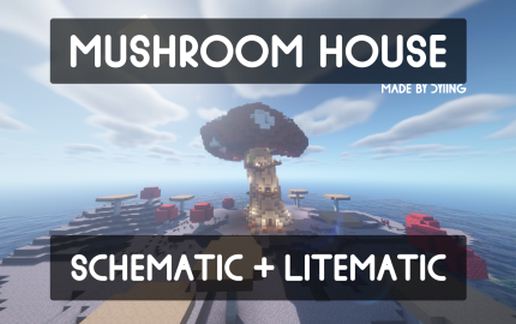
This is a mushroom house that I created for my mushroom island base! I built it in creative mode with the help of worldedit (and then survival). It was built in 1.16.5. The inside is completely furnished.
Original upload link, and .litematic file available here: https://www.planetminecraft.com/project/mushroom-house-schematic-litematic-fully-furnished/
=== Material list ===
Red Terracotta: 1432 (22 stacks + 24 blocks)
Smooth Quartz Block: 1226 (19 stacks + 10 blocks)
Spruce Planks: 306 (4 stacks + 50 blocks)
Brown Terracotta: 247 (3 stacks + 55 blocks)
Spruce Slab: 147 (2 stacks + 19 blocks)
White Carpet: 48
Lantern: 45
Bookshelf: 32
Sea Lantern: 28
Chest: 26
Oak Trapdoor: 24
Ladder: 19
Stone Brick Wall: 18
Red Carpet: 17
Barrel: 16
Black Carpet: 16
Chain: 12
Oak Leaves: 12
Spruce Stairs: 12
Sprice Trapdoor: 12
Birch Fence: 9
Spruce Door: 7
Birch Stairs: 6
Grass Block: 6
Smooth Stone Slab: 5
Glass Pane: 4
Light Grey Carpet: 4
Oak Stairs: 4
Stone Bricks: 4
Dirt: 3
Pumpkin: 3
Black Wool: 2
Brown Carpet: 2
Carved Pumpkin: 2
Oak Door: 2
Oak Slab: 2
Pumpkin Seeds: 2
Black Bed: 1
Shulker Boxes (yellow, pink, orange, magenta, lime, green, blue): 7
Cobweb: 1
Dispenser: 1
Fletching Table: 1
Flower Pot: 1
Iron Door: 1
Loom: 1
Spruce Pressure Plate: 1
Stone Button: 1
Torch: 1
Water Bucket: 1
Wheat Seeds: 1
Original upload link, and .litematic file available here: https://www.planetminecraft.com/project/mushroom-house-schematic-litematic-fully-furnished/
=== Material list ===
Red Terracotta: 1432 (22 stacks + 24 blocks)
Smooth Quartz Block: 1226 (19 stacks + 10 blocks)
Spruce Planks: 306 (4 stacks + 50 blocks)
Brown Terracotta: 247 (3 stacks + 55 blocks)
Spruce Slab: 147 (2 stacks + 19 blocks)
White Carpet: 48
Lantern: 45
Bookshelf: 32
Sea Lantern: 28
Chest: 26
Oak Trapdoor: 24
Ladder: 19
Stone Brick Wall: 18
Red Carpet: 17
Barrel: 16
Black Carpet: 16
Chain: 12
Oak Leaves: 12
Spruce Stairs: 12
Sprice Trapdoor: 12
Birch Fence: 9
Spruce Door: 7
Birch Stairs: 6
Grass Block: 6
Smooth Stone Slab: 5
Glass Pane: 4
Light Grey Carpet: 4
Oak Stairs: 4
Stone Bricks: 4
Dirt: 3
Pumpkin: 3
Black Wool: 2
Brown Carpet: 2
Carved Pumpkin: 2
Oak Door: 2
Oak Slab: 2
Pumpkin Seeds: 2
Black Bed: 1
Shulker Boxes (yellow, pink, orange, magenta, lime, green, blue): 7
Cobweb: 1
Dispenser: 1
Fletching Table: 1
Flower Pot: 1
Iron Door: 1
Loom: 1
Spruce Pressure Plate: 1
Stone Button: 1
Torch: 1
Water Bucket: 1
Wheat Seeds: 1
Download: Mushroom House schematic for Minecraft
| Format | Size | Use with | |
|---|---|---|---|
.litematic mushroom-house.litematic |
57.80 KB | Litematica (Java) — more Litematica schematics |
|
.schem mushroom-house.schem |
5.20 KB | WorldEdit / FAWE |
|
.schematic mushroom-house.schematic |
5.66 KB | Legacy / online installer Older format: about 3% of the blocks are replaced with their closest pre-1.13 lookalikes. |
|
| Install this build directly on your Minecraft map |
|
||
Auto-converted from the original format; container contents (chests, signs) may be missing.
📘 How to use with Litematica (click to expand)
- Put the downloaded
.litematicfile into the.minecraft/schematics/folder. - In game, press M to open the Litematica menu and choose Load Schematics.
- Select the file in the list and click Load Schematic.
- Position the placement where you want it and build — or paste it instantly in creative with Easy Place mode.
Requires the Litematica mod (Java Edition).
More builds: Litematica schematics.
Comments
Similar