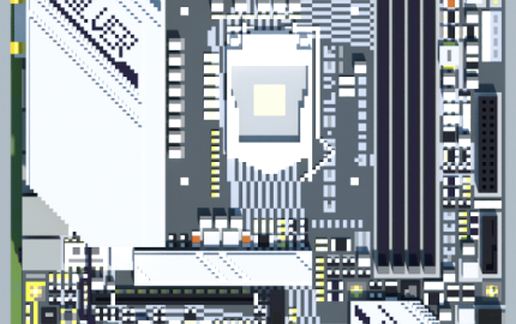
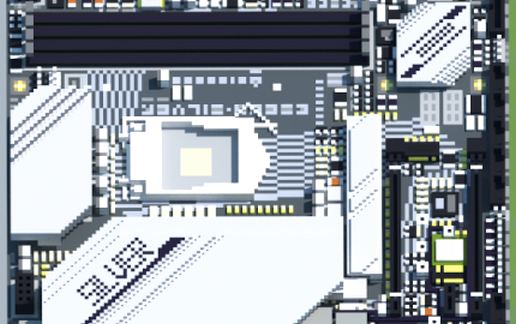
Intel B560M-SILVER (Ver 5.x) (BIOSTAR RACING Series)
Published on January 1, 2023
By MatthewStevenGo
👁️🗨️ 192
27
★
★
★
★
★
Rate it
Screenshots
Description
Seeing that it was recently released within this week, I decided to catch the opportunity to recreate it in Minecraft via MCEdit 0.1.7.1 and then render it via Chunky (1.12.2 mode).
These are the blocks being used based from the schematic analysis done via MCEdit 0.1.7.1:
(0:0),Air,0
(0:0),Air,352762
(1:0),Stone,154
(1:3),Stone,656
(1:4),Stone,20325
(4:0),Cobblestone,90
(7:0),Bedrock,839
(13:0),Gravel,145
(19:0),Sponge,54
(24:0),Sandstone,248
(35:0),White Wool,372
(35:1),Orange Wool,109
(35:5),Lime Wool,12
(35:7),Gray Wool,11511
(35:8),Light Gray Wool,9461
(35:10),Purple Wool,20
(35:11),Blue Wool,230
(35:13),Green Wool,179
(35:15),Black Wool,5985
(41:0),Block of Gold,455
(42:0),Block of Iron,4417
(43:0),Double Stone Slab,1541
(44:0),Stone Slab,364
(44:1),Sandstone Slab,64
(44:8),Stone Slab,59
(49:0),Obsidian,967
(77:2),Button,31
(79:0),Ice,480
(80:0),Snow,865
(82:0),Clay,1850
(89:0),Glowstone,32
(95:4),Locked Chest,38
(98:0),Stone Bricks,202
(121:0),End Stone,118
(133:0),Block of Emerald,8
(138:0),Beacon Block,16
(155:0),Block of Quartz,108
(159:1),Future Block!,201
(159:4),Future Block!,123
(165:0),Future Block!,2
(172:0),Future Block!,36
(173:0),Future Block!,654
(179:0),Future Block!,60
(216:0),Future Block!,76
(251:1),Future Block!,41
(251:4),Future Block!,32
(251:7),Future Block!,8
Thanks, and have a good day and stay safe! :)
These are the blocks being used based from the schematic analysis done via MCEdit 0.1.7.1:
(0:0),Air,0
(0:0),Air,352762
(1:0),Stone,154
(1:3),Stone,656
(1:4),Stone,20325
(4:0),Cobblestone,90
(7:0),Bedrock,839
(13:0),Gravel,145
(19:0),Sponge,54
(24:0),Sandstone,248
(35:0),White Wool,372
(35:1),Orange Wool,109
(35:5),Lime Wool,12
(35:7),Gray Wool,11511
(35:8),Light Gray Wool,9461
(35:10),Purple Wool,20
(35:11),Blue Wool,230
(35:13),Green Wool,179
(35:15),Black Wool,5985
(41:0),Block of Gold,455
(42:0),Block of Iron,4417
(43:0),Double Stone Slab,1541
(44:0),Stone Slab,364
(44:1),Sandstone Slab,64
(44:8),Stone Slab,59
(49:0),Obsidian,967
(77:2),Button,31
(79:0),Ice,480
(80:0),Snow,865
(82:0),Clay,1850
(89:0),Glowstone,32
(95:4),Locked Chest,38
(98:0),Stone Bricks,202
(121:0),End Stone,118
(133:0),Block of Emerald,8
(138:0),Beacon Block,16
(155:0),Block of Quartz,108
(159:1),Future Block!,201
(159:4),Future Block!,123
(165:0),Future Block!,2
(172:0),Future Block!,36
(173:0),Future Block!,654
(179:0),Future Block!,60
(216:0),Future Block!,76
(251:1),Future Block!,41
(251:4),Future Block!,32
(251:7),Future Block!,8
Thanks, and have a good day and stay safe! :)
Download: Intel B560M-SILVER (Ver 5.x) (BIOSTAR RACING Series) schematic for Minecraft
| Format | Size | Use with | |
|---|---|---|---|
.litematic intel-b560m-silver-(ver-5.x)-(biostar-racing-series).litematic |
56.03 KB | Litematica (Java) — more Litematica schematics |
|
.schem intel-b560m-silver-(ver-5.x)-(biostar-racing-series).schem |
10.15 KB | WorldEdit / FAWE |
|
.schematic intel-b560m-silver-(ver-5.x)-(biostar-racing-series).schematic |
15.73 KB | Legacy / online installer |
|
Install this build directly on your Minecraft map
Auto-converted from the original format; container contents (chests, signs) may be missing.
📘 How to use with Litematica (click to expand)
- Put the downloaded
.litematicfile into the.minecraft/schematics/folder. - In game, press M to open the Litematica menu and choose Load Schematics.
- Select the file in the list and click Load Schematic.
- Position the placement where you want it and build — or paste it instantly in creative with Easy Place mode.
Requires the Litematica mod (Java Edition).
More builds: Litematica schematics.