Gold & XP farm
Published on January 1, 2023
By 77Helly
👁️🗨️ 217
572
★
★
★
★
★
Rate it
Screenshots
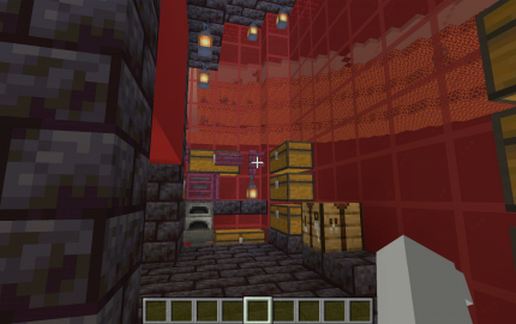
Description
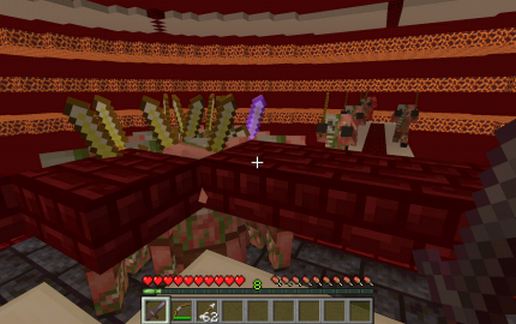
Piglin Gold& XP farm
Can be placed on top of the nether. (height 128)
With automatic smelter to turn the golden tools into golden nuggets.
NOTE:
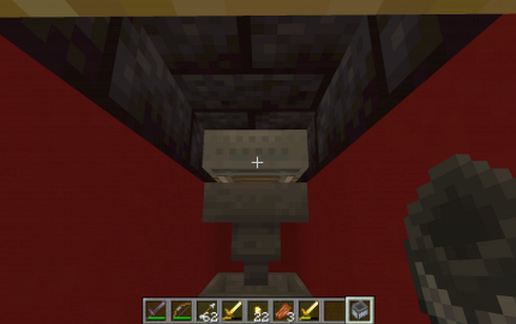
There has to be placed a hopper minecart between the place where the piglins got hit and the chests. (It disappeard while copying, look at the last picture where to put the minecart. The rail is still there)
Check out the video for instructions.
Please ask for help if you have problems!
Can be placed on top of the nether. (height 128)
With automatic smelter to turn the golden tools into golden nuggets.
NOTE:
There has to be placed a hopper minecart between the place where the piglins got hit and the chests. (It disappeard while copying, look at the last picture where to put the minecart. The rail is still there)
Check out the video for instructions.
Please ask for help if you have problems!
Download: Gold & XP farm schematic for Minecraft
| Format | Size | Use with | |
|---|---|---|---|
.litematic gold-&-xp-farm.litematic |
58.09 KB | Litematica (Java) — more Litematica schematics |
|
.schem gold-&-xp-farm.schem |
4.24 KB | WorldEdit / FAWE |
|
.schematic gold-&-xp-farm.schematic |
3.33 KB | Legacy / online installer Older format: about 24% of the blocks are replaced with their closest pre-1.13 lookalikes. |
|
Install this build directly on your Minecraft map
Auto-converted from the original format; container contents (chests, signs) may be missing.
📘 How to use with Litematica (click to expand)
- Put the downloaded
.litematicfile into the.minecraft/schematics/folder. - In game, press M to open the Litematica menu and choose Load Schematics.
- Select the file in the list and click Load Schematic.
- Position the placement where you want it and build — or paste it instantly in creative with Easy Place mode.
Requires the Litematica mod (Java Edition).
More builds: Litematica schematics.