5x5 Chunk Organized Floorplan
Published on January 1, 2023
By Thabael
👁️🗨️ 152
29
★
★
★
★
★
Rate it
Description
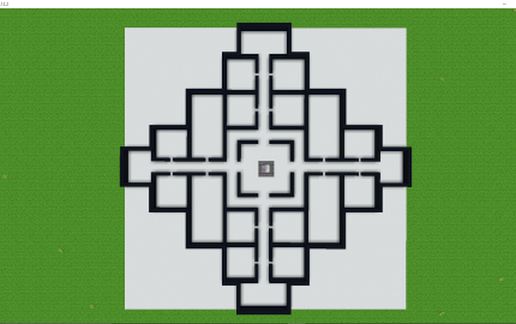
Hi guys! This is my first schematic creation, and it is inspired by TKH. I found his video about a large ME control layout on his channel (link below) and have been using it in every mod pack I've been playing in. I like this layout and floorplan because it helps keep me very organized and keeps my base from being cluttered.
This version I'm posting is for a 5x5 grid, but you can have it on a 3x3 or even bigger to expand. With the ME controllers set up the way they are, and if you add a P2P tunnel network, you can expand this much larger out, or even up if you want to. All credit goes to TKH for this design, I just added a few tweaks and modifications to fit my purposes! I hope you guys enjoy it and would love to hear some feedback! Show me your modifications if you make any, I'm always excited to see others' builds! Also, let me know if you want to see the completely finished design once it's full of machines, the P2P tunnel network system, and all ;-)
See the images for the full material list if you're using this on a multiplayer server! (Edit: For some reason I cannot get the picture that has the materials list to show, so here it is:
Black Concrete (walls/dividers): 1032
White Concrete (floor because I like the black/white contrast): 6400
ME Controller: 28
Energy Acceptor: 1
Energy Cell: 1
This setup will be enough to get you started and give you a little over 2k channels to use!)
Note: this was saved as a .schematic using Schematica.
TKH YouTube channel: https://www.youtube.com/user/therealtkh
This version I'm posting is for a 5x5 grid, but you can have it on a 3x3 or even bigger to expand. With the ME controllers set up the way they are, and if you add a P2P tunnel network, you can expand this much larger out, or even up if you want to. All credit goes to TKH for this design, I just added a few tweaks and modifications to fit my purposes! I hope you guys enjoy it and would love to hear some feedback! Show me your modifications if you make any, I'm always excited to see others' builds! Also, let me know if you want to see the completely finished design once it's full of machines, the P2P tunnel network system, and all ;-)
See the images for the full material list if you're using this on a multiplayer server! (Edit: For some reason I cannot get the picture that has the materials list to show, so here it is:
Black Concrete (walls/dividers): 1032
White Concrete (floor because I like the black/white contrast): 6400
ME Controller: 28
Energy Acceptor: 1
Energy Cell: 1
This setup will be enough to get you started and give you a little over 2k channels to use!)
Note: this was saved as a .schematic using Schematica.
TKH YouTube channel: https://www.youtube.com/user/therealtkh
Download: 5x5 Chunk Organized Floorplan schematic for Minecraft
| Format | Size | Use with | |
|---|---|---|---|
.litematic 5x5-chunk-organized-floorplan.litematic |
27.68 KB | Litematica (Java) — more Litematica schematics |
|
.schem 5x5-chunk-organized-floorplan.schem |
615.00 B | WorldEdit / FAWE |
|
.schematic 5x5-chunk-organized-floorplan.schematic |
1.36 KB | Legacy / online installer |
|
| Install this build directly on your Minecraft map |
|
||
Auto-converted from the original format; container contents (chests, signs) may be missing.
📘 How to use with Litematica (click to expand)
- Put the downloaded
.litematicfile into the.minecraft/schematics/folder. - In game, press M to open the Litematica menu and choose Load Schematics.
- Select the file in the list and click Load Schematic.
- Position the placement where you want it and build — or paste it instantly in creative with Easy Place mode.
Requires the Litematica mod (Java Edition).
More builds: Litematica schematics.
Comments
Similar