My First Creation
Published on January 1, 2023
By acoolguy
👁️🗨️ 138
28
★
★
★
★
★
Rate it
Description
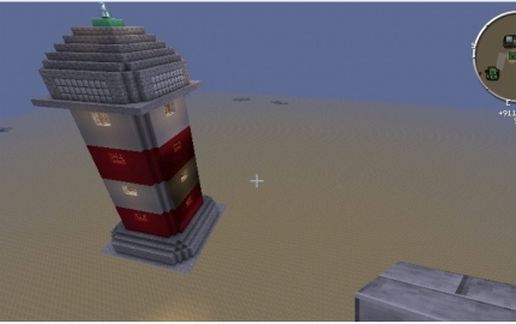
A Lighthouse with working lighht.
I am running Minecraft 1.6.4
With 1.6.4-Forge9.11.1.916.jar installed and all the following mods
1.6.4 DamageIndicators v2.9.0.9.zip
AdditionalPipes2.4.5b-BC4.1.0.jar
adv-repulsion-systems-57.0.0.jar
advanced-machines-57.0.0.jar
Atomic_Science_v1.0.0.145.jar
bcTools-v1.4-a-5.jar
Borderlands Weapon Mod pre 1.0.0.zip
buildcraft-A-1.6.2-4.1.0.jar
ChickenChunks 1.3.3.3.jar
CodeChickenCore 0.9.0.6.jar
ComputerCraft1.57.zip
dimensional-anchor-57.0.0.jar
Galacticraft-1.6.4-2.0.2.800.jar
Galacticraft-Planets-1.6.4-2.0.2.800.jar
ICBM_Contraption_v1.3.3.254.jar
ICBM_Explosion_v1.3.3.254.jar
ICBM_Sentry_v1.3.3.254.jar
iChunUtil2.3.0.zip
immibis-core-57.0.0.jar
immibis-microblocks-57.0.1.jar
immibis-peripherals-57.0.0.jar
industrialcraft-2_2.0.271-experimental.jar
infinitubes-57.0.1.jar
liquid-xp-57.0.0.jar
MFFS_v3.4.0.231.jar
MicdoodleCore-1.6.4-2.0.2.800.jar
MineFactoryReloaded-2.7.1-36.jar
NEIPlugins-1.1.0.2.jar
NotEnoughItems 1.6.1.5.jar
PneumaticCraft-0.3.7.zip
PortalGun2.0.1.zip
PowerCrystalsCore-1.1.8-7.jar
ProjectRedBase-1.6.4-4.0.4.11.jar
ProjectRedCompat-1.6.4-4.0.4.11.jar
ProjectRedIntegration-1.6.4-4.0.4.11.jar
ProjectRedWorld-1.6.4-4.0.4.11.jar
Railcraft_1.6.2-8.1.0.0.jar
redlogic-57.0.0.jar
RedstonePasteMod1.2.zip
Resonant_Induction_v0.2.2.206.jar
SecurityCraft v1.3 for 1.6.4.zip
TeleportPipes-Pre1c.zip
Thaumcraft4.0.2a.zip
traincraft-4.1.3_001.jar
tubestuff-57.0.1.jar
UniversalElectricity_Core_v2.2.1.183.jar
WR-CBE 1.4.0.6.jar
ZansMinimap1.6.4.zip
Also in the mods1.6.4 folder i have
ForgeMultipart-universal-1.6.4-1.0.0.193.jar
CodeChickenLib-universal-1.6.4-1.0.0.36.jar
I am running Minecraft 1.6.4
With 1.6.4-Forge9.11.1.916.jar installed and all the following mods
1.6.4 DamageIndicators v2.9.0.9.zip
AdditionalPipes2.4.5b-BC4.1.0.jar
adv-repulsion-systems-57.0.0.jar
advanced-machines-57.0.0.jar
Atomic_Science_v1.0.0.145.jar
bcTools-v1.4-a-5.jar
Borderlands Weapon Mod pre 1.0.0.zip
buildcraft-A-1.6.2-4.1.0.jar
ChickenChunks 1.3.3.3.jar
CodeChickenCore 0.9.0.6.jar
ComputerCraft1.57.zip
dimensional-anchor-57.0.0.jar
Galacticraft-1.6.4-2.0.2.800.jar
Galacticraft-Planets-1.6.4-2.0.2.800.jar
ICBM_Contraption_v1.3.3.254.jar
ICBM_Explosion_v1.3.3.254.jar
ICBM_Sentry_v1.3.3.254.jar
iChunUtil2.3.0.zip
immibis-core-57.0.0.jar
immibis-microblocks-57.0.1.jar
immibis-peripherals-57.0.0.jar
industrialcraft-2_2.0.271-experimental.jar
infinitubes-57.0.1.jar
liquid-xp-57.0.0.jar
MFFS_v3.4.0.231.jar
MicdoodleCore-1.6.4-2.0.2.800.jar
MineFactoryReloaded-2.7.1-36.jar
NEIPlugins-1.1.0.2.jar
NotEnoughItems 1.6.1.5.jar
PneumaticCraft-0.3.7.zip
PortalGun2.0.1.zip
PowerCrystalsCore-1.1.8-7.jar
ProjectRedBase-1.6.4-4.0.4.11.jar
ProjectRedCompat-1.6.4-4.0.4.11.jar
ProjectRedIntegration-1.6.4-4.0.4.11.jar
ProjectRedWorld-1.6.4-4.0.4.11.jar
Railcraft_1.6.2-8.1.0.0.jar
redlogic-57.0.0.jar
RedstonePasteMod1.2.zip
Resonant_Induction_v0.2.2.206.jar
SecurityCraft v1.3 for 1.6.4.zip
TeleportPipes-Pre1c.zip
Thaumcraft4.0.2a.zip
traincraft-4.1.3_001.jar
tubestuff-57.0.1.jar
UniversalElectricity_Core_v2.2.1.183.jar
WR-CBE 1.4.0.6.jar
ZansMinimap1.6.4.zip
Also in the mods1.6.4 folder i have
ForgeMultipart-universal-1.6.4-1.0.0.193.jar
CodeChickenLib-universal-1.6.4-1.0.0.36.jar
Download: My First Creation schematic for Minecraft
| Format | Size | Use with | |
|---|---|---|---|
.litematic my-first-creation.litematic |
31.46 KB | Litematica (Java) — more Litematica schematics |
|
.schem my-first-creation.schem |
1.46 KB | WorldEdit / FAWE |
|
.schematic my-first-creation.schematic |
4.24 KB | Legacy / online installer |
|
| Install this build directly on your Minecraft map |
|
||
Auto-converted from the original format; container contents (chests, signs) may be missing.
📘 How to use with Litematica (click to expand)
- Put the downloaded
.litematicfile into the.minecraft/schematics/folder. - In game, press M to open the Litematica menu and choose Load Schematics.
- Select the file in the list and click Load Schematic.
- Position the placement where you want it and build — or paste it instantly in creative with Easy Place mode.
Requires the Litematica mod (Java Edition).
More builds: Litematica schematics.
Comments
Similar