Functional Corvette Airship
Published on January 1, 2023
By msummers
👁️🗨️ 128
34
★
★
★
★
★
Rate it
Screenshots
Description
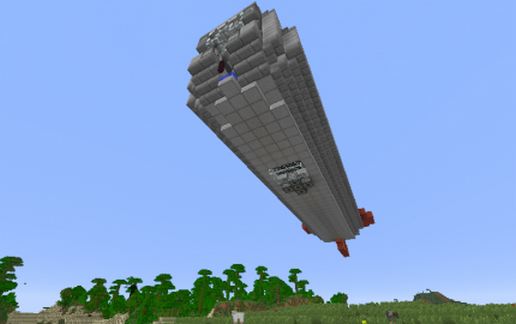
A Zeppelin style airship that can be flown using the Movecraft 3.1.32 (or later) mod for Bukkit. This is the smallest warship I've made, about 1/3 of the size of the Destroyer. Its a good choice if your server is of poor quality, but you still want that armored warship feel. Some sacrifices had to be made to miniaturize the design. The Corvette has no hangar at all, and so its the only warship that actually lands.
Features:
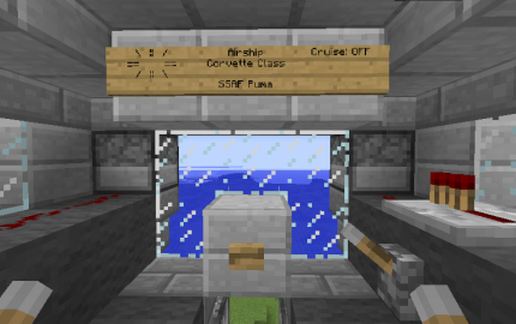
Main Bridge controls navigation and all guns on the ship
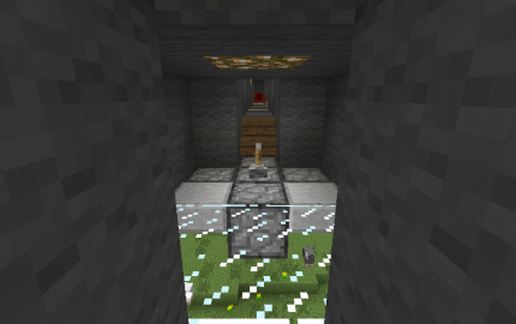
Bombs can be dropped from the Bomb Bay, directly aft from the Main Bridge.
Aft of the Bomb Bay are the corridors that lead to the port and starboard guns and the engine room and hatch in the rear
There is a bed, and some simple amenities in the middle of the ship for long voyages
Entry into the ship is gained by climbing the ladder on the tail and climbing through the hatch. The hatch can be closed by a lever during flight.
Armament:
1 x Forward facing main cannon
- Fired by the button in the middle of the bridge (DO NOT FIRE WHILE MOVING)
- Fires 2 TNT charges per volley
- Configurable range at the gun Deck, right below the bridge
- Effective at breaking through capital airship armor exposing the flammable interior
2 x Forward facing rapid fire machine guns
- Fired using the lever towards the front of the bridge
- Can be loaded with arrows for ground assault or fireballs for aerial combat
- When loaded with fireballs, effective for setting unarmored airships on fire
2 banks of 3 x rapid fire machine guns facing port and starboard
- Fired using the levers at the back and sides of the bridge
- Can be loaded with arrows or fireballs
1 Bomb dropper
- Drops 5 TNT bombs arranged in a circle
- Controled by the lever in the middle of the Bomb Bay
Notes:
Use these craft files for Movecraft, put them in the plugins\movecraft\types directory:
https://dl.dropboxusercontent.com/u/11164014/MovecraftTypes.zip
For the latest build of Movecraft to get all the features working, use this link to get the .jar file:
https://dl.dropboxusercontent.com/u/11164014/movecraft_alpha.zip
Finally, if you need help setting up Movecraft, use this tutorial:
www.youtube.com/watch?v=hWHqnTkY330
Features:
Main Bridge controls navigation and all guns on the ship
Bombs can be dropped from the Bomb Bay, directly aft from the Main Bridge.
Aft of the Bomb Bay are the corridors that lead to the port and starboard guns and the engine room and hatch in the rear
There is a bed, and some simple amenities in the middle of the ship for long voyages
Entry into the ship is gained by climbing the ladder on the tail and climbing through the hatch. The hatch can be closed by a lever during flight.
Armament:
1 x Forward facing main cannon
- Fired by the button in the middle of the bridge (DO NOT FIRE WHILE MOVING)
- Fires 2 TNT charges per volley
- Configurable range at the gun Deck, right below the bridge
- Effective at breaking through capital airship armor exposing the flammable interior
2 x Forward facing rapid fire machine guns
- Fired using the lever towards the front of the bridge
- Can be loaded with arrows for ground assault or fireballs for aerial combat
- When loaded with fireballs, effective for setting unarmored airships on fire
2 banks of 3 x rapid fire machine guns facing port and starboard
- Fired using the levers at the back and sides of the bridge
- Can be loaded with arrows or fireballs
1 Bomb dropper
- Drops 5 TNT bombs arranged in a circle
- Controled by the lever in the middle of the Bomb Bay
Notes:
Use these craft files for Movecraft, put them in the plugins\movecraft\types directory:
https://dl.dropboxusercontent.com/u/11164014/MovecraftTypes.zip
For the latest build of Movecraft to get all the features working, use this link to get the .jar file:
https://dl.dropboxusercontent.com/u/11164014/movecraft_alpha.zip
Finally, if you need help setting up Movecraft, use this tutorial:
www.youtube.com/watch?v=hWHqnTkY330
Download: Functional Corvette Airship schematic for Minecraft
| Format | Size | Use with | |
|---|---|---|---|
.litematic functional-corvette-airship.litematic |
28.60 KB | Litematica (Java) — more Litematica schematics |
|
.schem functional-corvette-airship.schem |
1.67 KB | WorldEdit / FAWE |
|
.schematic functional-corvette-airship.schematic |
1.99 KB | Legacy / online installer |
|
| Install this build directly on your Minecraft map |
|
||
Auto-converted from the original format; container contents (chests, signs) may be missing.
📘 How to use with Litematica (click to expand)
- Put the downloaded
.litematicfile into the.minecraft/schematics/folder. - In game, press M to open the Litematica menu and choose Load Schematics.
- Select the file in the list and click Load Schematic.
- Position the placement where you want it and build — or paste it instantly in creative with Easy Place mode.
Requires the Litematica mod (Java Edition).
More builds: Litematica schematics.
Comments
Similar