Statue of Liberty Schematic
Published on May 5, 2025
👁️🗨️ 30144
8294
★
★
★
★
★
Rate it
Screenshots

Description
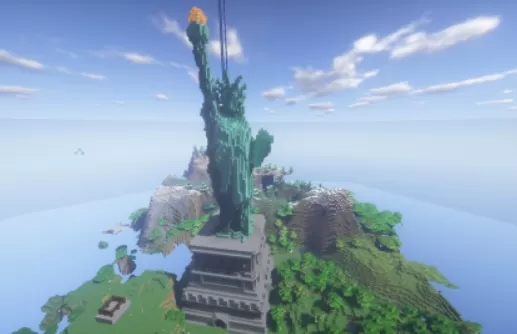
Bring one of the world’s most iconic landmarks into your Minecraft world with this detailed Statue of Liberty schematic. Standing tall on a custom pedestal, this massive build captures the grandeur and symbolism of the original monument, offering an awe-inspiring centerpiece for any map.
Perfect for creative worlds, city builds, or server lobbies, the statue features carefully crafted details—from the crown and torch to the flowing robes—constructed with realistic proportions and block choices. The surrounding terrain adds a natural touch, making it easy to blend into custom landscapes.
Perfect for creative worlds, city builds, or server lobbies, the statue features carefully crafted details—from the crown and torch to the flowing robes—constructed with realistic proportions and block choices. The surrounding terrain adds a natural touch, making it easy to blend into custom landscapes.
Download: Statue of Liberty Schematic schematic for Minecraft
| Format | Size | Use with | |
|---|---|---|---|
.litematic statue-of-liberty-schematic.litematic |
30.20 KB | Litematica (Java) — more Litematica schematics |
|
.schem statue-of-liberty-schematic.schem |
4.82 KB | WorldEdit / FAWE |
|
.schematic statue-of-liberty-schematic.schematic |
8.86 KB | Legacy / online installer |
|
| Install this build directly on your Minecraft map |
|
||
Auto-converted from the original format; container contents (chests, signs) may be missing.
📘 How to use with Litematica (click to expand)
- Put the downloaded
.litematicfile into the.minecraft/schematics/folder. - In game, press M to open the Litematica menu and choose Load Schematics.
- Select the file in the list and click Load Schematic.
- Position the placement where you want it and build — or paste it instantly in creative with Easy Place mode.
Requires the Litematica mod (Java Edition).
More builds: Litematica schematics.
Comments
Similar