Japanese Style House
Published on March 8, 2026
👁️🗨️ 11700
1839
★
★
★
★
★
Rate it
Screenshots

Description
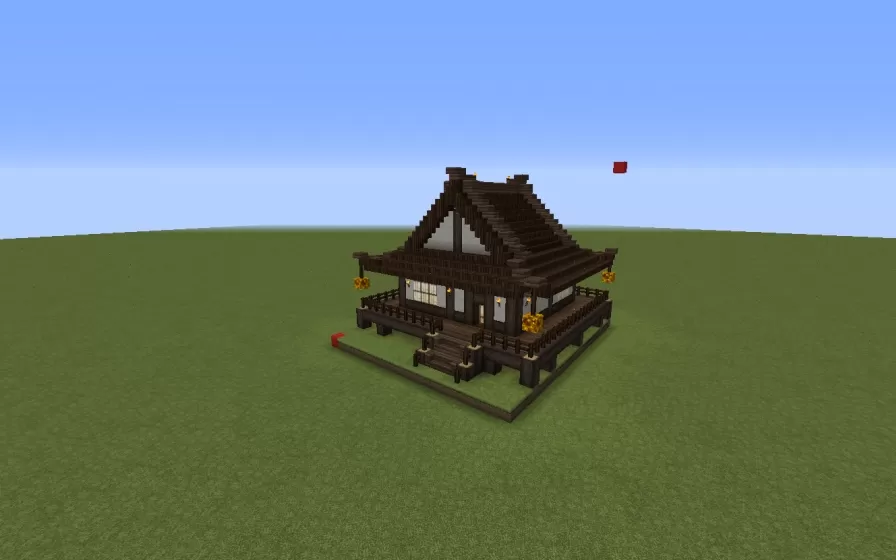
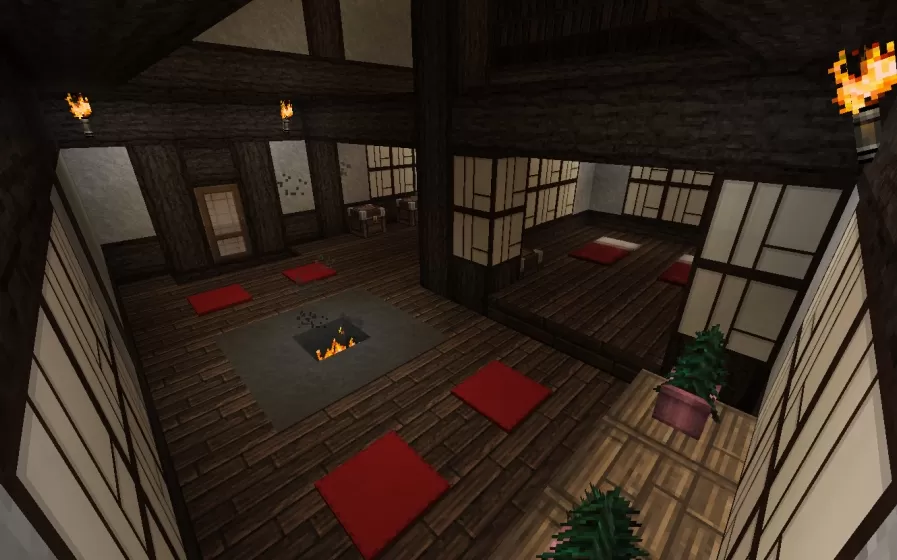
This schematic presents a traditional Japanese-style house featuring authentic architectural elements including a distinctive curved hip roof with dark wood construction, shoji-style paper window panels, and an elevated wooden deck with railings that wraps around the structure. The exterior showcases classic dark oak and spruce materials with clean lines and symmetrical design, accented by decorative lanterns hanging from the eaves. The building sits on a raised platform foundation with a simple fence perimeter, and includes a small courtyard area with a red banner flag marking the entrance.
The interior is fully furnished and functional, featuring a spacious open-plan layout with traditional Japanese aesthetics. The main room centers around a sunken fire pit surrounded by red cushion seating areas, creating a warm gathering space. Dark exposed wooden beams cross the ceiling, while paper screen walls with wooden frames provide natural lighting and maintain the authentic architectural style. The house comes equipped with practical amenities including one workbench for crafting, two furnaces for smelting and cooking, one anvil for repairs, and six storage chests strategically placed throughout the space. This schematic works perfectly for Asian-themed villages, zen gardens, samurai towns, or as a peaceful residential structure in survival worlds where players want a distinctive cultural building style.
The interior is fully furnished and functional, featuring a spacious open-plan layout with traditional Japanese aesthetics. The main room centers around a sunken fire pit surrounded by red cushion seating areas, creating a warm gathering space. Dark exposed wooden beams cross the ceiling, while paper screen walls with wooden frames provide natural lighting and maintain the authentic architectural style. The house comes equipped with practical amenities including one workbench for crafting, two furnaces for smelting and cooking, one anvil for repairs, and six storage chests strategically placed throughout the space. This schematic works perfectly for Asian-themed villages, zen gardens, samurai towns, or as a peaceful residential structure in survival worlds where players want a distinctive cultural building style.
Download: Japanese Style House schematic for Minecraft
| Format | Size | Use with | |
|---|---|---|---|
.litematic japanese-style-house.litematic |
24.92 KB | Litematica (Java) — more Litematica schematics |
|
.schem japanese-style-house.schem |
1.60 KB | WorldEdit / FAWE |
|
.schematic japanese-style-house.schematic |
1.38 KB | Legacy / online installer |
|
| Install this build directly on your Minecraft map |
|
||
Auto-converted from the original format; container contents (chests, signs) may be missing.
📘 How to use with Litematica (click to expand)
- Put the downloaded
.litematicfile into the.minecraft/schematics/folder. - In game, press M to open the Litematica menu and choose Load Schematics.
- Select the file in the list and click Load Schematic.
- Position the placement where you want it and build — or paste it instantly in creative with Easy Place mode.
Requires the Litematica mod (Java Edition).
More builds: Litematica schematics.
Comments
Similar