Burj Khalifa
Published on March 26, 2026
👁️🗨️ 6796
1805
★
★
★
★
★
Rate it
Description
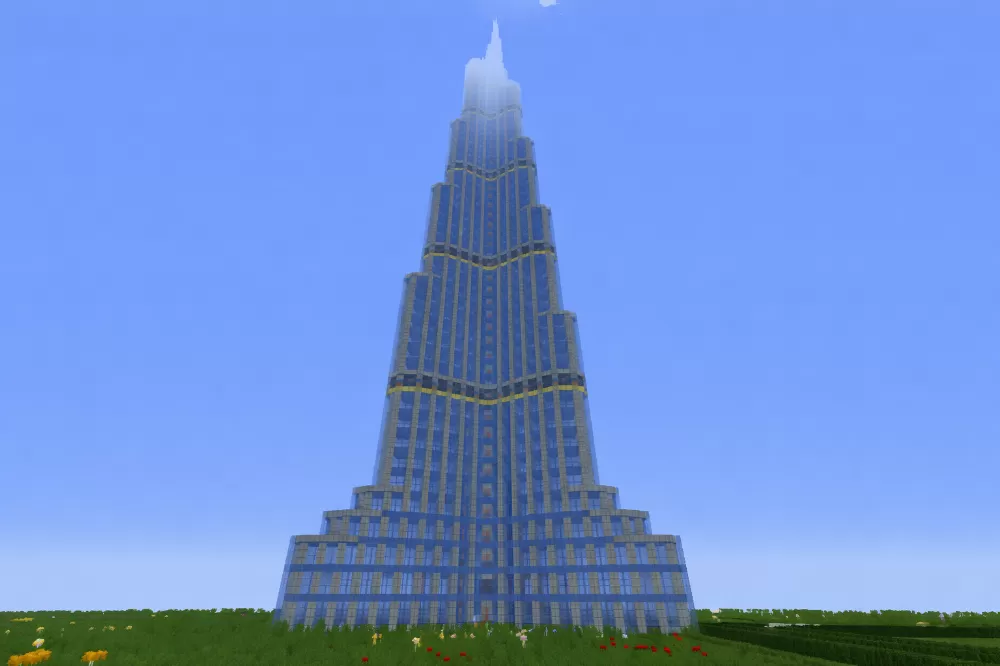
This schematic recreates the Burj Khalifa, the world's tallest building, standing at an impressive 240 blocks in height within Minecraft. The tower captures the distinctive stepped setback design of the Dubai landmark, featuring the characteristic Y-shaped floor plan that tapers as it rises through multiple tiers before culminating in a pointed spire. The build uses blue and cyan glass blocks to represent the reflective curtain wall facade, framed by stone and concrete materials that outline the structural setbacks and decorative gold-toned banding at each major tier transition.
The schematic accurately represents the skyscraper's iconic Art Deco-inspired silhouette with its progressive narrowing sections that create the building's elegant vertical thrust. Each setback level is clearly defined with horizontal accent lines, mimicking the architectural details of the real structure. This build works perfectly as a centerpiece for modern city builds, urban skylines, or architectural showcase worlds. The massive scale and vertical presence make it a dominant landmark visible from extreme distances, ideal for servers looking to add recognizable real-world architecture or players creating metropolitan environments. The Burj Khalifa's towering height and distinctive profile make it an instant focal point for any contemporary cityscape project.
The schematic accurately represents the skyscraper's iconic Art Deco-inspired silhouette with its progressive narrowing sections that create the building's elegant vertical thrust. Each setback level is clearly defined with horizontal accent lines, mimicking the architectural details of the real structure. This build works perfectly as a centerpiece for modern city builds, urban skylines, or architectural showcase worlds. The massive scale and vertical presence make it a dominant landmark visible from extreme distances, ideal for servers looking to add recognizable real-world architecture or players creating metropolitan environments. The Burj Khalifa's towering height and distinctive profile make it an instant focal point for any contemporary cityscape project.
Download: Burj Khalifa schematic for Minecraft
| Format | Size | Use with | |
|---|---|---|---|
.litematic burj-khalifa.litematic |
41.23 KB | Litematica (Java) — more Litematica schematics |
|
.schem burj-khalifa.schem |
8.00 KB | WorldEdit / FAWE |
|
.schematic burj-khalifa.schematic |
18.47 KB | Legacy / online installer |
|
| Install this build directly on your Minecraft map |
|
||
Auto-converted from the original format; container contents (chests, signs) may be missing.
📘 How to use with Litematica (click to expand)
- Put the downloaded
.litematicfile into the.minecraft/schematics/folder. - In game, press M to open the Litematica menu and choose Load Schematics.
- Select the file in the list and click Load Schematic.
- Position the placement where you want it and build — or paste it instantly in creative with Easy Place mode.
Requires the Litematica mod (Java Edition).
More builds: Litematica schematics.
Comments
Similar