Brick Town
Published on March 29, 2026
👁️🗨️ 4755
921
★
★
★
★
★
Rate it
Description
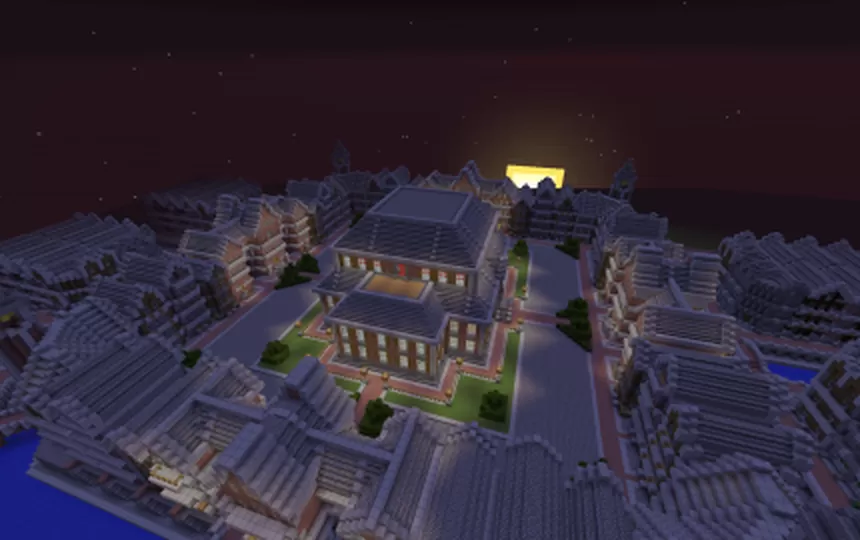
This schematic presents a massive brick town settlement showcasing an extensive urban layout with numerous residential buildings constructed primarily from brick and stone materials. The town features a well-organized street grid system with paved roads connecting multiple districts, creating a cohesive metropolitan environment. At the center stands an impressive two-story municipal building or town hall with distinctive architecture, large illuminated windows, and a flat roof design that serves as the focal point of the settlement. The surrounding residential structures display consistent brick construction with varied roof styles, creating visual diversity while maintaining architectural unity across the town.
Most of the houses come as empty shells, providing builders with pre-made exteriors ready for interior customization according to specific needs. This approach offers maximum flexibility for servers, roleplay communities, or survival worlds where players want to claim and furnish their own properties within an established urban framework. The town's scale and comprehensive layout make it ideal for multiplayer servers looking for a ready-made spawn town, economy-based gameplay with player-owned shops and homes, or large-scale medieval/industrial roleplay settings. The extensive street network, varied building sizes, and central landmark structure create natural districts and neighborhoods that can be designated for different purposes like residential zones, market areas, or administrative centers.
Most of the houses come as empty shells, providing builders with pre-made exteriors ready for interior customization according to specific needs. This approach offers maximum flexibility for servers, roleplay communities, or survival worlds where players want to claim and furnish their own properties within an established urban framework. The town's scale and comprehensive layout make it ideal for multiplayer servers looking for a ready-made spawn town, economy-based gameplay with player-owned shops and homes, or large-scale medieval/industrial roleplay settings. The extensive street network, varied building sizes, and central landmark structure create natural districts and neighborhoods that can be designated for different purposes like residential zones, market areas, or administrative centers.
Download: Brick Town schematic for Minecraft
| Format | Size | Use with | |
|---|---|---|---|
.litematic brick-town.litematic |
182.26 KB | Litematica (Java) — more Litematica schematics |
|
.schem brick-town.schem |
49.67 KB | WorldEdit / FAWE |
|
.schematic brick-town.schematic |
68.39 KB | Legacy / online installer |
|
| Install this build directly on your Minecraft map |
|
||
Auto-converted from the original format; container contents (chests, signs) may be missing.
📘 How to use with Litematica (click to expand)
- Put the downloaded
.litematicfile into the.minecraft/schematics/folder. - In game, press M to open the Litematica menu and choose Load Schematics.
- Select the file in the list and click Load Schematic.
- Position the placement where you want it and build — or paste it instantly in creative with Easy Place mode.
Requires the Litematica mod (Java Edition).
More builds: Litematica schematics.
Comments
Similar