Assassins Creed Tower
Published on April 12, 2026
👁️🗨️ 2557
349
★
★
★
★
★
Rate it
Screenshots
Description
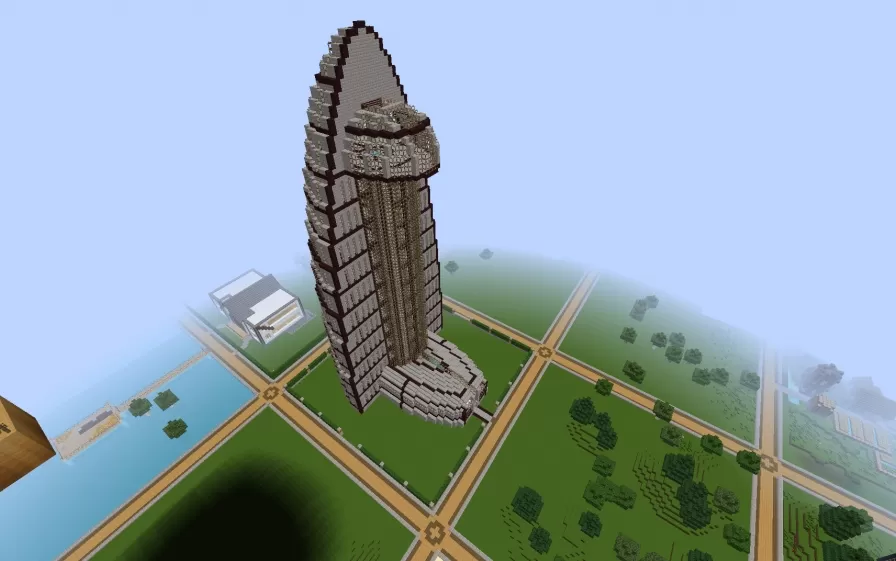
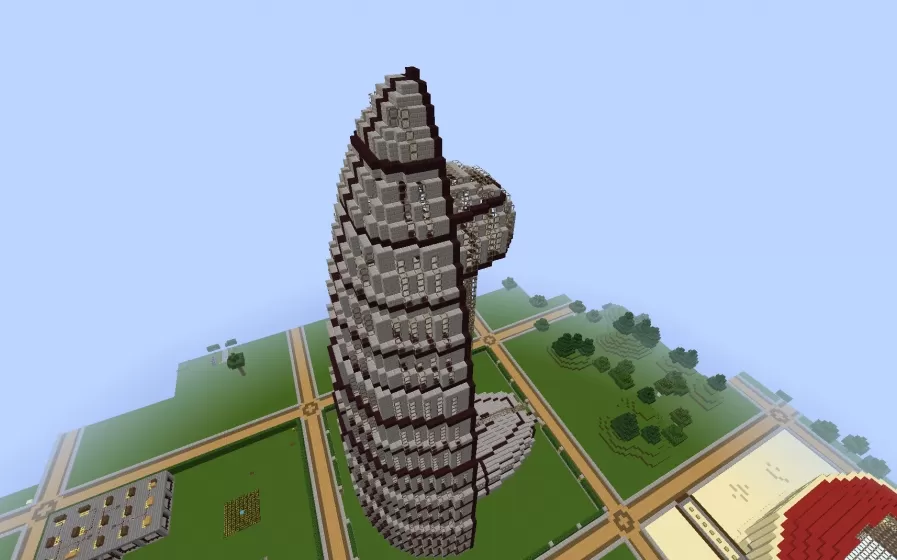
This schematic recreates an iconic tower structure inspired by Assassin's Creed architecture, featuring a distinctive leaning design reminiscent of medieval Italian bell towers and viewpoints from the game series. The tower is constructed primarily with stone brick and quartz blocks, accented by dark oak wooden support beams that create a characteristic striped pattern running vertically along the structure's exterior. The building tilts dramatically to one side while maintaining structural integrity, capturing the parkour-friendly architecture that defines Assassin's Creed's urban environments. The base features a multi-tiered platform foundation with decorative elements, while the tower itself rises through multiple sections before culminating in an observation platform with crenellated edges.
The tower's design emphasizes verticality and climbing opportunities, making it perfect for parkour maps, adventure worlds, or roleplay servers themed around stealth and exploration. The leaning architecture creates natural challenge for players attempting to scale the exterior, while the height provides commanding views of surrounding areas much like the synchronization points in the Assassin's Creed games. This schematic works excellently as a landmark in Renaissance-themed builds, medieval city centers, or as part of larger Italian-inspired towns where such towers would serve as bell towers, watchtowers, or guild headquarters. The distinctive tilt and striped pattern make it instantly recognizable while the practical height offers genuine gameplay value for observation and navigation purposes.
The tower's design emphasizes verticality and climbing opportunities, making it perfect for parkour maps, adventure worlds, or roleplay servers themed around stealth and exploration. The leaning architecture creates natural challenge for players attempting to scale the exterior, while the height provides commanding views of surrounding areas much like the synchronization points in the Assassin's Creed games. This schematic works excellently as a landmark in Renaissance-themed builds, medieval city centers, or as part of larger Italian-inspired towns where such towers would serve as bell towers, watchtowers, or guild headquarters. The distinctive tilt and striped pattern make it instantly recognizable while the practical height offers genuine gameplay value for observation and navigation purposes.
Download: Assassins Creed Tower schematic for Minecraft
| Format | Size | Use with | |
|---|---|---|---|
.litematic assassins-creed-tower.litematic |
34.35 KB | Litematica (Java) — more Litematica schematics |
|
.schem assassins-creed-tower.schem |
7.79 KB | WorldEdit / FAWE |
|
.schematic assassins-creed-tower.schematic |
11.42 KB | Legacy / online installer |
|
| Install this build directly on your Minecraft map |
|
||
Auto-converted from the original format; container contents (chests, signs) may be missing.
📘 How to use with Litematica (click to expand)
- Put the downloaded
.litematicfile into the.minecraft/schematics/folder. - In game, press M to open the Litematica menu and choose Load Schematics.
- Select the file in the list and click Load Schematic.
- Position the placement where you want it and build — or paste it instantly in creative with Easy Place mode.
Requires the Litematica mod (Java Edition).
More builds: Litematica schematics.