Sjins Castle
Published on April 16, 2026
👁️🗨️ 4403
892
★
★
★
★
★
Rate it
Screenshots
Description
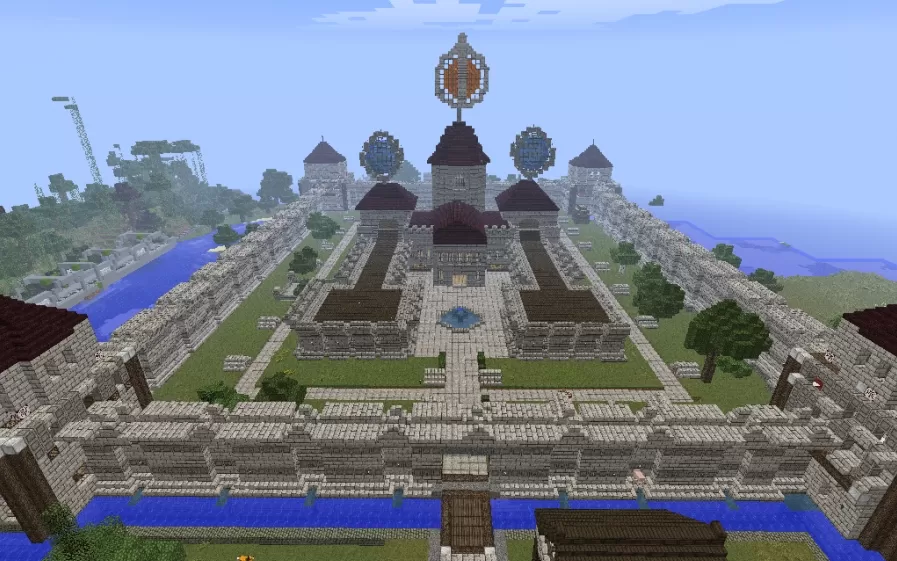
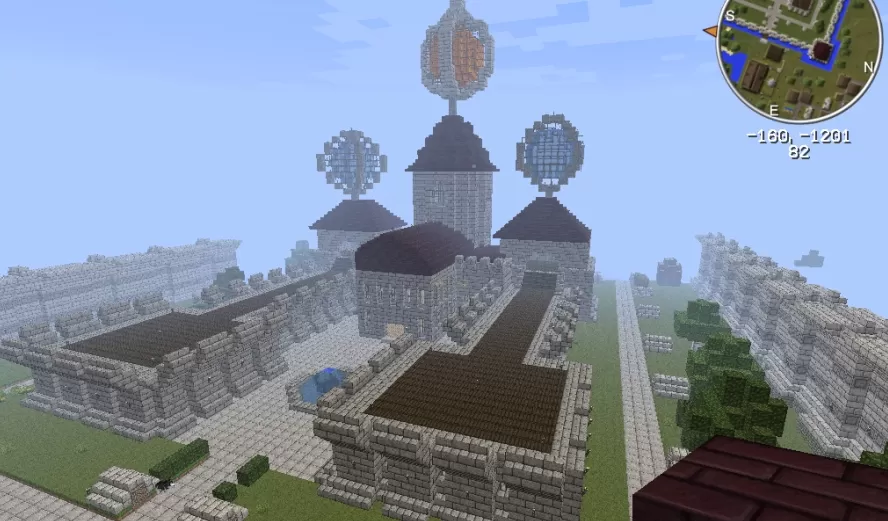
This schematic presents an expansive medieval castle complex featuring multiple towers, ornate decorative elements, and a symmetrical courtyard layout enclosed by stone walls. The fortress is constructed primarily from stone brick and cobblestone with dark wood roof accents, showcasing impressive architectural variety with circular towers capped by domed roofs, square keep structures, and decorative spires. A distinctive floating orange and gray spherical ornament crowns the central axis, serving as a unique focal point above the main courtyard. The complex includes a central water feature or pool, manicured lawn areas, and pathways that divide the interior grounds into organized sections.
The castle is surrounded by a moat and protective walls with watchtowers at strategic points, creating a complete defensive perimeter. The entrance features a bridge crossing the water barrier, leading through the main gate into the expansive courtyard. Multiple buildings of varying heights and functions are distributed throughout the grounds, suggesting spaces for great halls, residential quarters, chapels, and service buildings. This schematic works perfectly as a spawn point for medieval servers, a headquarters for factions or kingdoms in roleplay worlds, or as a centerpiece for large-scale survival builds where players want an imposing castle complex with room for multiple functional areas and community gathering spaces.
The castle is surrounded by a moat and protective walls with watchtowers at strategic points, creating a complete defensive perimeter. The entrance features a bridge crossing the water barrier, leading through the main gate into the expansive courtyard. Multiple buildings of varying heights and functions are distributed throughout the grounds, suggesting spaces for great halls, residential quarters, chapels, and service buildings. This schematic works perfectly as a spawn point for medieval servers, a headquarters for factions or kingdoms in roleplay worlds, or as a centerpiece for large-scale survival builds where players want an imposing castle complex with room for multiple functional areas and community gathering spaces.
Download: Sjins Castle schematic for Minecraft
| Format | Size | Use with | |
|---|---|---|---|
.litematic sjins-castle.litematic |
75.37 KB | Litematica (Java) — more Litematica schematics |
|
.schem sjins-castle.schem |
24.75 KB | WorldEdit / FAWE |
|
.schematic sjins-castle.schematic |
46.11 KB | Legacy / online installer |
|
Install this build directly on your Minecraft map
Auto-converted from the original format; container contents (chests, signs) may be missing.
📘 How to use with Litematica (click to expand)
- Put the downloaded
.litematicfile into the.minecraft/schematics/folder. - In game, press M to open the Litematica menu and choose Load Schematics.
- Select the file in the list and click Load Schematic.
- Position the placement where you want it and build — or paste it instantly in creative with Easy Place mode.
Requires the Litematica mod (Java Edition).
More builds: Litematica schematics.