Modern Hotel
Published on May 2, 2026
👁️🗨️ 3297
511
★
★
★
★
★
Rate it
Screenshots
Description
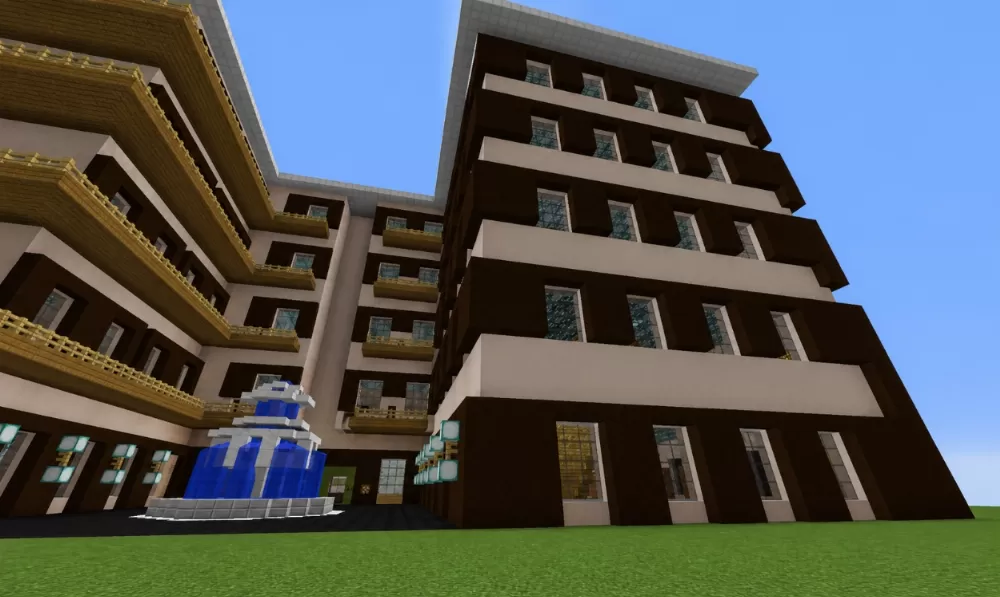
This schematic presents a modern four-story hotel building featuring clean contemporary architecture with a bold dark brown and white color scheme. The structure showcases horizontal banding created by alternating dark brown walls with white balcony slabs that protrude from each floor level, creating strong shadow lines and visual depth. The facade includes regular window patterns with glass pane installations and individual balconies for each unit, while the entrance level features a more open design with larger glass panels and what appears to be lobby access. A decorative blue fountain or water feature sits in front of the main entrance, adding a welcoming element to the hotel's exterior.
The hotel contains 60 rooms distributed across its four floors, providing substantial accommodation capacity suitable for multiplayer servers or large-scale city builds. The modern design with its repeating modular room layout suggests efficient interior organization with standardized unit sizes. This schematic works excellently for contemporary city centers, resort areas, or urban development projects where hospitality buildings are needed. The building's rectangular footprint and straightforward floor plan make it practical for survival construction while the sleek modern aesthetic fits well in metropolitan environments. The structure is ideal for roleplay servers requiring functional hotels, economy-based servers with rental properties, or creative builds focused on modern architecture and urban planning.
The hotel contains 60 rooms distributed across its four floors, providing substantial accommodation capacity suitable for multiplayer servers or large-scale city builds. The modern design with its repeating modular room layout suggests efficient interior organization with standardized unit sizes. This schematic works excellently for contemporary city centers, resort areas, or urban development projects where hospitality buildings are needed. The building's rectangular footprint and straightforward floor plan make it practical for survival construction while the sleek modern aesthetic fits well in metropolitan environments. The structure is ideal for roleplay servers requiring functional hotels, economy-based servers with rental properties, or creative builds focused on modern architecture and urban planning.
Download: Modern Hotel schematic for Minecraft
| Format | Size | Use with | |
|---|---|---|---|
.litematic modern-hotel.litematic |
59.54 KB | Litematica (Java) — more Litematica schematics |
|
.schem modern-hotel.schem |
15.33 KB | WorldEdit / FAWE |
|
.schematic modern-hotel.schematic |
31.69 KB | Legacy / online installer |
|
Install this build directly on your Minecraft map
Auto-converted from the original format; container contents (chests, signs) may be missing.
📘 How to use with Litematica (click to expand)
- Put the downloaded
.litematicfile into the.minecraft/schematics/folder. - In game, press M to open the Litematica menu and choose Load Schematics.
- Select the file in the list and click Load Schematic.
- Position the placement where you want it and build — or paste it instantly in creative with Easy Place mode.
Requires the Litematica mod (Java Edition).
More builds: Litematica schematics.