Beach Hotel
Published on May 10, 2026
👁️🗨️ 2584
420
★
★
★
★
★
Rate it
Screenshots


Description
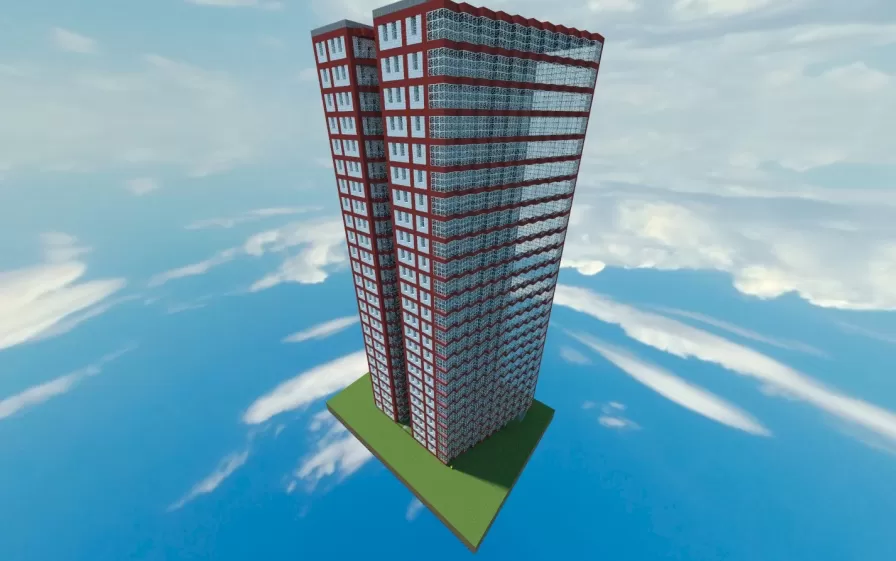
This schematic presents a towering 25-floor beach hotel constructed with a striking red and white color scheme that creates bold vertical stripes along the facade. The high-rise building features a modern rectangular design with extensive glass curtain walls on the main faces, allowing panoramic views from each floor. The red structural elements frame the white wall sections, creating a distinctive pattern that makes the building instantly recognizable from a distance.
The interior comes fully furnished with functional rooms distributed across all 25 floors. The furnished spaces include bedrooms with red beds, living areas with seating and decorative elements like potted plants, storage furniture including bookshelves and chests, and wooden plank flooring throughout. Windows provide natural lighting and views, while doors connect different room sections. This schematic works excellently for modern city builds requiring high-rise hospitality buildings, beach resort developments, or urban skylines where tall residential or hotel structures are needed. The 25-floor height creates an impressive vertical presence while the furnished interiors save significant time compared to building and decorating from scratch. The build is ideal for roleplay servers, economy-based gameplay with rental properties, or creative showcases focused on contemporary architecture and resort developments.
The interior comes fully furnished with functional rooms distributed across all 25 floors. The furnished spaces include bedrooms with red beds, living areas with seating and decorative elements like potted plants, storage furniture including bookshelves and chests, and wooden plank flooring throughout. Windows provide natural lighting and views, while doors connect different room sections. This schematic works excellently for modern city builds requiring high-rise hospitality buildings, beach resort developments, or urban skylines where tall residential or hotel structures are needed. The 25-floor height creates an impressive vertical presence while the furnished interiors save significant time compared to building and decorating from scratch. The build is ideal for roleplay servers, economy-based gameplay with rental properties, or creative showcases focused on contemporary architecture and resort developments.
Download: Beach Hotel schematic for Minecraft
| Format | Size | Use with | |
|---|---|---|---|
.litematic beach-hotel.litematic |
57.61 KB | Litematica (Java) — more Litematica schematics |
|
.schem beach-hotel.schem |
3.00 KB | WorldEdit / FAWE |
|
.schematic beach-hotel.schematic |
7.83 KB | Legacy / online installer |
|
Install this build directly on your Minecraft map
Auto-converted from the original format; container contents (chests, signs) may be missing.
📘 How to use with Litematica (click to expand)
- Put the downloaded
.litematicfile into the.minecraft/schematics/folder. - In game, press M to open the Litematica menu and choose Load Schematics.
- Select the file in the list and click Load Schematic.
- Position the placement where you want it and build — or paste it instantly in creative with Easy Place mode.
Requires the Litematica mod (Java Edition).
More builds: Litematica schematics.