Tennis Court
Published on May 10, 2026
👁️🗨️ 2098
305
★
★
★
★
★
Rate it
Screenshots


Description
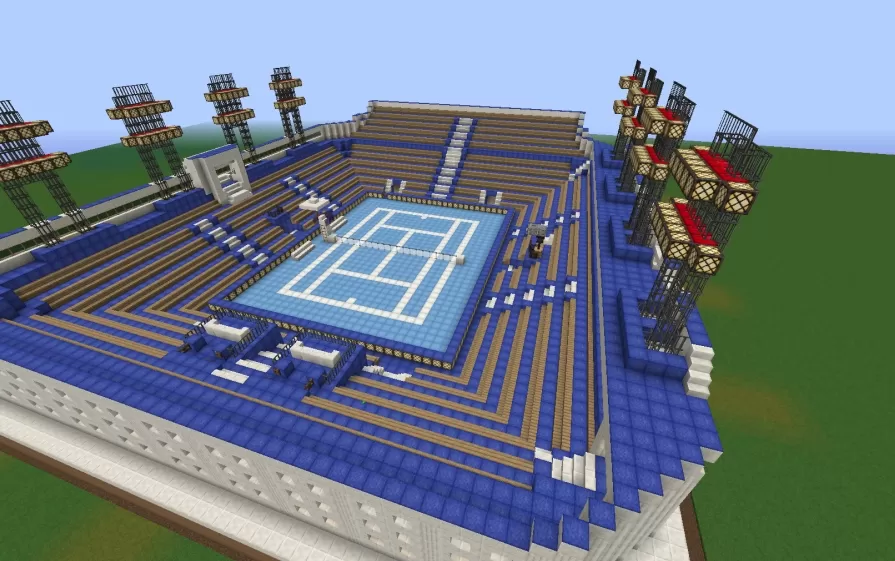
This schematic features a small tennis stadium built with a distinctive blue and gold color palette, centered around a regulation-sized tennis court with proper court markings in light blue and white. The playing surface is surrounded by tiered spectator seating that rises in stepped levels on multiple sides, constructed with blue wool or concrete blocks and wooden plank accents. The stadium includes tall floodlight towers positioned at the corners, built with dark oak fences and glowstone lighting fixtures that illuminate the court for night play. The entrance area features decorative elements with red and white banners, while iron bar fencing creates boundaries and safety barriers around the perimeter.
The court itself displays accurate tennis markings including the service boxes, baseline, and center service line rendered in white quartz or concrete against the blue playing surface. The seating areas provide viewing angles from multiple sides with wooden bench-style rows that accommodate spectators. Interior spaces beneath or adjacent to the stands offer functional areas for player facilities or equipment storage. This schematic works perfectly for sports complexes, recreational facilities in survival towns, modern city builds requiring athletic venues, or as part of larger stadium districts. The compact size makes it practical to build while maintaining all essential elements of a functioning tennis facility, ideal for multiplayer servers with sports themes or creative builds focused on contemporary architecture and leisure facilities.
The court itself displays accurate tennis markings including the service boxes, baseline, and center service line rendered in white quartz or concrete against the blue playing surface. The seating areas provide viewing angles from multiple sides with wooden bench-style rows that accommodate spectators. Interior spaces beneath or adjacent to the stands offer functional areas for player facilities or equipment storage. This schematic works perfectly for sports complexes, recreational facilities in survival towns, modern city builds requiring athletic venues, or as part of larger stadium districts. The compact size makes it practical to build while maintaining all essential elements of a functioning tennis facility, ideal for multiplayer servers with sports themes or creative builds focused on contemporary architecture and leisure facilities.
Download: Tennis Court schematic for Minecraft
| Format | Size | Use with | |
|---|---|---|---|
.litematic tennis-court.litematic |
59.64 KB | Litematica (Java) — more Litematica schematics |
|
.schem tennis-court.schem |
6.40 KB | WorldEdit / FAWE |
|
.schematic tennis-court.schematic |
14.33 KB | Legacy / online installer |
|
| Install this build directly on your Minecraft map |
|
||
Auto-converted from the original format; container contents (chests, signs) may be missing.
📘 How to use with Litematica (click to expand)
- Put the downloaded
.litematicfile into the.minecraft/schematics/folder. - In game, press M to open the Litematica menu and choose Load Schematics.
- Select the file in the list and click Load Schematic.
- Position the placement where you want it and build — or paste it instantly in creative with Easy Place mode.
Requires the Litematica mod (Java Edition).
More builds: Litematica schematics.
Comments
Similar