Palace
Published on May 20, 2026
👁️🗨️ 5541
837
★
★
★
★
★
Rate it
Screenshots
Description
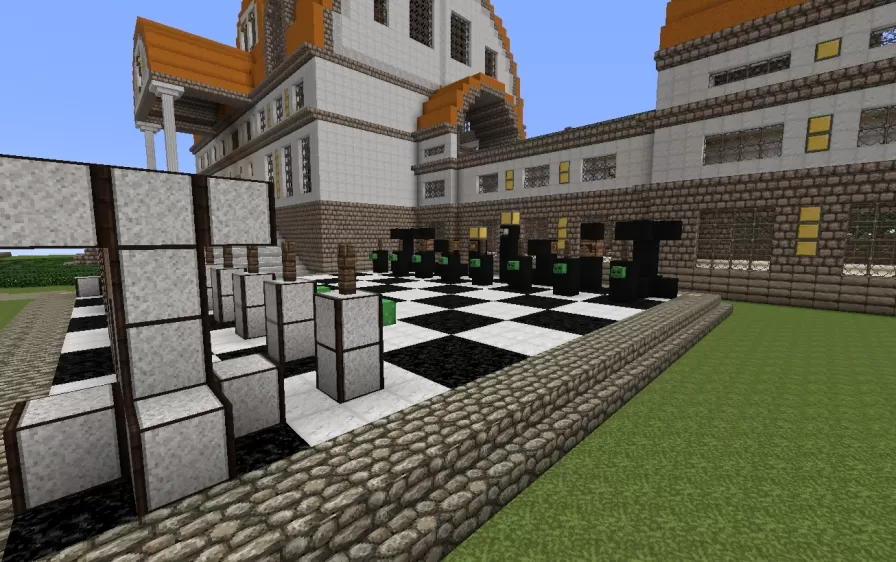
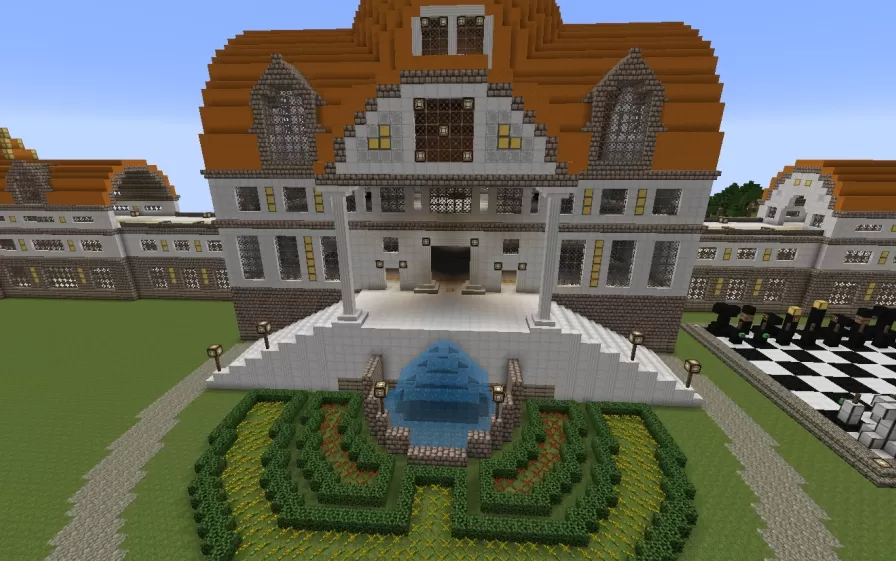
This schematic presents an expansive palace complex featuring grand architecture with white stone walls and distinctive orange stepped roofs that create a striking visual contrast. The main building showcases multiple wings connected by covered corridors, with a prominent central structure featuring a large domed section and ornamental towers. The facade includes numerous arched windows with decorative framing, tall columns at the main entrance, and detailed stonework patterns throughout. The exterior walls combine white and gray materials with brown wooden accents, while the roofing uses layered blocks to create traditional tiered designs.
The palace grounds include formal landscaping with a central courtyard featuring a decorative blue fountain surrounded by geometric hedge patterns in green and yellow tones. The entrance approach consists of a grand white stone staircase flanked by columns and decorative posts. An outdoor chess board with oversized pieces sits on one side of the complex, adding recreational elements to the grounds. Tree-lined pathways border the palace perimeter, creating natural boundaries and visual interest. The interior spaces come unfurnished, providing empty rooms ready for customization according to specific needs. This schematic works excellently for kingdom roleplay servers, medieval or fantasy builds requiring royal residences, spawn points for monarchy-themed worlds, or as administrative headquarters in large multiplayer communities where impressive architecture establishes authority and grandeur.
The palace grounds include formal landscaping with a central courtyard featuring a decorative blue fountain surrounded by geometric hedge patterns in green and yellow tones. The entrance approach consists of a grand white stone staircase flanked by columns and decorative posts. An outdoor chess board with oversized pieces sits on one side of the complex, adding recreational elements to the grounds. Tree-lined pathways border the palace perimeter, creating natural boundaries and visual interest. The interior spaces come unfurnished, providing empty rooms ready for customization according to specific needs. This schematic works excellently for kingdom roleplay servers, medieval or fantasy builds requiring royal residences, spawn points for monarchy-themed worlds, or as administrative headquarters in large multiplayer communities where impressive architecture establishes authority and grandeur.
Download: Palace schematic for Minecraft
| Format | Size | Use with | |
|---|---|---|---|
.litematic palace.litematic |
142.48 KB | Litematica (Java) — more Litematica schematics |
|
.schem palace.schem |
33.76 KB | WorldEdit / FAWE |
|
.schematic palace.schematic |
93.56 KB | Legacy / online installer |
|
| Install this build directly on your Minecraft map |
|
||
Auto-converted from the original format; container contents (chests, signs) may be missing.
📘 How to use with Litematica (click to expand)
- Put the downloaded
.litematicfile into the.minecraft/schematics/folder. - In game, press M to open the Litematica menu and choose Load Schematics.
- Select the file in the list and click Load Schematic.
- Position the placement where you want it and build — or paste it instantly in creative with Easy Place mode.
Requires the Litematica mod (Java Edition).
More builds: Litematica schematics.
Comments
Similar