Serverbad
Published on January 1, 2023
By Irsu
👁️🗨️ 167
47
★
★
★
★
★
Rate it
Screenshots
Description
Mit diesem Serverbad stellt die Servergemeinschaft "United we Craft" ihr Serverbad im Hauptwohngebiet zum Download bereit.
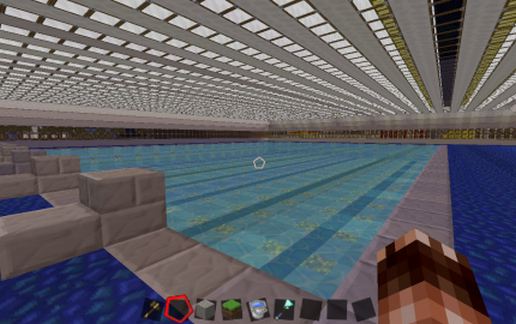
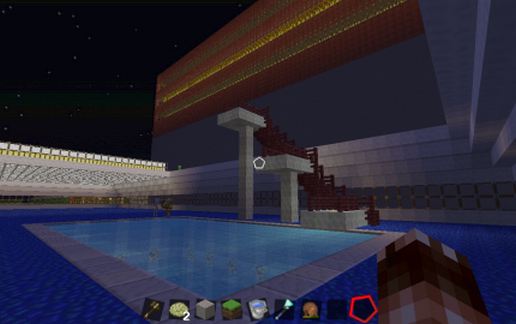
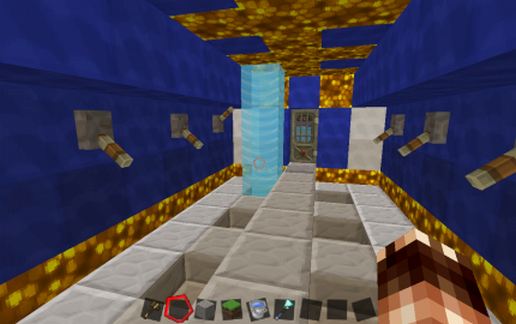
Das Serverbad verfügt über Damen und Herren Umkleidekabinen mit funktionierenden Duschen und Spinden. Das Schwimmbecken ist beleuchtet und hat einzelne Bahnen mit Startböcken. Im Spaßbereich hat das Bad ein Sprungturm mit 3Meter 5meter und /,5Meter Brett.
Die Servergemeinschaft "United we Craft" wünscht allen viel spaß mit der Schematic.
Beim Bau des Bades bitten wir euch die Tiefe des Beckens von 8 Blöcken zu beachten und dementsprechend den Boden anzupassen.
This Serverbad, the server community "United We Craft" her Serverbad in the main residential area for download.
The Serverbad has men and women locker rooms with showers and lockers functioning. The swimming pool is lit and has single lanes with starting blocks. Im fun area, the bathroom a diving tower with 3Meter 5meter and /, 5Meter board.
The Server Community "United We Craft" wishes all a lot of fun with the Schematic.
During the construction of the bath, we ask you to observe the depth of the basin of 8 blocks and accordingly adjust the ground.
Cette Serverbad, la communauté du serveur "United We Craft" son Serverbad dans le principal quartier résidentiel de téléchargement.
Le Serverbad a des hommes et des femmes des vestiaires avec douches et casiers fonctionnement. La piscine est éclairée et dispose voies simples avec des blocs de départ. Zone d'amusement Im, la salle de bain d'une tour de plongée avec 3Meter 5meter et /, planche 5Meter.
Le Community Server "United We Craft" souhaite à tous beaucoup de plaisir avec le Schéma.
Lors de la construction de la salle de bain, nous vous demandons de respecter la profondeur du bassin de 8 blocs et ajuster en conséquence le sol.
Das Serverbad verfügt über Damen und Herren Umkleidekabinen mit funktionierenden Duschen und Spinden. Das Schwimmbecken ist beleuchtet und hat einzelne Bahnen mit Startböcken. Im Spaßbereich hat das Bad ein Sprungturm mit 3Meter 5meter und /,5Meter Brett.
Die Servergemeinschaft "United we Craft" wünscht allen viel spaß mit der Schematic.
Beim Bau des Bades bitten wir euch die Tiefe des Beckens von 8 Blöcken zu beachten und dementsprechend den Boden anzupassen.
This Serverbad, the server community "United We Craft" her Serverbad in the main residential area for download.
The Serverbad has men and women locker rooms with showers and lockers functioning. The swimming pool is lit and has single lanes with starting blocks. Im fun area, the bathroom a diving tower with 3Meter 5meter and /, 5Meter board.
The Server Community "United We Craft" wishes all a lot of fun with the Schematic.
During the construction of the bath, we ask you to observe the depth of the basin of 8 blocks and accordingly adjust the ground.
Cette Serverbad, la communauté du serveur "United We Craft" son Serverbad dans le principal quartier résidentiel de téléchargement.
Le Serverbad a des hommes et des femmes des vestiaires avec douches et casiers fonctionnement. La piscine est éclairée et dispose voies simples avec des blocs de départ. Zone d'amusement Im, la salle de bain d'une tour de plongée avec 3Meter 5meter et /, planche 5Meter.
Le Community Server "United We Craft" souhaite à tous beaucoup de plaisir avec le Schéma.
Lors de la construction de la salle de bain, nous vous demandons de respecter la profondeur du bassin de 8 blocs et ajuster en conséquence le sol.
Download: Serverbad schematic for Minecraft
| Format | Size | Use with | |
|---|---|---|---|
.litematic serverbad.litematic |
72.45 KB | Litematica (Java) — more Litematica schematics |
|
.schem serverbad.schem |
6.33 KB | WorldEdit / FAWE |
|
.schematic serverbad.schematic |
7.17 KB | Legacy / online installer |
|
| Install this build directly on your Minecraft map |
|
||
Auto-converted from the original format; container contents (chests, signs) may be missing.
📘 How to use with Litematica (click to expand)
- Put the downloaded
.litematicfile into the.minecraft/schematics/folder. - In game, press M to open the Litematica menu and choose Load Schematics.
- Select the file in the list and click Load Schematic.
- Position the placement where you want it and build — or paste it instantly in creative with Easy Place mode.
Requires the Litematica mod (Java Edition).
More builds: Litematica schematics.