Connect 4
Published on January 1, 2023
By jimmyd89
👁️🗨️ 163
41
★
★
★
★
★
Rate it
Screenshots
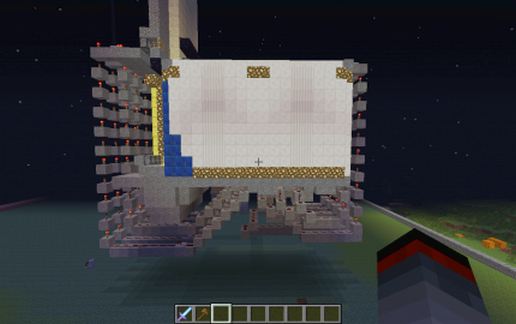
Description
Fully automated game of Connect 4! push a button in the column you want to drop your piece and it will fall there. Its pretty redstone heavy because I had to keep all the wires separate but it works great!
Feel free to change the room to your liking, but all blocks around the redstone are important.
In case the sign doesn't load properly all it says is:
NEW GAME
Open
|
Closed
I saved the file standing in the game room looking at the game board facing East, which might help you plan your //paste.
Enjoy!
Feel free to change the room to your liking, but all blocks around the redstone are important.
In case the sign doesn't load properly all it says is:
NEW GAME
Open
|
Closed
I saved the file standing in the game room looking at the game board facing East, which might help you plan your //paste.
Enjoy!
Download: Connect 4 schematic for Minecraft
| Format | Size | Use with | |
|---|---|---|---|
.litematic connect-4.litematic |
43.10 KB | Litematica (Java) — more Litematica schematics |
|
.schem connect-4.schem |
1.70 KB | WorldEdit / FAWE |
|
.schematic connect-4.schematic |
1.75 KB | Legacy / online installer |
|
| Install this build directly on your Minecraft map |
|
||
Auto-converted from the original format; container contents (chests, signs) may be missing.
📘 How to use with Litematica (click to expand)
- Put the downloaded
.litematicfile into the.minecraft/schematics/folder. - In game, press M to open the Litematica menu and choose Load Schematics.
- Select the file in the list and click Load Schematic.
- Position the placement where you want it and build — or paste it instantly in creative with Easy Place mode.
Requires the Litematica mod (Java Edition).
More builds: Litematica schematics.
Comments
Similar