The Trail Machine
Published on January 1, 2023
By pulchroxloom
👁️🗨️ 156
28
★
★
★
★
★
Rate it
Description
Important Note: This 'Machine' works only in the 14w04a Snapshot or greater!
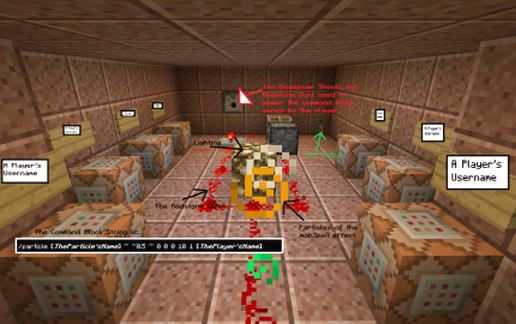
This is a *simple* command block build that can assign trails to certain players no matter their distance relation to the command block. (such as @p) The only thing powering it is a simple piston redstone clock that has a repeater so is customizable. I advise putting underground somewhere hidden and using a command block with '/tp @p ~ ~ ~ ~ ~'. It shouldn't create too much lag, and if your server is careening out of control from the lag of your surely numerous redstone builds, then it has an off switch (lever). I hope you enjoy it as I thought of the idea and decided to try building it. My favorite addition is a "Particle Room" that when pressing certain buttons plays certain particle effects. I will post the download to that on my website!
14w04b: https://mojang.com/2014/01/minecraft-snapshot-14w04a/
My Website: http://dantebarbieri.com/
This is a *simple* command block build that can assign trails to certain players no matter their distance relation to the command block. (such as @p) The only thing powering it is a simple piston redstone clock that has a repeater so is customizable. I advise putting underground somewhere hidden and using a command block with '/tp @p ~ ~ ~ ~ ~'. It shouldn't create too much lag, and if your server is careening out of control from the lag of your surely numerous redstone builds, then it has an off switch (lever). I hope you enjoy it as I thought of the idea and decided to try building it. My favorite addition is a "Particle Room" that when pressing certain buttons plays certain particle effects. I will post the download to that on my website!
14w04b: https://mojang.com/2014/01/minecraft-snapshot-14w04a/
My Website: http://dantebarbieri.com/
Download: The Trail Machine schematic for Minecraft
| Format | Size | Use with | |
|---|---|---|---|
.litematic the-trail-machine.litematic |
57.30 KB | Litematica (Java) — more Litematica schematics |
|
.schem the-trail-machine.schem |
615.00 B | WorldEdit / FAWE |
|
.schematic the-trail-machine.schematic |
940.00 B | Legacy / online installer |
|
| Install this build directly on your Minecraft map |
|
||
Auto-converted from the original format; container contents (chests, signs) may be missing.
📘 How to use with Litematica (click to expand)
- Put the downloaded
.litematicfile into the.minecraft/schematics/folder. - In game, press M to open the Litematica menu and choose Load Schematics.
- Select the file in the list and click Load Schematic.
- Position the placement where you want it and build — or paste it instantly in creative with Easy Place mode.
Requires the Litematica mod (Java Edition).
More builds: Litematica schematics.