Floating Islands: Forest Cluster
Published on January 1, 2023
By OldNag
👁️🗨️ 131
35
★
★
★
★
★
Rate it
Screenshots
Description
About this Schematic
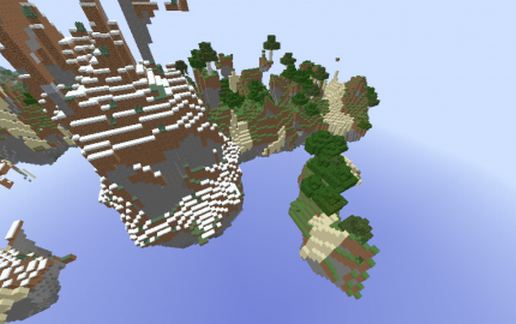
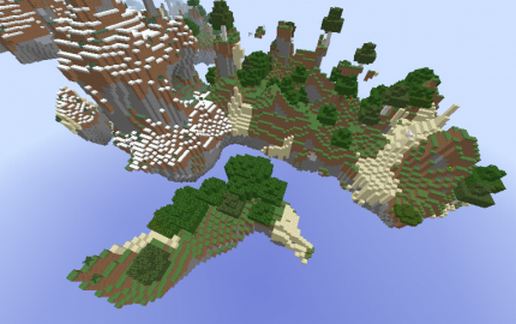
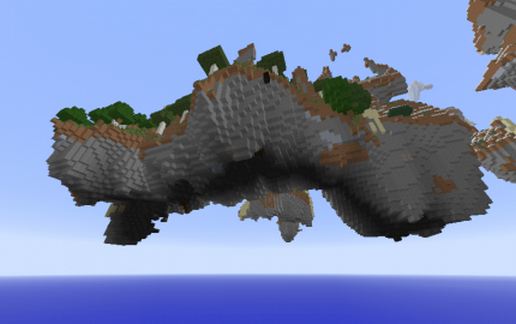
A small couple Forest islands from our Celestial (skylands) World. This .schematic features a sizable extreme hills/forest island with a batch of sand that wraps around a smaller island right next to it.
This is a very large .schematic, so you may have difficulty when pasting it. If you do, please let us know below in the comments so we'll know to upload more appropriate .schematics in the future.
Copy/Paste Info:
The island was copied to clipboard from the middle top of the island standing on the tallest solid sand block. This is how the .schematic will be oriented when you paste it.
How to Contribute
We hope you have fun with this schematic. If you have questions or comments, please post them below. If you enjoy these .schematics, please rate them in the upper right hand corner. This helps us know what kind of .schematics to upload in the future. Alternately, if you visit our Celestial (skyblock) world and have a particular island you want a schematic of, make a post in our forums of the coords and we'll see what we can do for you about copying it for you.
www.zionsleague.com/forum
Thanks,
- OldNag, Owner of:
www.zionsleague.com
A small couple Forest islands from our Celestial (skylands) World. This .schematic features a sizable extreme hills/forest island with a batch of sand that wraps around a smaller island right next to it.
This is a very large .schematic, so you may have difficulty when pasting it. If you do, please let us know below in the comments so we'll know to upload more appropriate .schematics in the future.
Copy/Paste Info:
The island was copied to clipboard from the middle top of the island standing on the tallest solid sand block. This is how the .schematic will be oriented when you paste it.
How to Contribute
We hope you have fun with this schematic. If you have questions or comments, please post them below. If you enjoy these .schematics, please rate them in the upper right hand corner. This helps us know what kind of .schematics to upload in the future. Alternately, if you visit our Celestial (skyblock) world and have a particular island you want a schematic of, make a post in our forums of the coords and we'll see what we can do for you about copying it for you.
www.zionsleague.com/forum
Thanks,
- OldNag, Owner of:
www.zionsleague.com
Download: Floating Islands: Forest Cluster schematic for Minecraft
| Format | Size | Use with | |
|---|---|---|---|
.litematic floating-islands:-forest-cluster.litematic |
88.05 KB | Litematica (Java) — more Litematica schematics |
|
.schem floating-islands:-forest-cluster.schem |
27.14 KB | WorldEdit / FAWE |
|
.schematic floating-islands:-forest-cluster.schematic |
31.82 KB | Legacy / online installer |
|
| Install this build directly on your Minecraft map |
|
||
Auto-converted from the original format; container contents (chests, signs) may be missing.
📘 How to use with Litematica (click to expand)
- Put the downloaded
.litematicfile into the.minecraft/schematics/folder. - In game, press M to open the Litematica menu and choose Load Schematics.
- Select the file in the list and click Load Schematic.
- Position the placement where you want it and build — or paste it instantly in creative with Easy Place mode.
Requires the Litematica mod (Java Edition).
More builds: Litematica schematics.
Comments
Similar