Airship Shipyard - Royal Navy Shipyard at Emerald Bay
Published on January 1, 2023
By msummers
👁️🗨️ 227
159
★
★
★
★
★
Rate it
Screenshots
Description
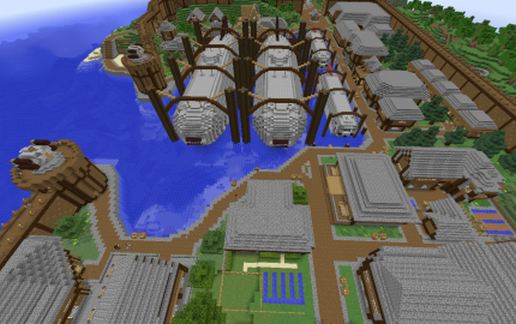
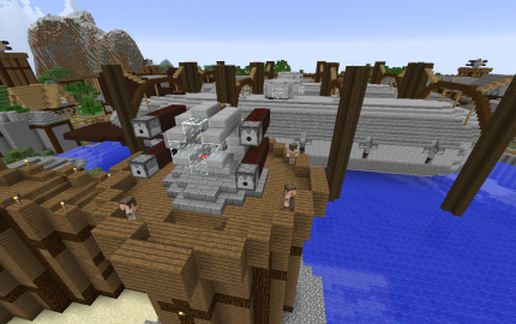
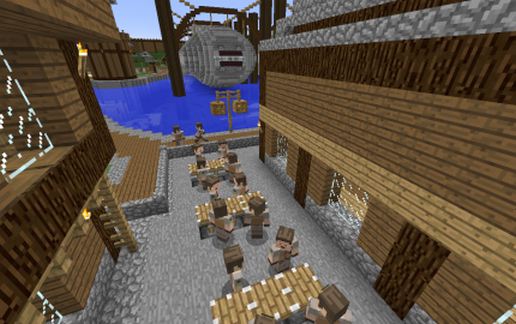
This is the Royal Navy Shipyard at Emerald Bay, featured in the Minecraft Airship Pirates Episode 5. In that video (the video linked on this creation) you get to see the shipyards bombed into oblivion by Silver Empire carrier based fighter craft.
I used QbicGaming's excellent "Old harbor spawn" for the basis of this build, adding fortifications, the shipyard itself, and the quad gun turrets. The quad gun turrets are fully functional, and are designed for AA defense. Also, unlike the original, this version will not burn itself down if you paste it into your world...
In the shipyards are 2 Royal Navy Battleships (http://www.minecraft-schematics.com/schematic/2845/) and 2 Royal Navy Torpedo Corvettes (http://www.minecraft-schematics.com/schematic/2877/). All are fully functional, although you would have to cut them loose from their harnesses to fly them.
Paste this standing on a block right at sea level. The city will appear south of you.
Notes:
Use these craft files for Movecraft, put them in the plugins\movecraft\types directory:
https://dl.dropboxusercontent.com/u/11164014/MovecraftTypes.zip
Finally, if you need help setting up Movecraft, use this tutorial:
www.youtube.com/watch?v=hWHqnTkY330
I used QbicGaming's excellent "Old harbor spawn" for the basis of this build, adding fortifications, the shipyard itself, and the quad gun turrets. The quad gun turrets are fully functional, and are designed for AA defense. Also, unlike the original, this version will not burn itself down if you paste it into your world...
In the shipyards are 2 Royal Navy Battleships (http://www.minecraft-schematics.com/schematic/2845/) and 2 Royal Navy Torpedo Corvettes (http://www.minecraft-schematics.com/schematic/2877/). All are fully functional, although you would have to cut them loose from their harnesses to fly them.
Paste this standing on a block right at sea level. The city will appear south of you.
Notes:
Use these craft files for Movecraft, put them in the plugins\movecraft\types directory:
https://dl.dropboxusercontent.com/u/11164014/MovecraftTypes.zip
Finally, if you need help setting up Movecraft, use this tutorial:
www.youtube.com/watch?v=hWHqnTkY330
Download: Airship Shipyard - Royal Navy Shipyard at Emerald Bay schematic for Minecraft
| Format | Size | Use with | |
|---|---|---|---|
.litematic airship-shipyard---royal-navy-shipyard-at-emerald-bay.litematic |
337.55 KB | Litematica (Java) — more Litematica schematics |
|
.schem airship-shipyard---royal-navy-shipyard-at-emerald-bay.schem |
142.65 KB | WorldEdit / FAWE |
|
.schematic airship-shipyard---royal-navy-shipyard-at-emerald-bay.schematic |
184.14 KB | Legacy / online installer |
|
Install this build directly on your Minecraft map
Auto-converted from the original format; container contents (chests, signs) may be missing.
📘 How to use with Litematica (click to expand)
- Put the downloaded
.litematicfile into the.minecraft/schematics/folder. - In game, press M to open the Litematica menu and choose Load Schematics.
- Select the file in the list and click Load Schematic.
- Position the placement where you want it and build — or paste it instantly in creative with Easy Place mode.
Requires the Litematica mod (Java Edition).
More builds: Litematica schematics.