Submersible Torpedo Airship - Minnow Mk II
Published on January 1, 2023
By msummers
👁️🗨️ 169
39
★
★
★
★
★
Rate it
Screenshots
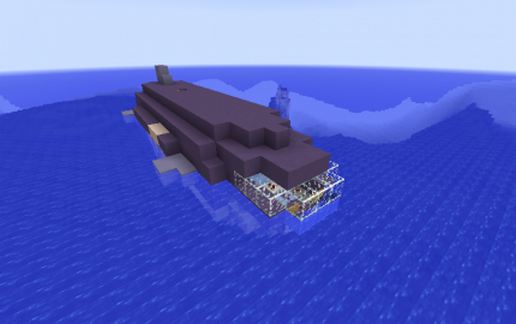
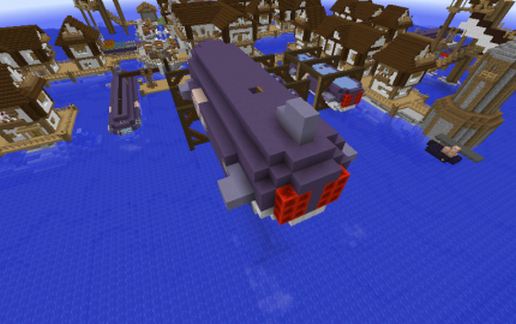
Description
A small submersible torpedo airship that can be flown using the Movecraft plugin for Minecraft.
Background
The original Minnow ships that served as a stopgap measure for Bellamy's pirate group in the aftermath of the Battle of the Argean Sea were quickly replaced by a more technologically advanced model, the Minnow Mk II. This version had armored torpedo tube doors, a technological innovation that would be rapidly copied by shipyards across the lands. These protected the torpedoes inside their tubes, providing significant increases in survivability for the torpedo ships. Additionally, the Mk II had forward firing fire guns, allowing them to set enemy ships ablaze immediately after a torpedo strike had holed the targets armor.
The tradeoff was that the Mk II had only 2 tubes as opposed to the Mk I's 3, and they had a shorter hull. However this was more than made up for by the other improvements, and the Mk II soon a mainstay of the Pirate fleet.
Armament
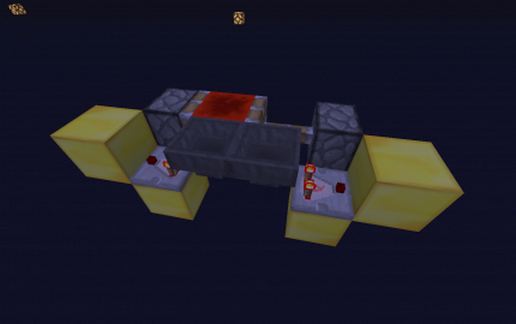
4 x Medium size torpedoes, arranged in 2 tubes protected by armored doors
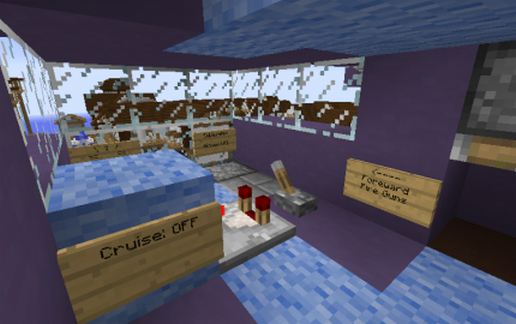
2 x Forward firing fire guns
8 x Side mounted fire guns, 4 on each side
Notes:
Use these craft files for Movecraft, put them in the plugins\movecraft\types directory:
https://dl.dropboxusercontent.com/u/11164014/MovecraftTypes.zip
Finally, if you need help setting up Movecraft, use this tutorial:
www.youtube.com/watch?v=hWHqnTkY330
Background
The original Minnow ships that served as a stopgap measure for Bellamy's pirate group in the aftermath of the Battle of the Argean Sea were quickly replaced by a more technologically advanced model, the Minnow Mk II. This version had armored torpedo tube doors, a technological innovation that would be rapidly copied by shipyards across the lands. These protected the torpedoes inside their tubes, providing significant increases in survivability for the torpedo ships. Additionally, the Mk II had forward firing fire guns, allowing them to set enemy ships ablaze immediately after a torpedo strike had holed the targets armor.
The tradeoff was that the Mk II had only 2 tubes as opposed to the Mk I's 3, and they had a shorter hull. However this was more than made up for by the other improvements, and the Mk II soon a mainstay of the Pirate fleet.
Armament
4 x Medium size torpedoes, arranged in 2 tubes protected by armored doors
2 x Forward firing fire guns
8 x Side mounted fire guns, 4 on each side
Notes:
Use these craft files for Movecraft, put them in the plugins\movecraft\types directory:
https://dl.dropboxusercontent.com/u/11164014/MovecraftTypes.zip
Finally, if you need help setting up Movecraft, use this tutorial:
www.youtube.com/watch?v=hWHqnTkY330
Download: Submersible Torpedo Airship - Minnow Mk II schematic for Minecraft
| Format | Size | Use with | |
|---|---|---|---|
.litematic submersible-torpedo-airship---minnow-mk-ii.litematic |
52.68 KB | Litematica (Java) — more Litematica schematics |
|
.schem submersible-torpedo-airship---minnow-mk-ii.schem |
1.16 KB | WorldEdit / FAWE |
|
.schematic submersible-torpedo-airship---minnow-mk-ii.schematic |
1.24 KB | Legacy / online installer |
|
| Install this build directly on your Minecraft map |
|
||
Auto-converted from the original format; container contents (chests, signs) may be missing.
📘 How to use with Litematica (click to expand)
- Put the downloaded
.litematicfile into the.minecraft/schematics/folder. - In game, press M to open the Litematica menu and choose Load Schematics.
- Select the file in the list and click Load Schematic.
- Position the placement where you want it and build — or paste it instantly in creative with Easy Place mode.
Requires the Litematica mod (Java Edition).
More builds: Litematica schematics.
Comments
Similar