Japanese pagoda Plus Tea House
Published on April 28, 2023
By ohnoitswoody
👁️🗨️ 25123
3958
★
★
★
★
★
Rate it
Screenshots
Description
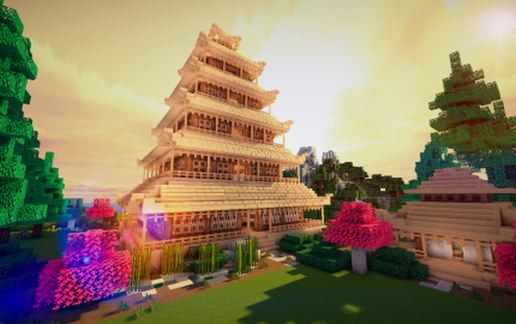
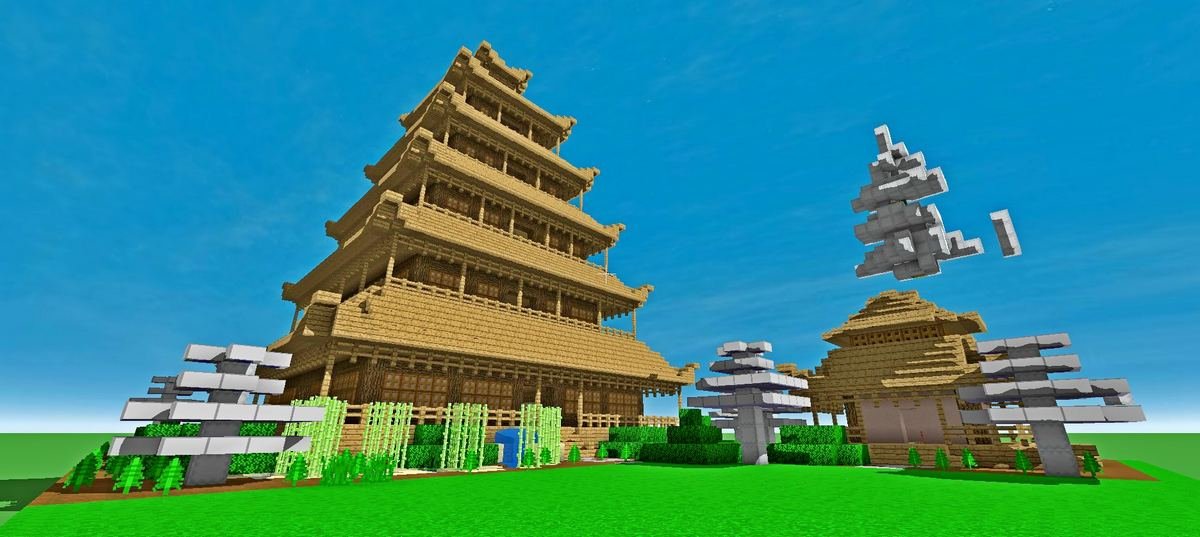
Hi guys, Here is a Japanese Pagoda and Tea house for you to download.
A Japanese pagoda is a beautiful and iconic structure that can add a unique and authentic touch to your Minecraft map. A Japanese pagoda is a tiered tower-like structure that is commonly found in Japan and other Asian countries. It has a unique and recognizable design, with multiple levels that decrease in size as they go up.
Start by choosing a location for your pagoda. It should be on a flat area and have enough space to build the structure.
Build the second level of the pagoda by repeating the process of building four pillars and connecting them with a ring of blocks.
For the top of the pagoda, build a small platform and add a decorative block such as a lantern or a flower pot.
Use a texture pack to give the pagoda a wooden appearance to simulate the traditional Japanese construction of pagodas.
Add details such as windows, railings, and decorations to make the pagoda more realistic. You can also add a garden around the pagoda to enhance its beauty.
The roof of a Japanese pagoda is typically adorned with a series of curved tiles, giving it a unique shape and appearance. The tiles are designed to protect the wooden structure from rain and wind, and they also add to the overall aesthetic of the pagoda.
Japanese pagodas are often found in temple complexes or other religious sites, and they are considered to be an important part of Japanese culture and history. Many pagodas have been designated as national treasures and are protected by the government.
Building a Japanese pagoda on a Minecraft map can be a challenging and rewarding project that can bring a touch of Japanese culture to your map.
A Japanese pagoda is a beautiful and iconic structure that can add a unique and authentic touch to your Minecraft map. A Japanese pagoda is a tiered tower-like structure that is commonly found in Japan and other Asian countries. It has a unique and recognizable design, with multiple levels that decrease in size as they go up.
Start by choosing a location for your pagoda. It should be on a flat area and have enough space to build the structure.
Build the second level of the pagoda by repeating the process of building four pillars and connecting them with a ring of blocks.
For the top of the pagoda, build a small platform and add a decorative block such as a lantern or a flower pot.
Use a texture pack to give the pagoda a wooden appearance to simulate the traditional Japanese construction of pagodas.
Add details such as windows, railings, and decorations to make the pagoda more realistic. You can also add a garden around the pagoda to enhance its beauty.
The roof of a Japanese pagoda is typically adorned with a series of curved tiles, giving it a unique shape and appearance. The tiles are designed to protect the wooden structure from rain and wind, and they also add to the overall aesthetic of the pagoda.
Japanese pagodas are often found in temple complexes or other religious sites, and they are considered to be an important part of Japanese culture and history. Many pagodas have been designated as national treasures and are protected by the government.
Building a Japanese pagoda on a Minecraft map can be a challenging and rewarding project that can bring a touch of Japanese culture to your map.
Download: Japanese pagoda Plus Tea House schematic for Minecraft
| Format | Size | Use with | |
|---|---|---|---|
.litematic japanese-pagoda-plus-tea-house.litematic |
63.40 KB | Litematica (Java) — more Litematica schematics |
|
.schem japanese-pagoda-plus-tea-house.schem |
4.70 KB | WorldEdit / FAWE |
|
.schematic japanese-pagoda-plus-tea-house.schematic |
5.94 KB | Legacy / online installer |
|
Install this build directly on your Minecraft map
Auto-converted from the original format; container contents (chests, signs) may be missing.
📘 How to use with Litematica (click to expand)
- Put the downloaded
.litematicfile into the.minecraft/schematics/folder. - In game, press M to open the Litematica menu and choose Load Schematics.
- Select the file in the list and click Load Schematic.
- Position the placement where you want it and build — or paste it instantly in creative with Easy Place mode.
Requires the Litematica mod (Java Edition).
More builds: Litematica schematics.