Airship WarFrigate Class T Type G Prototype1007
Published on January 1, 2023
By AlphaHarrius
👁️🗨️ 203
32
★
★
★
★
★
Rate it
Description
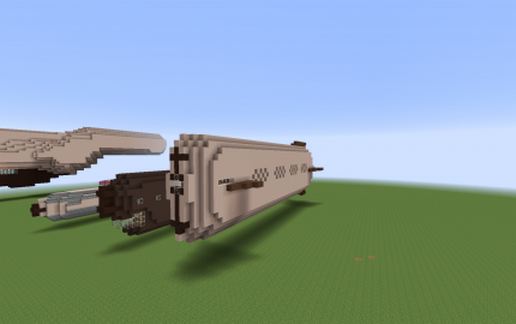
Prototype Ship with the prototype cannons ADT-191 which ranged approximately 262 blocks from 10 blocks in sky ,
Al ship system is in developing status , the new fire gun system is also a prototype , so this ship will not be fully functional at this moment .
This ship uses craft file airfrigate.craft which can be found in the previous release , but recommend using airship.craft .
The two cannons have been tested for 32 times and got a good result with no jamming and high accuracy ,
they are not build to fire together but separately .
Side fire ball system is not fully functional and still under development , don't expect too much on it now.
This ship got improved lighting system and reloading deck , you can reload the cannon easily .
*Sorry for the pilot sign , which stated that this is a destroyer , but it's not , according to it's size , it's still too small to be a destroyer.
*NEVER TRY THE CANNON ON RAPID FIRE MODE OR IT WILL EXPLODE AND CAUSE GREAT DAMAGE TO NEAR BY ENVIRONMENT.
although the previous version support rapid fire but this is not
Armament : 2x ADT-191 prototype cannon
40x fire ball gun /side
Al ship system is in developing status , the new fire gun system is also a prototype , so this ship will not be fully functional at this moment .
This ship uses craft file airfrigate.craft which can be found in the previous release , but recommend using airship.craft .
The two cannons have been tested for 32 times and got a good result with no jamming and high accuracy ,
they are not build to fire together but separately .
Side fire ball system is not fully functional and still under development , don't expect too much on it now.
This ship got improved lighting system and reloading deck , you can reload the cannon easily .
*Sorry for the pilot sign , which stated that this is a destroyer , but it's not , according to it's size , it's still too small to be a destroyer.
*NEVER TRY THE CANNON ON RAPID FIRE MODE OR IT WILL EXPLODE AND CAUSE GREAT DAMAGE TO NEAR BY ENVIRONMENT.
although the previous version support rapid fire but this is not
Armament : 2x ADT-191 prototype cannon
40x fire ball gun /side
Download: Airship WarFrigate Class T Type G Prototype1007 schematic for Minecraft
| Format | Size | Use with | |
|---|---|---|---|
.litematic airship-warfrigate-class-t-type-g-prototype1007.litematic |
25.89 KB | Litematica (Java) — more Litematica schematics |
|
.schem airship-warfrigate-class-t-type-g-prototype1007.schem |
1.84 KB | WorldEdit / FAWE |
|
.schematic airship-warfrigate-class-t-type-g-prototype1007.schematic |
3.06 KB | Legacy / online installer |
|
Install this build directly on your Minecraft map
Auto-converted from the original format; container contents (chests, signs) may be missing.
📘 How to use with Litematica (click to expand)
- Put the downloaded
.litematicfile into the.minecraft/schematics/folder. - In game, press M to open the Litematica menu and choose Load Schematics.
- Select the file in the list and click Load Schematic.
- Position the placement where you want it and build — or paste it instantly in creative with Easy Place mode.
Requires the Litematica mod (Java Edition).
More builds: Litematica schematics.