Automated Gate - Day/Night, Castle/Wall
Published on January 1, 2023
By RADdoc
👁️🗨️ 126
86
★
★
★
★
★
Rate it
Screenshots
Description
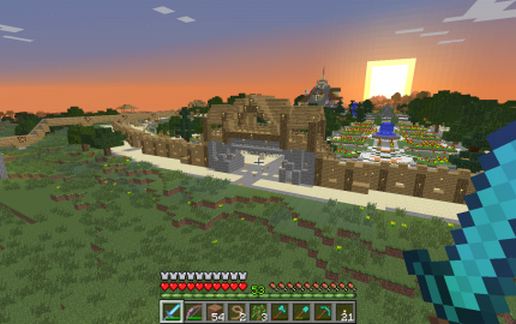
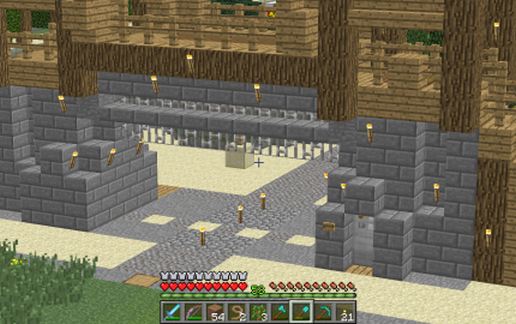
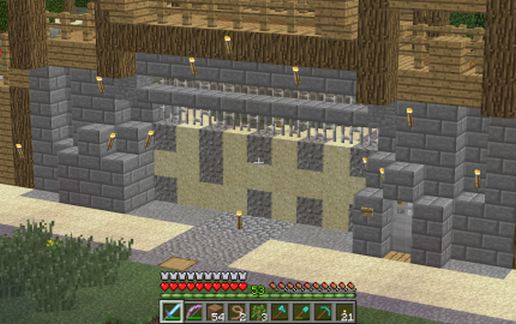
At night, the gate "closes" automatically; morning it opens. Great for putting into a castle or city wall.
First - credit to MineColonies for the GATE template(I downsized it some). Credit to MaizumaGames and/or RedMinecraftStonetut (I believe) for the compact triple piston extender (anyone know who it is for sure, let me know; I will correct this credit). Credit to me for this application (!)
Default placement of the gate is looking EAST from the inside. If you want it facing other directions, place it and then, in the game, go to the inside of the gate, looking out. There is a "maintenance access" around on the RIGHT. Go down into the "Power Room" and as you walk in, signs will explain how to re-align the two dropper-hopper combinations. Remember to put one redstone in each dropper!
SOMETIMES - the pistons "misfire" and it will lose a block of sand or gravel - it just takes occasional maintenance (like everything else in life!) MAKE SURE to use only blocks that drop with gravity.
I have a diagonal, "corner" gate as well that works on the same principle. Looks a bit like a spider (!), but it works well.
First - credit to MineColonies for the GATE template(I downsized it some). Credit to MaizumaGames and/or RedMinecraftStonetut (I believe) for the compact triple piston extender (anyone know who it is for sure, let me know; I will correct this credit). Credit to me for this application (!)
Default placement of the gate is looking EAST from the inside. If you want it facing other directions, place it and then, in the game, go to the inside of the gate, looking out. There is a "maintenance access" around on the RIGHT. Go down into the "Power Room" and as you walk in, signs will explain how to re-align the two dropper-hopper combinations. Remember to put one redstone in each dropper!
SOMETIMES - the pistons "misfire" and it will lose a block of sand or gravel - it just takes occasional maintenance (like everything else in life!) MAKE SURE to use only blocks that drop with gravity.
I have a diagonal, "corner" gate as well that works on the same principle. Looks a bit like a spider (!), but it works well.
Download: Automated Gate - Day/Night, Castle/Wall schematic for Minecraft
| Format | Size | Use with | |
|---|---|---|---|
.litematic automated-gate---day/night,-castle/wall.litematic |
55.04 KB | Litematica (Java) — more Litematica schematics |
|
.schem automated-gate---day/night,-castle/wall.schem |
2.26 KB | WorldEdit / FAWE |
|
.schematic automated-gate---day/night,-castle/wall.schematic |
2.34 KB | Legacy / online installer |
|
| Install this build directly on your Minecraft map |
|
||
Auto-converted from the original format; container contents (chests, signs) may be missing.
📘 How to use with Litematica (click to expand)
- Put the downloaded
.litematicfile into the.minecraft/schematics/folder. - In game, press M to open the Litematica menu and choose Load Schematics.
- Select the file in the list and click Load Schematic.
- Position the placement where you want it and build — or paste it instantly in creative with Easy Place mode.
Requires the Litematica mod (Java Edition).
More builds: Litematica schematics.
Comments
Similar