The MCShowroom - Clay and Wool Division
Published on January 1, 2023
By AnitaBonen
👁️🗨️ 136
27
★
★
★
★
★
Rate it
Screenshots
Description
This being my first upload, I decided to post the strangest one I own.
There are some amazing resource packs out there. When I began playing Minecraft I was content with snagging bits and pieces from other packs for use on my personal projects. But then, as my obsession with always having the exactly perfect block for each building purpose grew, I began collecting my own blocks. Building my own pack has been fun, but it's also time consuming because I'm constantly flipping between moving pngs around and updating MC to see the results.
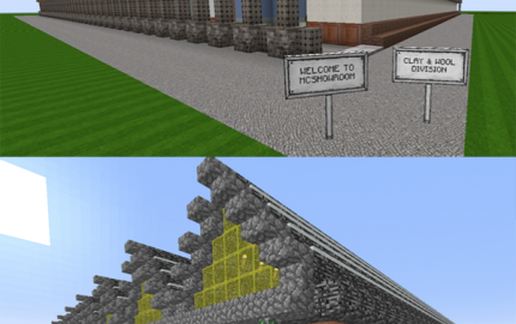
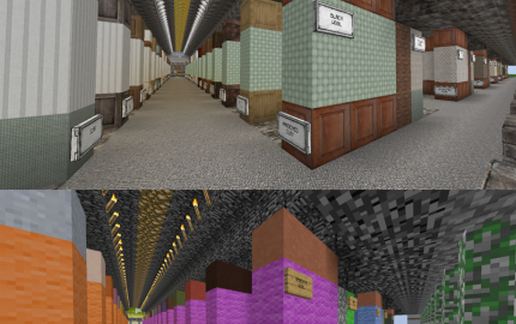
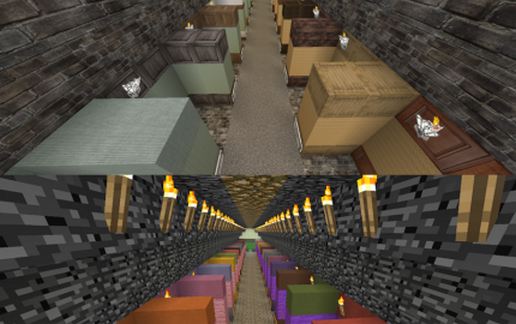
So what does a crazy (yet clever) girl do to solve such a problem? Why, build an odd contraption that allows her to compare all of the wool and all of the clay together at one time, of course! And now I'm sharing it with you fine folks. I hope you find it useful. If not, I hope it at least gave you a giggle.
Note: The photos show the default pack compared to the pack that I'm working on. My pack still has elements left over from when I was using the mix tape, so if you happen to see something that belongs to you, hit me up and I'll either remove it or give you credit. And if any of you happen to have any spare parts laying around, I'd be happy to take them off of your hands for you. Thanks for stopping by!
There are some amazing resource packs out there. When I began playing Minecraft I was content with snagging bits and pieces from other packs for use on my personal projects. But then, as my obsession with always having the exactly perfect block for each building purpose grew, I began collecting my own blocks. Building my own pack has been fun, but it's also time consuming because I'm constantly flipping between moving pngs around and updating MC to see the results.
So what does a crazy (yet clever) girl do to solve such a problem? Why, build an odd contraption that allows her to compare all of the wool and all of the clay together at one time, of course! And now I'm sharing it with you fine folks. I hope you find it useful. If not, I hope it at least gave you a giggle.
Note: The photos show the default pack compared to the pack that I'm working on. My pack still has elements left over from when I was using the mix tape, so if you happen to see something that belongs to you, hit me up and I'll either remove it or give you credit. And if any of you happen to have any spare parts laying around, I'd be happy to take them off of your hands for you. Thanks for stopping by!
Download: The MCShowroom - Clay and Wool Division schematic for Minecraft
| Format | Size | Use with | |
|---|---|---|---|
.litematic the-mcshowroom---clay-and-wool-division.litematic |
46.09 KB | Litematica (Java) — more Litematica schematics |
|
.schem the-mcshowroom---clay-and-wool-division.schem |
2.51 KB | WorldEdit / FAWE |
|
.schematic the-mcshowroom---clay-and-wool-division.schematic |
3.92 KB | Legacy / online installer |
|
| Install this build directly on your Minecraft map |
|
||
Auto-converted from the original format; container contents (chests, signs) may be missing.
📘 How to use with Litematica (click to expand)
- Put the downloaded
.litematicfile into the.minecraft/schematics/folder. - In game, press M to open the Litematica menu and choose Load Schematics.
- Select the file in the list and click Load Schematic.
- Position the placement where you want it and build — or paste it instantly in creative with Easy Place mode.
Requires the Litematica mod (Java Edition).
More builds: Litematica schematics.
Comments
Similar