Tide Farer Class Mk.1 Seaplane Tender
Published on January 1, 2023
By GameBreaker
👁️🗨️ 215
61
★
★
★
★
★
Rate it
Screenshots
Description
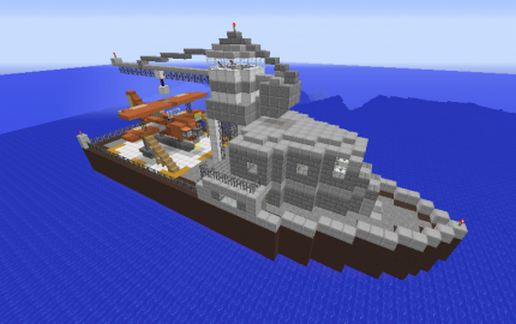
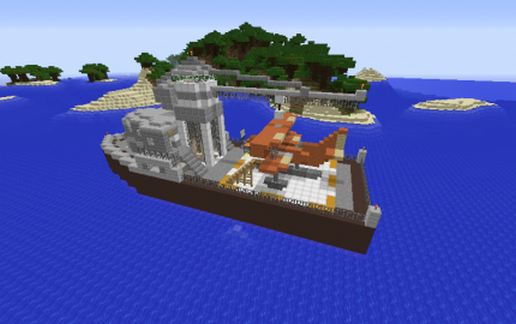
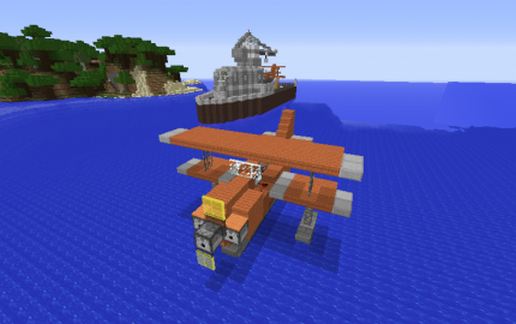
The Tide Farer class was a small-sized, single-aircraft seaplane tender built for reconnaissance and scouting.
It was developed in response to the need to field and deploy seaborne versions of the Robin-type biplane fighter at longer ranges, as well as serve as a repair and rearming platform.
Due to carrying only a single seaplane, the Tide Farer proved to be nimble to navigate and easy to maintain.
Later models were outfitted to fill the other roles of transport ship, freighter, and fuel tanker.
This ship is built with five levels, the crane, the bridge, the main deck, and two lower decks.
The crew quarters provides accomodation for as many as 8 players, each room contains a starter kit of custom and basic items and gear.
NPC Villagers serving as vendors can be found in the Mess Hall and the Workshop.
Aircraft deck contains one Robin-type biplane fighter, and is armed with 3 Fireball HMGs, two synchronized to the engine, one running through the propeller hub.
Place in Ports, Habours, and open seas (Ocean and Deep Ocean biomes) for best effect.
Optimal placement height is 6 blocks deep in water.
IMPORTANT: Several blocks such as Stairs, Dispensers and Droppers may not rotate with the rest of the schematic if it is rotated, mirrored or flipped.
It was developed in response to the need to field and deploy seaborne versions of the Robin-type biplane fighter at longer ranges, as well as serve as a repair and rearming platform.
Due to carrying only a single seaplane, the Tide Farer proved to be nimble to navigate and easy to maintain.
Later models were outfitted to fill the other roles of transport ship, freighter, and fuel tanker.
This ship is built with five levels, the crane, the bridge, the main deck, and two lower decks.
The crew quarters provides accomodation for as many as 8 players, each room contains a starter kit of custom and basic items and gear.
NPC Villagers serving as vendors can be found in the Mess Hall and the Workshop.
Aircraft deck contains one Robin-type biplane fighter, and is armed with 3 Fireball HMGs, two synchronized to the engine, one running through the propeller hub.
Place in Ports, Habours, and open seas (Ocean and Deep Ocean biomes) for best effect.
Optimal placement height is 6 blocks deep in water.
IMPORTANT: Several blocks such as Stairs, Dispensers and Droppers may not rotate with the rest of the schematic if it is rotated, mirrored or flipped.
Download: Tide Farer Class Mk.1 Seaplane Tender schematic for Minecraft
| Format | Size | Use with | |
|---|---|---|---|
.litematic tide-farer-class-mk.1-seaplane-tender.litematic |
43.44 KB | Litematica (Java) — more Litematica schematics |
|
.schem tide-farer-class-mk.1-seaplane-tender.schem |
3.58 KB | WorldEdit / FAWE |
|
.schematic tide-farer-class-mk.1-seaplane-tender.schematic |
6.85 KB | Legacy / online installer |
|
Install this build directly on your Minecraft map
Auto-converted from the original format; container contents (chests, signs) may be missing.
📘 How to use with Litematica (click to expand)
- Put the downloaded
.litematicfile into the.minecraft/schematics/folder. - In game, press M to open the Litematica menu and choose Load Schematics.
- Select the file in the list and click Load Schematic.
- Position the placement where you want it and build — or paste it instantly in creative with Easy Place mode.
Requires the Litematica mod (Java Edition).
More builds: Litematica schematics.