GLADIUS spawn
Published on January 1, 2023
By applebranch
👁️🗨️ 265
923
★
★
★
★
★
Rate it
Description
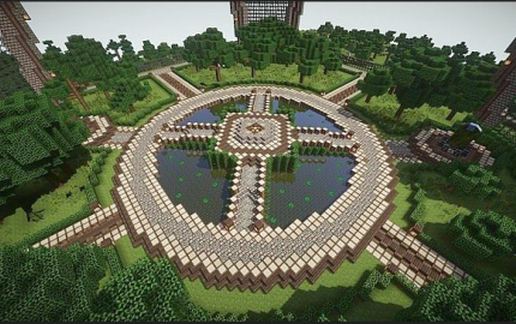
This is the spawn I built for my server, GLADIUS (vanillanation.mcpro.co). As we are a semi-vanilla server it is quite a simple spawn layout, however it combines some futuristic and nature-inspired build features which make it unique.
New players begin in a small underground spawn room which lists commands and rules for the server. Players are then teleported via. command blocks to the center island at spawn. From here the players can run towards the glass, drop off spawn, and begin their adventure.
BENEATH SPAWN
Two sets of stairs in spawn lead down to a PVP arena. To enter the PVP arena walk down a set of stairs on either side of the room - these lead to a pressure plate activated steel door. Once in the arena, players can use /spawn to return to spawn.
Here there is also space for extra rooms. Currently we have a vote shop and a trading room, but if you choose to use this build on your own server I'm sure you can think of some other cool things to add.
ROOM FOR EXPANSION
Surrounding the central spawn island are four circular "pods". Two of these pods are stairways down to the arena. On GLADIUS, one of the remaining two pods is used for a jail (see the image above) while the final pod is currently a list of top voters/players. These areas could also be used for a small shop, rules signs, donor information, warps, etc.
HIDDEN ROOMS
This spawn contains five (or so) hidden rooms. Some of these are inaccessible without using command blocks, but if you turn on an x-ray texture pack you should be able to see them. There is a secret stair to the top of spawn, a treehouse, a magic button, and more!
New players begin in a small underground spawn room which lists commands and rules for the server. Players are then teleported via. command blocks to the center island at spawn. From here the players can run towards the glass, drop off spawn, and begin their adventure.
BENEATH SPAWN
Two sets of stairs in spawn lead down to a PVP arena. To enter the PVP arena walk down a set of stairs on either side of the room - these lead to a pressure plate activated steel door. Once in the arena, players can use /spawn to return to spawn.
Here there is also space for extra rooms. Currently we have a vote shop and a trading room, but if you choose to use this build on your own server I'm sure you can think of some other cool things to add.
ROOM FOR EXPANSION
Surrounding the central spawn island are four circular "pods". Two of these pods are stairways down to the arena. On GLADIUS, one of the remaining two pods is used for a jail (see the image above) while the final pod is currently a list of top voters/players. These areas could also be used for a small shop, rules signs, donor information, warps, etc.
HIDDEN ROOMS
This spawn contains five (or so) hidden rooms. Some of these are inaccessible without using command blocks, but if you turn on an x-ray texture pack you should be able to see them. There is a secret stair to the top of spawn, a treehouse, a magic button, and more!
Download: GLADIUS spawn schematic for Minecraft
| Format | Size | Use with | |
|---|---|---|---|
.litematic gladius-spawn.litematic |
176.26 KB | Litematica (Java) — more Litematica schematics |
|
.schem gladius-spawn.schem |
97.92 KB | WorldEdit / FAWE |
|
.schematic gladius-spawn.schematic |
116.75 KB | Legacy / online installer |
|
| Install this build directly on your Minecraft map |
|
||
Auto-converted from the original format; container contents (chests, signs) may be missing.
📘 How to use with Litematica (click to expand)
- Put the downloaded
.litematicfile into the.minecraft/schematics/folder. - In game, press M to open the Litematica menu and choose Load Schematics.
- Select the file in the list and click Load Schematic.
- Position the placement where you want it and build — or paste it instantly in creative with Easy Place mode.
Requires the Litematica mod (Java Edition).
More builds: Litematica schematics.
Comments
Similar