Nottoway Plantaion
Published on January 1, 2023
By Corky
👁️🗨️ 250
49
★
★
★
★
★
Rate it
Screenshots
Description
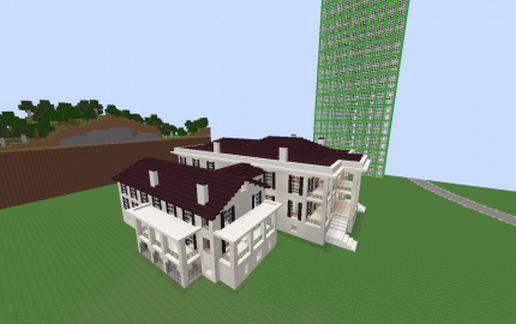
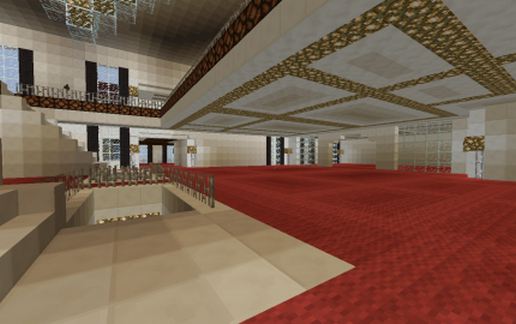
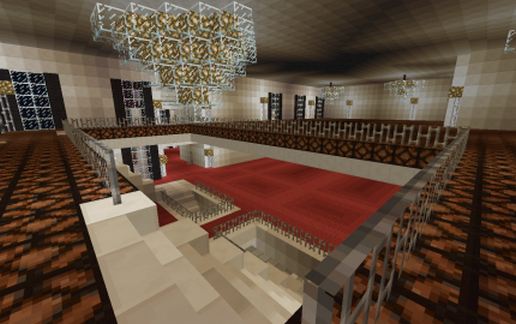
The real Nottoway Plantation home from here in Louisiana. Yes another realistic La creation lol. For everyone else, well here's a big mansion for you :)
66 blocks long x 74 blocks x wide x 25.5 blocks tall
Interior is pretty much all done minus the bottom floor.
Main floor is 100% complete. Flooring and lighting done entirely. Attached living quarters building has 4 fully furnished bedrooms with fireplaces, beds, chest etc.
Upper floor is 95% complete. All flooring is done and lighting is complete everywhere except the large main room. Huge chandelier at front of room and 3 small chandeliers to the back of main room, and various lamps throughout. Still needs more lighting in ceiling. Everywhere else on upper floor is complete with attached living quarters having 2 VIP bedrooms with fireplaces, beds, chest, jukeboxes, rugs etc.
Bottom floor is wide open. All stone floor, open floor plan and just random lights stuck to the ceiling for light. (proper lighting will need to be done and can be set flush in ceiling like the other floors. (I couldn't decide what I wanted to do lol)
Attached living quarters has same 4 rooms as the middle floor but not furnished. Lighting in ceilings are done and floors are done in those rooms but that's it.
To see the real Nottoway Plantation go to www.nottoway.com and take the photo tour.
66 blocks long x 74 blocks x wide x 25.5 blocks tall
Interior is pretty much all done minus the bottom floor.
Main floor is 100% complete. Flooring and lighting done entirely. Attached living quarters building has 4 fully furnished bedrooms with fireplaces, beds, chest etc.
Upper floor is 95% complete. All flooring is done and lighting is complete everywhere except the large main room. Huge chandelier at front of room and 3 small chandeliers to the back of main room, and various lamps throughout. Still needs more lighting in ceiling. Everywhere else on upper floor is complete with attached living quarters having 2 VIP bedrooms with fireplaces, beds, chest, jukeboxes, rugs etc.
Bottom floor is wide open. All stone floor, open floor plan and just random lights stuck to the ceiling for light. (proper lighting will need to be done and can be set flush in ceiling like the other floors. (I couldn't decide what I wanted to do lol)
Attached living quarters has same 4 rooms as the middle floor but not furnished. Lighting in ceilings are done and floors are done in those rooms but that's it.
To see the real Nottoway Plantation go to www.nottoway.com and take the photo tour.
Download: Nottoway Plantaion schematic for Minecraft
| Format | Size | Use with | |
|---|---|---|---|
.litematic nottoway-plantaion.litematic |
49.16 KB | Litematica (Java) — more Litematica schematics |
|
.schem nottoway-plantaion.schem |
6.49 KB | WorldEdit / FAWE |
|
.schematic nottoway-plantaion.schematic |
8.57 KB | Legacy / online installer |
|
Install this build directly on your Minecraft map
Auto-converted from the original format; container contents (chests, signs) may be missing.
📘 How to use with Litematica (click to expand)
- Put the downloaded
.litematicfile into the.minecraft/schematics/folder. - In game, press M to open the Litematica menu and choose Load Schematics.
- Select the file in the list and click Load Schematic.
- Position the placement where you want it and build — or paste it instantly in creative with Easy Place mode.
Requires the Litematica mod (Java Edition).
More builds: Litematica schematics.