Fairchild Republic A-10 Thunderbolt 2
Published on January 1, 2023
By GameBreaker
👁️🗨️ 152
80
★
★
★
★
★
Rate it
Screenshots
Description
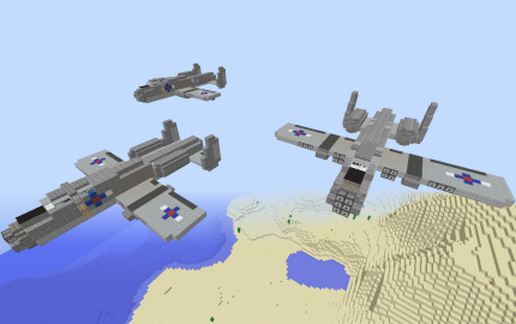
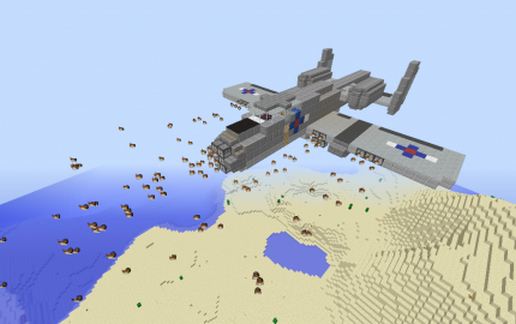
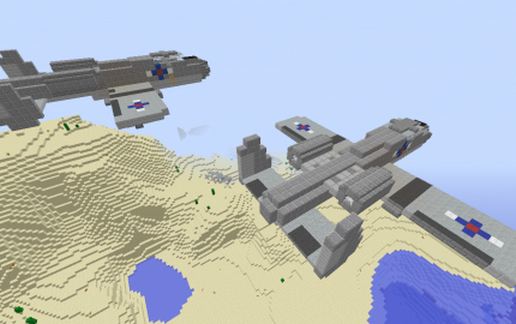
A fully functional, realistically-sized replica of the American made A-10 Thunderbolt attack aircraft.
The A-10 was developed in 1972 in response to a need for a low-speed ground attack and close air support aircraft, after it was learned that high-speed jet fighters such as the F-100, F-105 and F-4 Phantom 2 were poor candidates for this role.
The project resulted in a large-framed, highly durable straight-winged assault plane with a long loiter time and a low stall speed. It is constructed with heavy aircraft armor, effectively maximizing its durability and ability to withstand damage. It is also known to mount the largest rotary cannon of any kind, the 30mm GAU-8 Avenger, in addition to 11 hardpoints for external ordinance.
This version of the A-10 is armed with 20 automatic Fireball HMGs, and 16 TNT Dispensers. All weapons are pulser-driven and fully automatic. Fire controls are housed in the cockpit along with one set of standard gear.
Armament Layout:
Guns: 7 in each wing, 6 in the nose.
Ordinance: 8 in each wing.
Place on runways or in mid-air for best effect.
IMPORTANT: Several blocks such as Stairs, Dispensers and Droppers may not rotate with the rest of the schematic if it is rotated, mirrored or flipped.
The A-10 was developed in 1972 in response to a need for a low-speed ground attack and close air support aircraft, after it was learned that high-speed jet fighters such as the F-100, F-105 and F-4 Phantom 2 were poor candidates for this role.
The project resulted in a large-framed, highly durable straight-winged assault plane with a long loiter time and a low stall speed. It is constructed with heavy aircraft armor, effectively maximizing its durability and ability to withstand damage. It is also known to mount the largest rotary cannon of any kind, the 30mm GAU-8 Avenger, in addition to 11 hardpoints for external ordinance.
This version of the A-10 is armed with 20 automatic Fireball HMGs, and 16 TNT Dispensers. All weapons are pulser-driven and fully automatic. Fire controls are housed in the cockpit along with one set of standard gear.
Armament Layout:
Guns: 7 in each wing, 6 in the nose.
Ordinance: 8 in each wing.
Place on runways or in mid-air for best effect.
IMPORTANT: Several blocks such as Stairs, Dispensers and Droppers may not rotate with the rest of the schematic if it is rotated, mirrored or flipped.
Download: Fairchild Republic A-10 Thunderbolt 2 schematic for Minecraft
| Format | Size | Use with | |
|---|---|---|---|
.litematic fairchild-republic-a-10-thunderbolt-2.litematic |
33.27 KB | Litematica (Java) — more Litematica schematics |
|
.schem fairchild-republic-a-10-thunderbolt-2.schem |
1.76 KB | WorldEdit / FAWE |
|
.schematic fairchild-republic-a-10-thunderbolt-2.schematic |
2.28 KB | Legacy / online installer |
|
| Install this build directly on your Minecraft map |
|
||
Auto-converted from the original format; container contents (chests, signs) may be missing.
📘 How to use with Litematica (click to expand)
- Put the downloaded
.litematicfile into the.minecraft/schematics/folder. - In game, press M to open the Litematica menu and choose Load Schematics.
- Select the file in the list and click Load Schematic.
- Position the placement where you want it and build — or paste it instantly in creative with Easy Place mode.
Requires the Litematica mod (Java Edition).
More builds: Litematica schematics.
Comments
Similar