GoldNuggetFarmV2
Published on January 1, 2023
By LordMaverick
👁️🗨️ 207
32
★
★
★
★
★
Rate it
Screenshots
Description
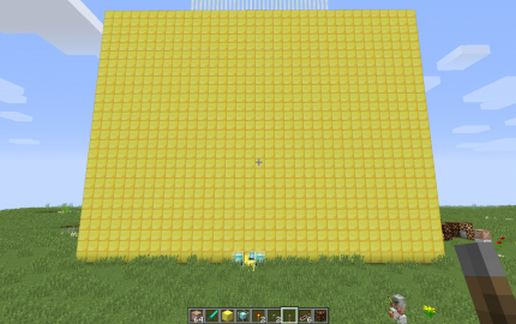
This schematic was inspired by a gold farm I had seen on here recently.
This idea is greatly altered however with my version.
V2 includes minor cosmetic additions to make it look more attractive.... well as attractive as a giant block can get lol.
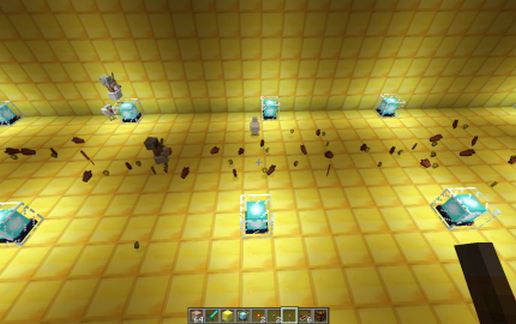
In this schematic command blocks spawn zombie pigmen using a redstone auto clock.
The design provides around 6.5 to 7.5 stacks of gold nuggets every 15-20 seconds. 9 Stacks in about 30.
The clock is activated via a lever. Flip it and leave it alone to do its job. Flip it again to shut it off.
Things to keep in mind:
1.This schematic will spam your chat massively unless you disable it by using the following command
/gamerule commandBlockOutput false
2. This schematic will lag slower machines during the spawning process.
I have included 2 levers to aid with issue #2. one is the auto which is connected directly to the blocks of the redstone clock.
the other is a manual lever placed on the floor next to the clock.
If your machine is slow feel free to use manual mode to prevent lag.
If you wish to farm exp, feel free to edit the command line on the command box. I have made the height of the spawn at 23 to ensure it kills pigmen during the fall. Simply edit the spawn height to 22 or lower to farm the piggies for Exp. Keep in mind you will be swarmed if not on creative.
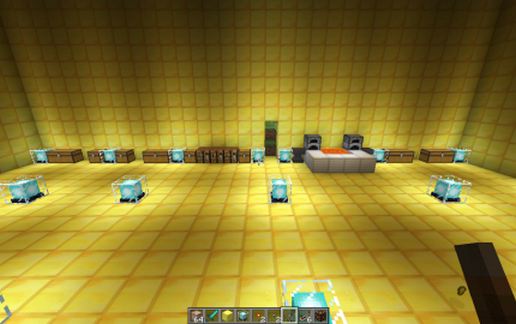
This schematic also includes a lava disposal (for the rotten flesh), A crafting table (to craft nuggets to bars and blocks), a Anvil for repairs, a furnace to make food. No bed though.
That is about it... hope you enjoy!
Any problems or issues feel free to comment to see if i can fix them asap.
This idea is greatly altered however with my version.
V2 includes minor cosmetic additions to make it look more attractive.... well as attractive as a giant block can get lol.
In this schematic command blocks spawn zombie pigmen using a redstone auto clock.
The design provides around 6.5 to 7.5 stacks of gold nuggets every 15-20 seconds. 9 Stacks in about 30.
The clock is activated via a lever. Flip it and leave it alone to do its job. Flip it again to shut it off.
Things to keep in mind:
1.This schematic will spam your chat massively unless you disable it by using the following command
/gamerule commandBlockOutput false
2. This schematic will lag slower machines during the spawning process.
I have included 2 levers to aid with issue #2. one is the auto which is connected directly to the blocks of the redstone clock.
the other is a manual lever placed on the floor next to the clock.
If your machine is slow feel free to use manual mode to prevent lag.
If you wish to farm exp, feel free to edit the command line on the command box. I have made the height of the spawn at 23 to ensure it kills pigmen during the fall. Simply edit the spawn height to 22 or lower to farm the piggies for Exp. Keep in mind you will be swarmed if not on creative.
This schematic also includes a lava disposal (for the rotten flesh), A crafting table (to craft nuggets to bars and blocks), a Anvil for repairs, a furnace to make food. No bed though.
That is about it... hope you enjoy!
Any problems or issues feel free to comment to see if i can fix them asap.
Download: GoldNuggetFarmV2 schematic for Minecraft
| Format | Size | Use with | |
|---|---|---|---|
.litematic goldnuggetfarmv2.litematic |
63.30 KB | Litematica (Java) — more Litematica schematics |
|
.schem goldnuggetfarmv2.schem |
1.14 KB | WorldEdit / FAWE |
|
.schematic goldnuggetfarmv2.schematic |
2.53 KB | Legacy / online installer |
|
| Install this build directly on your Minecraft map |
|
||
Auto-converted from the original format; container contents (chests, signs) may be missing.
📘 How to use with Litematica (click to expand)
- Put the downloaded
.litematicfile into the.minecraft/schematics/folder. - In game, press M to open the Litematica menu and choose Load Schematics.
- Select the file in the list and click Load Schematic.
- Position the placement where you want it and build — or paste it instantly in creative with Easy Place mode.
Requires the Litematica mod (Java Edition).
More builds: Litematica schematics.
Comments
Similar