Mining Refinery
Published on January 1, 2023
By balthizarlucien
👁️🗨️ 189
84
★
★
★
★
★
Rate it
Screenshots
Description
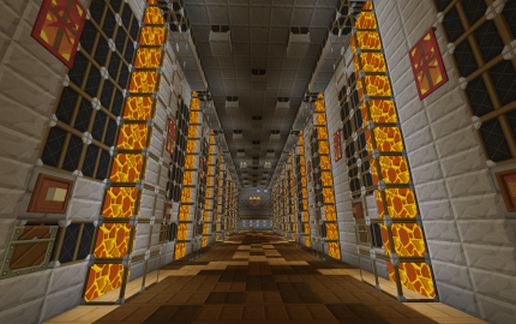
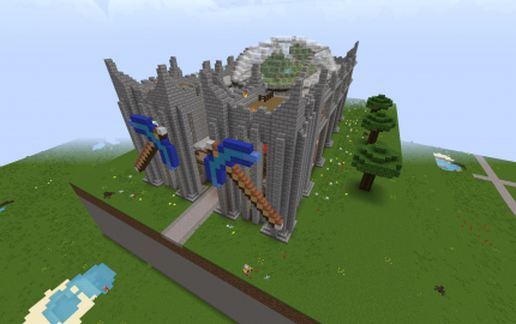
This building possesses night time only lighting, item mass storage and auto ore smelting for your convenience. It is not without its creature comforts either, you can pick up a train leaving from here, you can tour the glassed in roof top garden or you can take advantage of the Sl!ppy water-brake drop-chute (Sl1pg8r from youtube designed this as far as I know) so that you may begin mining next to the bedrock.
On top of all of that, items which do not belong in this building's storage system will be picked up and all of the mining done at remote mine sites can be shipped back to this facility for sorting and smelting.
Note: To ensure best placement with as little hassle as possible, choose a location which has the ground level at level 83. This will prevent the build from protruding from the ground like some strange rectangular cube.
Updated!
Due to some omissions in the original, this project has been updated with corrections (2/1/15)
-Finished lighting the build to prevent mob spawn inside
-Added bedrock level item drop point
-Removed errant command block
-Patched top of dome
-Added remaining passenger train station components
Terms of Use and Acknowledgements of Your Visit
Please feel free to use this however you wish. Simply place a sign somewhere on the build acknowledging me as the builder. If you do use this build, please rate it and if you download it please let me know in the comments how you feel about the build or if you have any issues with it whatsoever. If there is an issue with this or any of my builds I will immediately attempt to rectify it and reupload it as soon as I possibly can.
Thank you for taking time to look, have a wonderful day both in and out of the minecraftian realms!
On top of all of that, items which do not belong in this building's storage system will be picked up and all of the mining done at remote mine sites can be shipped back to this facility for sorting and smelting.
Note: To ensure best placement with as little hassle as possible, choose a location which has the ground level at level 83. This will prevent the build from protruding from the ground like some strange rectangular cube.
Updated!
Due to some omissions in the original, this project has been updated with corrections (2/1/15)
-Finished lighting the build to prevent mob spawn inside
-Added bedrock level item drop point
-Removed errant command block
-Patched top of dome
-Added remaining passenger train station components
Terms of Use and Acknowledgements of Your Visit
Please feel free to use this however you wish. Simply place a sign somewhere on the build acknowledging me as the builder. If you do use this build, please rate it and if you download it please let me know in the comments how you feel about the build or if you have any issues with it whatsoever. If there is an issue with this or any of my builds I will immediately attempt to rectify it and reupload it as soon as I possibly can.
Thank you for taking time to look, have a wonderful day both in and out of the minecraftian realms!
Download: Mining Refinery schematic for Minecraft
| Format | Size | Use with | |
|---|---|---|---|
.litematic mining-refinery.litematic |
84.21 KB | Litematica (Java) — more Litematica schematics |
|
.schem mining-refinery.schem |
20.48 KB | WorldEdit / FAWE |
|
.schematic mining-refinery.schematic |
34.31 KB | Legacy / online installer |
|
| Install this build directly on your Minecraft map |
|
||
Auto-converted from the original format; container contents (chests, signs) may be missing.
📘 How to use with Litematica (click to expand)
- Put the downloaded
.litematicfile into the.minecraft/schematics/folder. - In game, press M to open the Litematica menu and choose Load Schematics.
- Select the file in the list and click Load Schematic.
- Position the placement where you want it and build — or paste it instantly in creative with Easy Place mode.
Requires the Litematica mod (Java Edition).
More builds: Litematica schematics.
Comments
Similar