changeable 4 digit combination lock
Published on January 1, 2023
By lenardjee
👁️🗨️ 154
64
★
★
★
★
★
Rate it
Screenshots
Description
--------READ THIS CAREFULLY--------
hey guys,
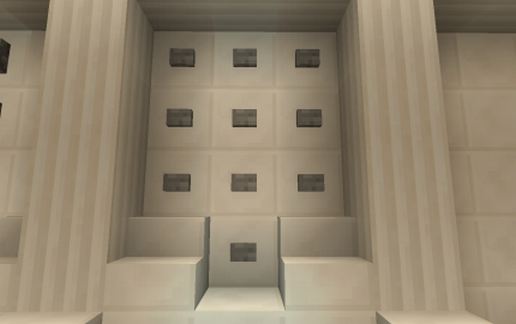
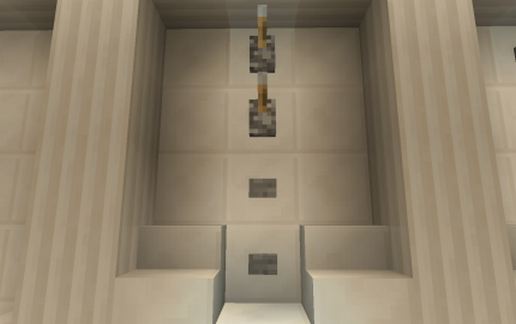
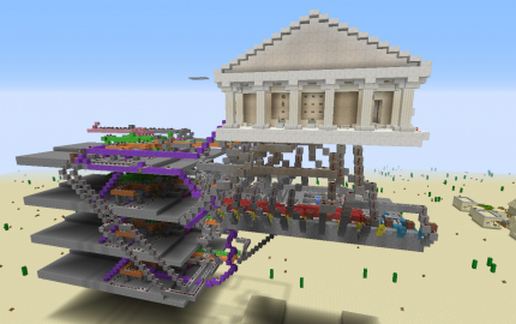
this is my biggest redstone creation ever and it is a... changeable 4 digit combination lock, I mean I've made a redstone system that allows you to protect your things with a combination lock of 4 digits, and you can also change that code. when you want to change the code you have to look to the screenshots and find the one where you see a lever with 'change', you have to flip that lever, wait 10 seconds, push the ok button (see screenshots), wait 3 seconds and then you can type you new password but make sure your password is higher then 0000 and wait 8 seconds between each digit, make sure you do not touch the lever above the change lever because that's not working and it will crash the system, when you have changed your password you have to flip the 'change' lever again. when you have done that you can enter your new password (make sure you wait 8 seconds between each digit) and when you push the 'ok' button there will be a door in the wall at the right of the 'temple'.
Each time you've entered your code and you'ill close the door and reset the system you have to push the reset button or you can walk true the door in the wall, take a look at the redstone and come back, while coming back you have to walk beyond a pressure plate and the door will close behind you.
The next times you change your password are a little differed, then you have to flip the 'change' lever, enter your password (still make sure you wait 8 seconds between each digit), push the ok button, wait 10 seconds and then type your new password, then flip the change lever again and your new password is ready.
tell me ideas for other redstone creations in the comments. thank you
lenardjee
hey guys,
this is my biggest redstone creation ever and it is a... changeable 4 digit combination lock, I mean I've made a redstone system that allows you to protect your things with a combination lock of 4 digits, and you can also change that code. when you want to change the code you have to look to the screenshots and find the one where you see a lever with 'change', you have to flip that lever, wait 10 seconds, push the ok button (see screenshots), wait 3 seconds and then you can type you new password but make sure your password is higher then 0000 and wait 8 seconds between each digit, make sure you do not touch the lever above the change lever because that's not working and it will crash the system, when you have changed your password you have to flip the 'change' lever again. when you have done that you can enter your new password (make sure you wait 8 seconds between each digit) and when you push the 'ok' button there will be a door in the wall at the right of the 'temple'.
Each time you've entered your code and you'ill close the door and reset the system you have to push the reset button or you can walk true the door in the wall, take a look at the redstone and come back, while coming back you have to walk beyond a pressure plate and the door will close behind you.
The next times you change your password are a little differed, then you have to flip the 'change' lever, enter your password (still make sure you wait 8 seconds between each digit), push the ok button, wait 10 seconds and then type your new password, then flip the change lever again and your new password is ready.
tell me ideas for other redstone creations in the comments. thank you
lenardjee
Download: changeable 4 digit combination lock schematic for Minecraft
| Format | Size | Use with | |
|---|---|---|---|
.litematic changeable-4-digit-combination-lock.litematic |
52.44 KB | Litematica (Java) — more Litematica schematics |
|
.schem changeable-4-digit-combination-lock.schem |
7.93 KB | WorldEdit / FAWE |
|
.schematic changeable-4-digit-combination-lock.schematic |
10.16 KB | Legacy / online installer |
|
| Install this build directly on your Minecraft map |
|
||
Auto-converted from the original format; container contents (chests, signs) may be missing.
📘 How to use with Litematica (click to expand)
- Put the downloaded
.litematicfile into the.minecraft/schematics/folder. - In game, press M to open the Litematica menu and choose Load Schematics.
- Select the file in the list and click Load Schematic.
- Position the placement where you want it and build — or paste it instantly in creative with Easy Place mode.
Requires the Litematica mod (Java Edition).
More builds: Litematica schematics.