Lockheed AC-130
Published on January 1, 2023
By GameBreaker
👁️🗨️ 200
47
★
★
★
★
★
Rate it
Screenshots
Description
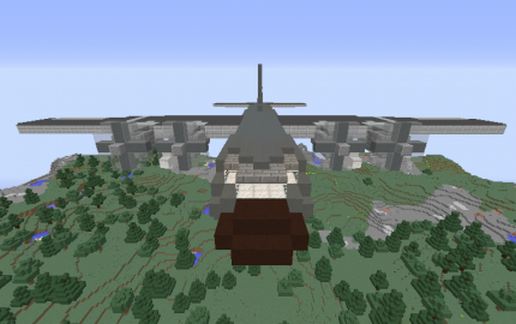
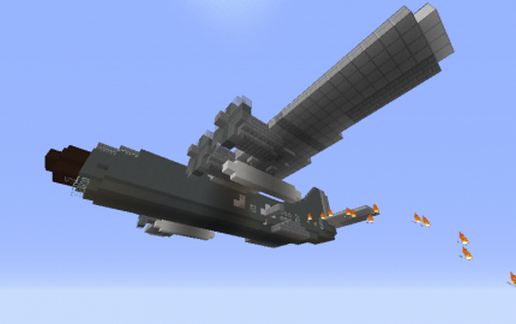
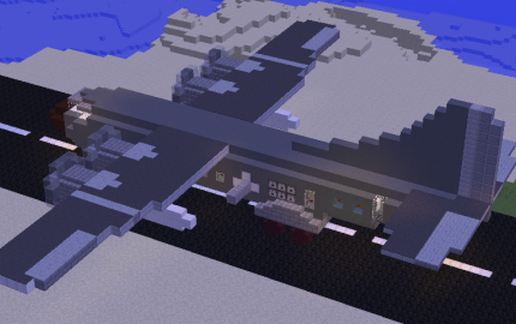
A realistically-scaled, fully functional replica of the Lockheed AC-130 Gunship.
The AC-130 is a series of heavy support gunships developed from the C-130 transport plane during the Vietnam War as a replacement and upgrade to the AC-47 gunship.
The most well-known variant, the AC-130U, is armed with one 25mm GAU-12, one 40mm Bofors autocannon, and one M102 howitzer. Though other versions with different armament exist.
This rendition of the AC-130 is armed with the following weapons:
1. A Two-barrelled autocannon - A tandem-firing autocannon with a lava-veil that can be toggled.
2. A Six-barrelled barrage cannon. - For firing Splash Potions.
3. A Self-loading Howitzer / Cannon. - Has a maximum range of 100 blocks forward and 70 blocks downward.
Also included is an NPC Villager for rearming and reloading ammunition. Sells five ammunition types:
1. Arrows.
2. TNT. (For the Howitzer.)
3. Healing Ordinance.*
4. Gas Shells.*
5. Anti-Personnel Shells.*
[*] These are custom splash potions that have been stacked to 64, load these via SHIFT-CLICK only to avoid splitting them up.
IMPORTANT: Several blocks such as Stairs, Dispensers and Droppers may not rotate with the rest of the schematic if it is rotated, mirrored or flipped.
The AC-130 is a series of heavy support gunships developed from the C-130 transport plane during the Vietnam War as a replacement and upgrade to the AC-47 gunship.
The most well-known variant, the AC-130U, is armed with one 25mm GAU-12, one 40mm Bofors autocannon, and one M102 howitzer. Though other versions with different armament exist.
This rendition of the AC-130 is armed with the following weapons:
1. A Two-barrelled autocannon - A tandem-firing autocannon with a lava-veil that can be toggled.
2. A Six-barrelled barrage cannon. - For firing Splash Potions.
3. A Self-loading Howitzer / Cannon. - Has a maximum range of 100 blocks forward and 70 blocks downward.
Also included is an NPC Villager for rearming and reloading ammunition. Sells five ammunition types:
1. Arrows.
2. TNT. (For the Howitzer.)
3. Healing Ordinance.*
4. Gas Shells.*
5. Anti-Personnel Shells.*
[*] These are custom splash potions that have been stacked to 64, load these via SHIFT-CLICK only to avoid splitting them up.
IMPORTANT: Several blocks such as Stairs, Dispensers and Droppers may not rotate with the rest of the schematic if it is rotated, mirrored or flipped.
Download: Lockheed AC-130 schematic for Minecraft
| Format | Size | Use with | |
|---|---|---|---|
.litematic lockheed-ac-130.litematic |
38.19 KB | Litematica (Java) — more Litematica schematics |
|
.schem lockheed-ac-130.schem |
2.40 KB | WorldEdit / FAWE |
|
.schematic lockheed-ac-130.schematic |
4.73 KB | Legacy / online installer |
|
| Install this build directly on your Minecraft map |
|
||
Auto-converted from the original format; container contents (chests, signs) may be missing.
📘 How to use with Litematica (click to expand)
- Put the downloaded
.litematicfile into the.minecraft/schematics/folder. - In game, press M to open the Litematica menu and choose Load Schematics.
- Select the file in the list and click Load Schematic.
- Position the placement where you want it and build — or paste it instantly in creative with Easy Place mode.
Requires the Litematica mod (Java Edition).
More builds: Litematica schematics.
Comments
Similar