Ed's Computer
Published on January 1, 2023
By EdCr0w
👁️🗨️ 142
26
★
★
★
★
★
Rate it
Description
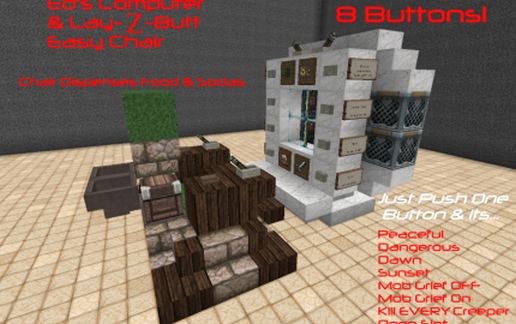
Continuing to explore command cubes. Well might as well make a PC compooter so instead of typing crap in creative or doing the impossible in Survival! currently 7 functions with an 8th open slot. Set time to Dawn or Sunset, Change Difficulty between peaceful and normal modes, Mob Grief on/off,( my favorite at the moment plug into a No-Cheat, Survival world, push a button now creepers no longer destroy blocks BAM! world wide!, Put in the switch it back button if you want it.) and Creepergeddon button that will kill all creepers in 2500 block radius (or whatever loaded chunks I suppose.) Kind of an admin short cut box, I like it. Also made a bug cushy chair with a built in cooler for sodas and snacks that dispenses with a button push.
Download: Ed's Computer schematic for Minecraft
| Format | Size | Use with | |
|---|---|---|---|
.litematic ed's-computer.litematic |
57.30 KB | Litematica (Java) — more Litematica schematics |
|
.schem ed's-computer.schem |
907.00 B | WorldEdit / FAWE |
|
.schematic ed's-computer.schematic |
1.70 KB | Legacy / online installer |
|
| Install this build directly on your Minecraft map |
|
||
Auto-converted from the original format; container contents (chests, signs) may be missing.
📘 How to use with Litematica (click to expand)
- Put the downloaded
.litematicfile into the.minecraft/schematics/folder. - In game, press M to open the Litematica menu and choose Load Schematics.
- Select the file in the list and click Load Schematic.
- Position the placement where you want it and build — or paste it instantly in creative with Easy Place mode.
Requires the Litematica mod (Java Edition).
More builds: Litematica schematics.
Comments
Similar